# Introduction

### All processes digital, smart and as simple as possible!

With EverReal you get a digital solution that not only makes your day-to-day work much easier, but also significantly increases the profitability of individual areas of responsibility in real estate management and marketing. While speed in the selection of prospects and applicants, customer satisfaction through quick reactions, ability to provide information to clients and quality levels in communication increase, error rates decrease due to uniform templates, processing time through automated processes and smart functions.

Using this API you can connect to most of the functionality that Everreal has to offer. Here are some things that you can do:

* import & update master data (owners/property/unit/tenants)
* Configure Webhooks for varieties of purposes


# Authentication

EverReal implements OAuth 2.1 authentication standard on top of its APIs. Before you can use our SSO API, everreal has to generate a client\_id and client\_secret for the SSO.

## Requirements

EverReal APIs supports jwt tokens using [Bearer token](https://jwt.io/introduction) according to [RFC-7519](https://datatracker.ietf.org/doc/html/rfc7519). This allows us to protect our information and make sure, who is requesting has correct authorization to execute the operation.

#### OAuth 2.0 Password Grant

**Important!** You should use the password grant only in server-to-server communication, where you completely trust the client.&#x20;

This allows you to use the username and password to get the `refresh_token`. After `refresh_token` is obtain, username and password is not needed.

## Authentication

<mark style="color:green;">`POST`</mark> `https://{custom_subdomain}.everreal.co/accounts/oauth/token`

#### Headers

| Name         | Type   | Description        |
| ------------ | ------ | ------------------ |
| Content-Type | string | `application/json` |

#### Request Body

| Name         | Type   | Description                                                                                                                                                                                                                                                                                                                                |
| ------------ | ------ | ------------------------------------------------------------------------------------------------------------------------------------------------------------------------------------------------------------------------------------------------------------------------------------------------------------------------------------------ |
| Payload body | object | <p><code>{</code> <br><code>"username": "<john.doe@everreal.co>",</code> <br><code>"password": "Password",</code> <br><code>"client\_id": "\<Client\_iD>",</code> <br><code>"client\_secret": "\<Client Secret>",</code> <br><code>"scope": "offline\_access \*",</code> <br><code>"grant\_type": "password"</code> <br><code>}</code></p> |

{% tabs %}
{% tab title="200 " %}

```
{
    "access_token": "eyJhbGciOiJSUzI1NiIsInR5cCI6IkpXVCJ9.eyJqdGkiOiJjYTdhZDI2MC1mNmE3LTQ1OWEtOWNjYy1kNTMzMzNjY2M1Y2EiLCJzdWIiOiI3NmFmY2FiMC02NTJiLTQ1NDctODAxYi03YzcwMWMwOTdiODEiLCJleHAiOjE2Mjg1OTYyNTYsImlhdCI6MTYyODU5MjY1Nn0.nnBmf0r7oTsqDYxwkA9seO-aZGhLY3z-ZodFn2NSa9gPOxCCtXvACj7UNIifd03KbqLDiJcpqj5anUzyKpXY0taXRCPMVHB78iVYDyKR8rZqNZ7PP8XSXvxxLaZPfTiqYG01pzCgaDWHwgpUsBoFRJDr2rPt1ShD6Pe-efcZIQfS81jGUAw4dYAwnot6zNC6uNY8OkihEUEwnsVI1mCfjvmrWL6cHmL-YSko-gPUGAjF1ulSJZ68CcMTrsC2tXnWLAMyiJMu9_VWoLXUgQJH2FzISeJkyPCJbnzDlMmAYfe8Kq0z8QL_l2q_cs2aOAvre-jJpyri-dsP-6hR2ODL4g",
    "refresh_token": "eyJhbGciOiJSUzI1NiIsInR5cCI6IkpXVCJ9.eyJqdGkiOiI2ZWU5YzFhNi1hMWM5LTQwOWQtYjJjOS03NjdlZGRlMzAwNDQiLCJzdWIiOiI3NmFmY2FiMC02NTJiLTQ1NDctODAxYi03YzcwMWMwOTdiODEiLCJleHAiOjE2MzExODQ2NTYsImlhdCI6MTYyODU5MjY1Nn0.IcdmncHIE3PTxix5QS5bZAm3JsPDprRqyEU6pEk09mViV-V9F8EWlYofDuQglfB5vNe_oBzZWmu3wdxGm7hO-9Z_sveI6OEBy-mv_-bHarIRytToH7zjSkl4BO_l-s48hwxGVYyQLtFX1G9vU-ykJ4Bwd4M6V1Z-0gwW65MCFn6CXgAz8lXgDLoLorwoxGjZVMKFmjNQcNLLdcLXDNXXYdU6d2bjJQLz6hzixbqhUFYbR6hZUbEJ6cBZsKWZjsvDydtJ9froWR3d4C4tbYkirmSGvZHjvtwVrjKnoHtAd0MQ8UVTKxrH7jTcATrCmWDaxyW2XFcd7HtuI3_TdQH8aw",
    "expires_in": 3600,
    "token_type": "Bearer"
}
```

{% endtab %}

{% tab title="403 " %}

```
{
    "error": "invalid_grant",
    "error_description": "heimdall.validation.user.does.not.exist"
}
```

{% endtab %}
{% endtabs %}

* Make sure to store the `refresh_token` securely.
* Currently the `refresh_token` has an expiration between 4 weeks and 2 years, it is configurable

  by EverReal for each customer. After it expires you need to re-authenticate with username and

  password
* The `access_token` expires by default every hour, but also can be configurable by EverReal to

  have another expiration time (it is described by the `expires_in` property). Use the

  `refresh_token` to generate a new one if you get an unauthorized response

Bellow you can see some examples to get token correctly.

{% tabs %}
{% tab title="Bash" %}

```bash
curl --location --request POST 'https://{custom_subdomain}.everreal.co/accounts/oauth/token' \
--header 'Content-Type: application/json' \
--header 'Cookie: accept-language=de-DE' \
--data-raw '{ 
"username": "john.doe@everreal.co", 
"password": "Password", 
"client_id": "<Client_iD>", 
"client_secret": "<Client Secret>", 
"scope": "offline_access *", 
"grant_type": "password" 
}'
```

{% endtab %}

{% tab title="C#(RestSharp)" %}

```csharp
var client = new RestClient($"https://{custom_subdomain}.everreal.co/accounts/oauth/token");
client.Timeout = -1;
var request = new RestRequest(Method.POST);
request.AddHeader("Content-Type", "application/json");
request.AddHeader("Cookie", "accept-language=de-DE");
var body = @"{ 
" + "\n" +
@"""username"": ""john.doe@everreal.co"", 
" + "\n" +
@"""password"": ""Password"", 
" + "\n" +
@"""client_id"": ""<Client_iD>"", 
" + "\n" +
@"""client_secret"": ""<Client Secret>"", 
" + "\n" +
@"""scope"": ""offline_access *"", 
" + "\n" +
@"""grant_type"": ""password"" 
" + "\n" +
@"}";
request.AddParameter("application/json", body,  ParameterType.RequestBody);
IRestResponse response = client.Execute(request);
Console.WriteLine(response.Content);
```

{% endtab %}

{% tab title="JS" %}

```javascript
var axios = require('axios');
var data = JSON.stringify({
  "username": "john.doe@everreal.co",
  "password": "Password",
  "client_id": "<Client_iD>",
  "client_secret": "<Client Secret>",
  "scope": "offline_access *",
  "grant_type": "password"
});

var config = {
  method: 'post',
  url: `https://{custom_subdomain}.everreal.co/accounts/oauth/token`,
  headers: { 
    'Content-Type': 'application/json', 
    'Cookie': 'accept-language=de-DE'
  },
  data : data
};

axios(config)
.then(function (response) {
  console.log(JSON.stringify(response.data));
})
.catch(function (error) {
  console.log(error);
});

```

{% endtab %}

{% tab title="Python" %}

```python
import requests
import json

url = "https://{custom_subdomain}.everreal.co/accounts/oauth/token"

payload = json.dumps({
  "username": "john.doe@everreal.co",
  "password": "Password",
  "client_id": "<Client_iD>",
  "client_secret": "<Client Secret>",
  "scope": "offline_access *",
  "grant_type": "password"
})
headers = {
  'Content-Type': 'application/json',
  'Cookie': 'accept-language=de-DE'
}

response = requests.post(url, headers=headers, data=payload)

print(response.text)
```

{% endtab %}
{% endtabs %}

{% hint style="info" %}
&#x20;**client\_id** and **client\_secret** are parameter provided by EverReal
{% endhint %}

#### Oauth2.0 Authorization Code Flow

**Important!** Use the Authorization Code Flow in not trusted environments, like Web or Mobile app clients. Below are the necessary endpoints for the Authorization Code Flow.&#x20;

```
authorizationUri="https://${subdomain}.everreal.co/accounts/dialog/authorize"
accessTokenUri="https://${subdomain}.everreal.co/accounts/oauth/token"
tokenInfoUri="https://${subdomain}.everreal.co/accounts/api/tokeninfo?access_token={token}"
revokeTokenUri="https://${subdomain}.everreal.co/accounts/api/tokenrevoke?token={token}"
userInfoUri="https://${subdomain}.everreal.co/accounts/api/userinfo"
```

A basic next.js example can be over our github page <https://github.com/EverRealGMBH/everreal-nextjs-nextauth-oauth2-example>:

{% tabs %}
{% tab title="Next.js example" %}
Read more here: <https://next-auth.js.org/v3/configuration/providers#using-a-custom-provider>

```
{
  id: "everreal",
  name: "EverReal",
  type: "oauth",
  version: "2.0",
  scope: "offline_access *",
  params: { grant_type: "authorization_code" },
  accessTokenUrl: `https://${subdomain}.everreal.co/accounts/oauth/token`,
  requestTokenUrl: `https://${subdomain}.everreal.co/accounts/oauth/token`,
  authorizationUrl: `https://${subdomain}.everreal.co/accounts/dialog/authorize`,
  profileUrl: `https://${subdomain}.everreal.co/accounts/api/userinfo`,
  async profile(profile, tokens) {
    return {
       ...profile
    }
  },
  clientId: "provided by everreal",
  clientSecret: "provided by everreal"
}
```

{% endtab %}
{% endtabs %}

#### Refresh access\_token API endpoint

## Refresh token in case it expires

<mark style="color:green;">`POST`</mark> `https://{custom_subdomain}.everreal.co/accounts/oauth/token`

Refresh the `access_token` in case it expires

#### Headers

| Name         | Type   | Description        |
| ------------ | ------ | ------------------ |
| Content-Type | string | `application/json` |

#### Request Body

| Name | Type   | Description                                                                                                                                           |
| ---- | ------ | ----------------------------------------------------------------------------------------------------------------------------------------------------- |
|      | string | <p>{<br>"grant\_type":"refresh\_token",<br>"client\_id": "{secret}",<br>"client\_secret": "{secret}",<br>"refresh\_token":"{refresh\_token}"<br>}</p> |

{% tabs %}
{% tab title="200 " %}

```javascript
{
"access_token": "NEW TOKEN",
"expires_in": "3600" 
}
```

{% endtab %}
{% endtabs %}

{% hint style="info" %}
Use the `access_token` to authenticate to any protected endpoint by passing it to the “Authorization” header like this: “Authorization: Bearer MY\_ACCESS\_TOKEN”
{% endhint %}

## User information

<mark style="color:blue;">`GET`</mark> `https://{custom_subdomain}.everreal.co/accounts/api/users/me`

Based on Bearer token provided in header request, it will retrieve user information and all information about it.

#### Headers

| Name          | Type   | Description        |
| ------------- | ------ | ------------------ |
| Content-Type  | string | `application/json` |
| Authorization | string | Bearer token       |

{% tabs %}
{% tab title="200 " %}

```javascript
{
    "id": "76dccab0-652e-4543-802c-7c701c098ad3",
    "email": "john.doe@ovooovo.com",
    "isActive": true,
    "firstName": null,
    "lastName": null,
    "profilePhoto": null,
    "profileData": {
        "language": "en-US"
    },
    "isTenant": false,
    "createdAt": "2021-07-19T14:21:50.215Z",
    "updatedAt": "2021-07-19T14:21:50.215Z",
    "areTermsAccepted": true,
    "companies": [
        {
            "id": "76dccab0-652e-4543-802c-7c701c0b3bb3",
            "name": "automation-reporting-qa",
            "isDefault": true
        }
    ],
    "currentCompany": {
        "id": "76dccab0-652e-4543-802c-7c701c0b3bb3",
        "name": "automation-reporting-qa",
        "partner": {
            "id": "76dccab0-652e-4543-802c-7c701c046579",
            "name": "test-documentation",
            "subdomain": "test-documentation"
        },
        "isDefault": true
    },
    "tokenInfo": {
        "audience": "76dccab0-652e-4543-802c-7c701c0a68f6",
        "scope": [
            "offline_access",
            "company_contracting_edit_contract",
            "message_templates_all",
            "company_portfolio_all",
            "company_user",
            "email_templates_all"
        ],
        "user_id": "76dccab0-652e-4543-802c-7c701c097b81",
        "expires_in": 3571
    }
}
```

{% endtab %}
{% endtabs %}


# API ClientID and ClientSecret

To be able to authenticate over Everreal API, you will need an API ClientID and ClientSecret. For now it's only possible to get an API ClientID and Client Secret only by emailing <support@everreal.co>. Please drop us a line and we will generate them for you.


# Authentication limitations

A maximum of 50 refresh tokens are allowed per combination if `client_id` and `user_id.` When this limit is exceeded, older refresh tokens are automatically deleted.

To be able to use our API, you will need an `access_token` that is generated most of the times via a `refresh_token`.  An `access_token` has usually a life-time of 1 hour, but a `refresh_token` has a bigger life time, by default from 4 weeks to 3 years.

| Token type      | Maximum tokens                 |
| --------------- | ------------------------------ |
| `refresh_token` | `50 per client_id and user_id` |
| `access_token`  | `Infinite`                     |

{% hint style="info" %}
Important:  Please make sure to store `refresh_token` in redis or some similar caching provider, and ALWAYS in a secure storage.
{% endhint %}


# Rate limiting

You can make **300 requests per minute** to each API in our system. Check the returned HTTP headers of any API request to see your current rate limit status. When you reached your rate limit, the API will return `429` status code

By default we return the following status codes

<table><thead><tr><th width="374">Status code</th><th>Description</th></tr></thead><tbody><tr><td><code>200</code></td><td>Success</td></tr><tr><td><code>429</code></td><td>Too many requests from rate limiting</td></tr></tbody></table>

And the following headers

| Response header         | Description                                                                                                   |
| ----------------------- | ------------------------------------------------------------------------------------------------------------- |
| `X-RateLimit-Limit`     | The maximum number of requests that the consumer is permitted to make per minute (by default 300 per minute). |
| `X-RateLimit-Remaining` | The number of requests remaining in the current rate limit window.                                            |
| `X-RateLimit-Reset`     | The number of seconds to wait until the rate limit window resets. This header is sent for each response.      |

Here is an example in python to handle rate limiting

```python
#make sure you have requests installed or run the following pip3 install requests

from datetime import datetime
from time import sleep
import requests

url = "https://{subdomain}.everreal-dev.co/api/reporting/graphql"
token =  'ey...'

payload="{\"query\":\"query {\\r\\n  users(input: { paging: { take: 10, skip: 0 }, filter: { email: \\\"email@domain.com\\\" } }) {\\r\\n    id\\r\\n    email\\r\\n  }\\r\\n}\",\"variables\":{}}"
headers = {
  'Authorization': f'Bearer {token}',
  'Content-Type': 'application/json',
}

for i in range(0,100):
    response = requests.request("POST", url, headers=headers, data=payload)
    print(f"response code {response.status_code} at {datetime.now()}")
    print("remaining", response.headers['X-RateLimit-Remaining'])
    if(response.headers['X-RateLimit-Remaining'] == 0):
        print(f"Sleeping {response.headers['X-RateLimit-Reset']}")
        sleep(int(response.headers['X-RateLimit-Reset']))
    print("-------------------------------------------------------")
```


# Helpers


# Errors

Our API returns standard HTTP success or error status codes. For errors, we will also include extra information about what went wrong encoded in the response as JSON. The various HTTP status codes we might return are listed below.&#x20;

{% hint style="info" %}
When requesting data to graphQL endpoints you will always get a 200 OK response, In those cases look for object \`errors\` to find the error information.
{% endhint %}

### HTTP StatusCode <a href="#errors-http-status-codes" id="errors-http-status-codes"></a>

| Code | Title                 | Description                     |
| ---- | --------------------- | ------------------------------- |
| 200  | OK                    | The request was successful.     |
| 400  | Bad request           | Bad request                     |
| 403  | Unauthorized          | Your API key is invalid.        |
| 404  | Not found             | The resource does not exist.    |
| 429  | Too Many Requests     | The rate limit was exceeded.    |
| 50X  | Internal Server Error | An error occurred with our API. |


# Pagination

Pagination is a technique that allows you to divide a large set of data into smaller chunks that can be easily retrieved and displayed

To use pagination in your API, you need to specify two parameters in your request: `take` and `skip`. The `take` parameter determines how many items you want to receive in each response, while the `skip` parameter determines how many items you want to skip from the beginning of the data set.&#x20;

For example, if you have 100 items in total and you want to get 10 items per page, you can use `take=10` and `skip=0` for the first page, `take=10` and `skip=10` for the second page, and so on. By using pagination, you can improve the performance and usability of your API.

<pre class="language-graphql"><code class="lang-graphql"># usage of pagination with owners query
<strong>{
</strong><strong>    owners(input: {filter: &#x3C;your filters>, paging: {skip:0, take:50}})
</strong><strong>    { id }
</strong><strong>}
</strong>
</code></pre>


# Formatting

Common formatting used in Everreal

### **Country Code Formatting**

ISO 3166 is the international standard for country codes and the codes of their subdivisions. The standard is intended for use in any application requiring the expression of current country names in coded form. An alpha-2 code is a two-letter code that represents a country name.

Following are some of the eg and make sure ISO is passed when country is used.

| Country | ISO Code |
| ------- | -------- |
| Germany | DE       |
| Austria | AT       |
| Swiss   | CH       |
| France  | FR       |

### **Currency Formatting**

ISO 4217 is the international standard for currency codes. It includes a three-letter alphabetic code for each currency. For example, USD is the code for US dollars, EUR is the code for Euros, and GBP is the code for British Pounds.

### **Date Formatting**

ISO 8601 specifies numeric representations of date and time. This standard notation helps to avoid confusion in international communication caused by the many different national notations and increases the portability of computer user interfaces.

The international standard date notation is

> **YYYY-MM-DD**

where YYYY is the year in the usual Gregorian calendar, MM is the month of the year between 01 (January) and 12 (December), and DD is the day of the month between 01 and 31.

For example, the fourth day of February in the year 1995 is written in the standard notation as

> **1995-02-04**

### **Decimals**

A decimal is a way of writing a number that is not whole. A decimal has two parts: a whole number part and a fractional part. The fractional part is written with a decimal point and one or more digits after it.&#x20;

For example, 3.14 is a decimal number with a whole number part of 3 and a fractional part of 0.14. Decimals can be used to represent fractions, percentages, measurements, and more.


# How to guide


# EverReal Data Import Process

This page provides a description of how the import data process works. Importing data allows you to upload your own data sets and view in EverReal

This system is designed to make your onboarding process as seamless as possible by allowing you to upload your data in a simple and secure way. Whether you want to import properties, owner, units, tenants, bank accounts, or any other data related to your real estate business, EverReal has you covered.

How do we make it easy? EverReal provides you with all the infrastructure you need to get started with your data import. We provide you with FTP to which you can add your files in form of zip and this is then subjected to pre-processing and valid data is added to EverReal.

The import process consists of three stages, which are illustrated in the image below:

<figure><img src="https://1594188794-files.gitbook.io/~/files/v0/b/gitbook-x-prod.appspot.com/o/spaces%2F-MgL3i0-8YP9K1HyrHy8%2Fuploads%2FSyIG52RA26kA0t8Yd8Jo%2FBlank.jpg?alt=media&amp;token=ea55d193-c138-4acb-926f-d79db9e7a259" alt=""><figcaption></figcaption></figure>

**Stage 1**: Upload your data files to our FTP server. You can find the FTP credentials and the server address in the integration details page of your Integration. You can upload your data files in CSV format (delimiter `;` ), compressed in a ZIP file. We also provide you the ability to replace/default/grok replacement for your CSV data which defines how your data fields are mapped to EverReal's data model, so if you wish to change your data make sure you navigate to our [mappers](/how-to-guide/everreal-data-import-process/import-mappers) tab and make all the changes to your needs before uploading your file.

**Stage 2**: Process your data files using mapping configuration, once you upload your data files, our system will automatically process them using the mapping configuration and generate a subset of valid items that can be imported to EverReal.

**Stage 3**: Import your valid data items to EverReal. You can review the valid data items imported to EverReal from our Event log tab in the integrations detail page. You can also download the processed CSV file to understand which data items were invalidated and why. We also download and review the processed file with reference to the data thats been imported to Everreal .

That's it! You have successfully imported your data to EverReal. You can now enjoy the benefits of our platform and manage your real estate business more efficiently and effectively.

Here are few articles that will help your understanding more about our process and best practices to get started with importing data

<table data-view="cards"><thead><tr><th></th><th></th><th></th><th data-hidden data-card-target data-type="content-ref"></th></tr></thead><tbody><tr><td><strong>How to connect an integration</strong></td><td></td><td></td><td><a href="/how-to-guide/everreal-data-import-process/connect-an-integration">Connect an Integration</a></td></tr><tr><td><strong>How to prepare files for Import</strong></td><td></td><td></td><td><a href="/how-to-guide/everreal-data-import-process/master-data">Ideal CSV Structure</a></td></tr><tr><td><strong>Sample Dataset for your import</strong></td><td></td><td></td><td><a href="/how-to-guide/everreal-data-import-process/master-data#sample-dataset-for-imports">Ideal CSV Structure</a></td></tr><tr><td><strong>How to Set mappers for the Import</strong></td><td></td><td></td><td><a href="/how-to-guide/everreal-data-import-process/import-mappers">Import Mappers</a></td></tr><tr><td><strong>How to debug import</strong></td><td></td><td></td><td><a href="/how-to-guide/everreal-data-import-process/debug-imports">Debug Imports</a></td></tr><tr><td><strong>Commonly Asked Questions</strong></td><td></td><td></td><td><a href="/how-to-guide/everreal-data-import-process/faq">FAQ</a></td></tr></tbody></table>

<br>


# Connect an Integration

If you want to create an integration with EverReal, you don't need to worry about complex coding or configuration. You can simply connect your data source with one click from the integration pages. Just choose the one that suits your needs and click on Connect.

<figure><img src="https://1594188794-files.gitbook.io/~/files/v0/b/gitbook-x-prod.appspot.com/o/spaces%2F-MgL3i0-8YP9K1HyrHy8%2Fuploads%2FMmUpCLFDLA9td2PoH16v%2FScreenshot%202023-04-17%20at%203.24.08%20PM.png?alt=media&amp;token=c27f31a3-c2d2-49f6-be75-b87f13a1ddf6" alt=""><figcaption><p>integrations list page</p></figcaption></figure>

After you click on Connect, you will be redirected to a detail page where you can view more information about the integration. This page has four major sections:

<figure><img src="https://1594188794-files.gitbook.io/~/files/v0/b/gitbook-x-prod.appspot.com/o/spaces%2F-MgL3i0-8YP9K1HyrHy8%2Fuploads%2FJ9vQWD6bIrmqFqqMGoZ2%2FScreenshot%202023-04-17%20at%204.41.35%20PM.png?alt=media&amp;token=c005125d-cbd8-40d6-bdb9-21fa61a4f7a1" alt=""><figcaption><p>Integration detail page</p></figcaption></figure>

* The first section is **Summary**, where you can find the FTP information for your integration. This includes the host name, port number, user name, password, and folder name. You can use this information to upload your data files to EverReal. Make sure that you use SFTP to establish connection.
* The second section is **Mappers**, where you can create your own mapping configuration that helps in transforming your data to your desired format. You can also customize the fields and values that you want to map to EverReal's data model.&#x20;
* The third section is **Event Logs**, where you can monitor the status and progress of your integration. This section shows you the events that happened in the integration, such as when a file was uploaded, how many entities were loaded to EverReal, etc. You can also see if there were any errors or warnings during the integration process and take action accordingly.
* The fourth section is Processed **File History**, where you can access the historical records of your integration files. This section helps you to understand the errors and also visualize the transformed values. You can download or view the files and see how the mapper transformed your data to EverReal's format. This can help you improve your data quality and efficiency.


# Import Mappers

How to increase data consistency and save time

Mappers are one of the key features of the EverReal data importer and allow you to customize how your data is processed and transformed before loading it to EverReal. Mappers can help you solve data compatibility issues, improve data quality, and save time and manual work.

Mappers work by applying rules to your data fields based on the conditions and actions you specify. For example, you can use a mapper to change the format of a number field, replace a missing value with a default one, or convert a text field using grok. This ensures your data is consistent and accurate.

To use mappers, navigate to your integration detail page and select the tab mappers. Here you could see sections for 5 different entities: Owner, Property, Units, Tenants, and Bank account. In each section you could see the csv headers in the list and clicking on edits bring a set of operations that you can process, Here you can add functions for pre-processing value replacement etc. Following is an example mapper UI

<figure><img src="https://1594188794-files.gitbook.io/~/files/v0/b/gitbook-x-prod.appspot.com/o/spaces%2F-MgL3i0-8YP9K1HyrHy8%2Fuploads%2FOfWddhaobjgiFl1frkM1%2FScreenshot%202023-04-17%20at%205.13.32%20PM.png?alt=media&amp;token=1975ae2d-8036-4605-911c-f023445c0b06" alt=""><figcaption><p>Mapper UI</p></figcaption></figure>

Once you have a mapping template saved, you can use it to import your data source to EverReal. The EverReal data importer will apply the mappers and their rules to your data fields and transform them accordingly. You could also download the results of the mappers from the history tab to increase efficiency, and make any adjustments if needed.

Mappers are a powerful tool that can help you streamline your data import process and ensure that your data is clean and compatible with EverReal. With mappers, you can focus on your business goals and not worry about your data issues.

### Defaulting Rule

Defaulting in mapping is a useful feature that allows you to specify a default value for a field in case the value is missing from the source data. For example, if you are mapping a property type is missing in your EPR, you can use defaulting to assign a generic name like "RESIDENTIAL" to those rows. To use defaulting in mapping, you need to add the default value in the default value section of the mapping configuration.&#x20;

<figure><img src="https://1594188794-files.gitbook.io/~/files/v0/b/gitbook-x-prod.appspot.com/o/spaces%2F-MgL3i0-8YP9K1HyrHy8%2Fuploads%2FoTa2t3gXUpNSOePt1w2Z%2FScreenshot%202023-04-17%20at%205.17.56%20PM.png?alt=media&amp;token=4315df38-aa76-4aad-bd43-c353d35cd5f1" alt=""><figcaption></figcaption></figure>

You can enter any value that is compatible with the target field type, such as a string, a number, or a date. Defaulting in mapping helps you avoid errors and gaps in your data transformation process.

### Grok Replacement

Grok replacer is a tool that allows you to replace values in your data that follow a certain pattern. For example, if you have a field that contains the floor number of a building, and you want to convert it from a format like 0.OG to a numerical format like 0, you can use grok replacer to extract the number from the original value and replace it with the new value. This can help you simplify your data processing and avoid repeating the same replacement for multiple values.&#x20;

To use grok replacer, you need to specify the pattern of the value you want to replace, and the format of the new value you want to generate. You can use regular expressions or predefined grok patterns to match the value. You can also use variables to capture parts of the value and use them in the new value. For example, if your original value is 0.OG and you want to replace it with 0, you can use the following grok pattern:

%{NUMBER:floor}.%{WORD:og}

This pattern will match any value that has a number followed by a dot and a word, and assign them to the variables floor and og. Then, you can use the following format for the new value:

floor

<figure><img src="https://1594188794-files.gitbook.io/~/files/v0/b/gitbook-x-prod.appspot.com/o/spaces%2F-MgL3i0-8YP9K1HyrHy8%2Fuploads%2FPGuZbl7yHCNBAMbESW3u%2FScreenshot%202023-04-17%20at%205.18.54%20PM.png?alt=media&amp;token=b6b36e7e-0c8a-475b-8790-e9b2b7f1495e" alt=""><figcaption></figcaption></figure>

This format will use the value of the floor variable as the new value. So, if your original value is 0.OG, the new value will be 0. You can apply this grok replacer to any field that has a similar pattern in your data.

### Other Applicable Rules

**Street Name & Street Number Extractor**

Used to split address fields into separate components to match the requirements of the respective target fields.

* **Street Name Extractor**\
  Extracts the street name from a full address string.\
  **Example**: `Musterstraße 8` → `Musterstraße`
* **Street Number Extractor**\
  Extracts the street number from a full address string.\
  **Example**: `Musterstraße 8` → `8`

<figure><img src="https://1594188794-files.gitbook.io/~/files/v0/b/gitbook-x-prod.appspot.com/o/spaces%2F-MgL3i0-8YP9K1HyrHy8%2Fuploads%2FwCThhfnGHzwjSI8PF1eq%2FScreenshot%202025-05-26%20at%2013.04.24.png?alt=media&amp;token=c698ca38-931b-482b-ba4d-5170e76c001e" alt=""><figcaption></figcaption></figure>

These extractors are useful when address data is stored in a single column but needs to be mapped to separate fields in EverReal.\
They can be configured directly in the mapper for fields such as `street` and `streetNumber`.

### Value Replacement

Value replacement is a technique that allows you to modify your text by replacing a value of it with different values. For example, you can use value replacement to change the Wohnung to Apartment.

{% hint style="info" %}
When using value mapper, make sure that the validate rules (eg: validate unit type, validate subtype etc..) are removed and kept empty. The role of  rule is to try align automatically with EverReal values and if selected and when system cannot match, it uses given default value. This prevents value replacement from happening.
{% endhint %}

<figure><img src="https://1594188794-files.gitbook.io/~/files/v0/b/gitbook-x-prod.appspot.com/o/spaces%2F-MgL3i0-8YP9K1HyrHy8%2Fuploads%2FULhaZdmqvWPfXbs6kSAg%2FScreenshot%202023-04-17%20at%205.18.10%20PM.png?alt=media&amp;token=0bda425b-92e6-4be5-94fe-80cdd188b012" alt=""><figcaption></figcaption></figure>


# Ideal CSV Structure

This page help you understand how your csv should be structured and helpers guidelines that helps you started

This section contains detailed specifications for preparing CSV files for import. We explain the required file structure for five modules: **Owner** (owners.csv), **Property** (objects.csv), **Unit** (units.csv), **Tenant** (tenants.csv), and **Bank Account** (bank\_accounts.csv). Each module corresponds to a different type of data that can be imported into the EverReal system.

Each module has its own CSV file with a specific set of columns and values that must be followed for a successful import. If all guidelines are correctly followed, mappers are not required.

{% hint style="warning" %}
**Important:** All core modules (owner, property, unit, tenant) must be included in every import. Missing any of these files will result in import failure. The `bank_accounts.csv` file is optional. For formatting guidelines, please see our [helper section](/helpers)
{% endhint %}

{% hint style="info" %}
If you would like to use a CSV template, there is one attached at the end of the page. For the most up-to-date version, please contact our support team at **<support@everreal.co>**
{% endhint %}

### Recommended Owner File Structure

The owner module contains information about the owners of the properties and following are the field requirements.

{% hint style="info" %}
`owner_id` must be unique and serves as the external identifier.
{% endhint %}

<table><thead><tr><th width="154">Everreal Field</th><th width="151">CSV Field</th><th width="101">Data Type</th><th width="93">Required</th><th width="74">Default</th><th>Description</th></tr></thead><tbody><tr><td>ownerId</td><td>owner_id</td><td>String</td><td>Yes</td><td>-</td><td>external owner_id reference</td></tr><tr><td>firstName</td><td>first_name</td><td>String</td><td>Yes</td><td>-</td><td>owner's first name</td></tr><tr><td>lastName</td><td>last_name</td><td>String</td><td>Yes</td><td>-</td><td>owner's last name</td></tr><tr><td>email</td><td>email</td><td>Email</td><td>No</td><td>-</td><td>owner's email</td></tr><tr><td>companyName</td><td>company_name</td><td>String</td><td>No</td><td>-</td><td>owner's company name</td></tr><tr><td>street</td><td>street</td><td>String</td><td>No</td><td>-</td><td>owner's street name</td></tr><tr><td>streetNumber</td><td>street_number</td><td>String</td><td>No</td><td>-</td><td>owner's street number</td></tr><tr><td>zipCode</td><td>zip_code</td><td>String</td><td>No</td><td>-</td><td>owner's zipcode</td></tr><tr><td>city</td><td>city</td><td>String</td><td>No</td><td>-</td><td>owner's city</td></tr><tr><td>country</td><td>country</td><td>String</td><td>No</td><td>-</td><td>owner's country</td></tr></tbody></table>

### Recommended Property File Structure

The property module contains information about the properties themselves, such as the address and type. The following are the field requirements.

{% hint style="info" %}
`property_id` must be unique and serves as the external identifier.
{% endhint %}

<table><thead><tr><th>Everreal Field</th><th>CSV Field</th><th width="90">Data Type</th><th width="93">Required</th><th width="123">Default</th><th>Description</th></tr></thead><tbody><tr><td>propertyId</td><td>property_id</td><td>String</td><td>Yes</td><td>-</td><td>external property_id reference</td></tr><tr><td>ownerId</td><td>owner_id</td><td>String</td><td>No</td><td>-</td><td>external owner_id reference</td></tr><tr><td>name</td><td>property_name</td><td>String</td><td>Yes</td><td></td><td>property name</td></tr><tr><td>type</td><td>property_type</td><td>String</td><td>Yes</td><td>BUILDING</td><td>property type</td></tr><tr><td>category</td><td>property_category</td><td>String</td><td>Yes</td><td>RESIDENTIAL_AND_COMMERCIAL</td><td>property category</td></tr><tr><td>street</td><td>street</td><td>String</td><td>Yes</td><td></td><td>property street name</td></tr><tr><td>streetNumber</td><td>street_number</td><td>String</td><td>Yes</td><td></td><td>property street number</td></tr><tr><td>zipCode</td><td>zip_code</td><td>String</td><td>Yes</td><td></td><td>property zipcode</td></tr><tr><td>city</td><td>city</td><td>String</td><td>Yes</td><td></td><td>property city</td></tr><tr><td>country</td><td>country</td><td>String</td><td>Yes</td><td></td><td>property country</td></tr><tr><td>noOfFloors</td><td>number_of_floors</td><td>Decimal</td><td>No</td><td>0</td><td>number of floors for the property</td></tr><tr><td>yearBuilt</td><td>year_built</td><td>Number</td><td>No</td><td></td><td>year of build for the property</td></tr><tr><td>ownershipType</td><td>ownership_type</td><td>String</td><td>Yes</td><td>INDIVIDUAL</td><td>propery ownership type</td></tr></tbody></table>

### Recommended Unit File Structure

The unit module contains information about the individual units within a property, such as number, size and rent. Following are the field requirements.

{% hint style="info" %}
`unit_id` must be unique and serves as the external identifier.
{% endhint %}

<table><thead><tr><th width="137">Everreal Field</th><th width="137">CSV Field</th><th width="98">Data Type</th><th width="100">Required</th><th>Default Value</th><th>Description</th></tr></thead><tbody><tr><td>unitId</td><td>unit_id</td><td>String</td><td>Yes</td><td>-</td><td>external unit_id reference</td></tr><tr><td>propertyId</td><td>property_id</td><td>String</td><td>Yes</td><td>-</td><td>external property_id reference</td></tr><tr><td>ownerId</td><td>owner_id</td><td>String</td><td>Yes</td><td>-</td><td>external owner_id reference</td></tr><tr><td>name</td><td>unit_name</td><td>String</td><td>Yes</td><td></td><td>unit name</td></tr><tr><td>category</td><td>category</td><td>String</td><td>Yes</td><td>RESIDENTIAL</td><td>unit category</td></tr><tr><td>type</td><td>type</td><td>String</td><td>Yes</td><td>APARTMENT</td><td>unit type</td></tr><tr><td>subType</td><td>sub_type</td><td>String</td><td>Yes</td><td>NO_INFORMATION</td><td>unit subtype</td></tr><tr><td>surfaceCommercial</td><td>surface_commercial</td><td>Decimal</td><td>No</td><td>0</td><td>surface  if unit type is commercial </td></tr><tr><td>livingSurfaceResidential</td><td>living_surface_residential</td><td>Decimal</td><td>No</td><td>0</td><td>surface  if unit type is residential </td></tr><tr><td>rooms</td><td>rooms</td><td>Decimal</td><td>Yes</td><td>0</td><td>no of rooms</td></tr><tr><td>bathrooms</td><td>bathrooms</td><td>Number</td><td>Yes</td><td>0</td><td>no of bathrooms</td></tr><tr><td>bedrooms</td><td>bedrooms</td><td>Decimal</td><td>Yes</td><td>0</td><td>no of bedrooms</td></tr><tr><td>hasMainStorage</td><td>has_main_storage</td><td>Boolean</td><td>Yes</td><td>FALSE</td><td>does it has main storage</td></tr><tr><td>floorNo</td><td>floor_number</td><td>Decimal</td><td>Yes</td><td>0</td><td>floor number of unit</td></tr><tr><td>currentRent</td><td>current_rent</td><td>Decimal</td><td>No</td><td></td><td>current rent of unit</td></tr><tr><td>hasParking</td><td>has_parking</td><td>Boolean</td><td>Yes</td><td>FALSE</td><td>parking available for this unit</td></tr><tr><td>energyEfficiencyClass</td><td>energy_efficiency_class</td><td>String</td><td>No</td><td></td><td>energy efficiency<br>class on energy certificate(Possible values can be found under <a href="https://api-docs.everreal.co/endpoints/units/units-mutation#enum-table-maps">enum mapping </a>for ENERGY_EFFICIENCY_CLASS)</td></tr><tr><td>buildingEnergyRatingType</td><td>building_energy_rating_type</td><td>String</td><td>No</td><td></td><td>building energy rating type on energy certificate(Possible values can be found under <a href="https://api-docs.everreal.co/endpoints/units/units-mutation#enum-table-maps">enum mapping </a>for BUILDING_ENERGY_RATING_TYPE)</td></tr><tr><td>energyCertificateCreationDate</td><td>energy_certificate_creation_date</td><td>String</td><td>No</td><td></td><td>energy certificate creation date(Possible values can be found under <a href="https://api-docs.everreal.co/endpoints/units/units-mutation#enum-table-maps">enum mapping </a>for ENERGY_CERTIFICATE_CREATION_DATE)</td></tr><tr><td>energyPerformanceCertificateAvailability</td><td>energy_performance_certificate_availability</td><td>String</td><td>No</td><td></td><td>is energy performance certificate available(Possible values can be found under <a href="https://api-docs.everreal.co/endpoints/units/units-mutation#enum-table-maps">enum mapping </a>for ENERGY_SOURCE_TYPE)</td></tr><tr><td>mainEnergySource</td><td>main_energy_source</td><td>String</td><td>No</td><td></td><td>main energy source according to energy certificate(possible values can be found in <a href=" https://api-docs.everreal.co/endpoints/units/units-mutation ">unit mutation</a> under ENERGY_SOURCE_TYPE)</td></tr><tr><td>heatingType</td><td>heating_type</td><td>String</td><td>No</td><td></td><td>heating type according to energy certificate(possible values can be found in <a href=" https://api-docs.everreal.co/endpoints/units/units-mutation ">unit mutation</a> under HEATING_TYPE)</td></tr><tr><td>condition</td><td>condition</td><td>String</td><td>No</td><td></td><td>condition of unit(possible values can be found in <a href="https://api-docs.everreal.co/endpoints/units/units-mutation#enum-table-maps">enum mapping </a>under AMENITIES_CONDITION)</td></tr><tr><td>qualityOfAmenities</td><td>quality_of_amenities</td><td>String</td><td>No</td><td></td><td>quality of amenities in unit(possible values can be found in <a href=" https://api-docs.everreal.co/endpoints/units/units-mutation ">unit mutation</a> under QUALITY_OF_AMENITIES)</td></tr><tr><td>amenitiesIncluded</td><td>amenities_included</td><td>String</td><td>No</td><td></td><td>amenities included in unit (comma separated and possible values can be found in <a href=" https://api-docs.everreal.co/endpoints/units/units-mutation ">unit mutation</a> under AMENITIES_INCLUDED)</td></tr></tbody></table>

### Recommended Tenant File Structure

The tenants module contains information about the tenants who occupy the units, such as name, lease term. Following are the field requirements.

{% hint style="info" %}
`tenant_id` must be unique and serves as the external identifier.
{% endhint %}

<table><thead><tr><th width="151">Everreal Field</th><th width="130">CSV Field</th><th width="113">Data Type</th><th width="93">Required</th><th width="130">Default</th><th>Description</th></tr></thead><tbody><tr><td>tenantId</td><td>tenant_id</td><td>String</td><td>Yes</td><td>-</td><td>external tenant_id reference</td></tr><tr><td>unitId</td><td>unit_id</td><td>String</td><td>Yes</td><td>-</td><td>external unit_id reference</td></tr><tr><td>firstName</td><td>first_name</td><td>String</td><td>Yes</td><td>-</td><td>tenant's first name</td></tr><tr><td>lastName</td><td>last_name</td><td>String</td><td>Yes</td><td>-</td><td>tenant's last name</td></tr><tr><td>email</td><td>email</td><td>Email</td><td>No</td><td>-</td><td>tenant's email</td></tr><tr><td>basicRent</td><td>basic_rent</td><td>Decimal</td><td>No</td><td>-</td><td>contract's basic rent</td></tr><tr><td>utilityCosts</td><td>utility_costs</td><td>Decimal</td><td>No</td><td>-</td><td>contract's utility costs</td></tr><tr><td>heatingCosts</td><td>heating_costs</td><td>Decimal</td><td>No</td><td>-</td><td>contract's heating cost</td></tr><tr><td>totalRent</td><td>total_rent</td><td>Decimal</td><td>Yes</td><td>-</td><td>contract's total rent</td></tr><tr><td>deposit</td><td>deposit</td><td>Decimal</td><td>Yes</td><td>-</td><td>contract's deposit</td></tr><tr><td>contractStartDate</td><td>contract_start_date</td><td>String</td><td>Yes</td><td>-</td><td>contract start date</td></tr><tr><td>contractEndDate</td><td>contract_end_date</td><td>String</td><td>No</td><td>-</td><td>contract end date</td></tr></tbody></table>

### Recommended Bank Account File Structure

The bank accounts module contains information about the bank accounts associated with owners, properties, or units. This file is **optional** and only required if you want to import bank account details into EverReal.

Each bank account must be linked to at least one of the following IDs: `owner_id`, `property_id`, or `unit_id`. You can provide multiple IDs to associate an account with more than one entity.

<table><thead><tr><th width="151.3828125">EverReal Field	</th><th width="129.953125">CSV Field	</th><th width="113.46875">Data Type	</th><th width="93.19140625">Required</th><th width="130">Default</th><th>Descriptions</th></tr></thead><tbody><tr><td>accountId</td><td>account_id</td><td>String</td><td>Yes</td><td></td><td>Unique identifier for the bank account</td></tr><tr><td>accountName</td><td>account_name</td><td>String</td><td>No</td><td></td><td>Name of the account</td></tr><tr><td>accountIban</td><td>account_iban</td><td>String</td><td>Yes</td><td></td><td>IBAN number of the account</td></tr><tr><td>accountBic</td><td>account_bic</td><td>String</td><td>Yes</td><td></td><td>BIC code of the account</td></tr><tr><td>accountBankName</td><td>account_bank_name</td><td>String</td><td>No</td><td></td><td>Name of the bank</td></tr><tr><td>accountType</td><td>account_type</td><td>String</td><td>No</td><td></td><td></td></tr><tr><td>accountHolder</td><td>account_holder</td><td>String</td><td>No</td><td></td><td>Name of the account holder</td></tr><tr><td>accountReferenceNumber</td><td>account_reference_number</td><td>String</td><td>No</td><td></td><td>Reference number associated with the account</td></tr><tr><td>ownerId</td><td>owner_id</td><td>String</td><td>No*</td><td></td><td>External <code>owner_id</code> reference</td></tr><tr><td>propertyId</td><td>property_id</td><td>String</td><td>No*</td><td></td><td>External <code>property_id</code> reference</td></tr><tr><td>unitId</td><td>unit_id</td><td>String</td><td>No*</td><td></td><td>External <code>unit_id</code> reference</td></tr></tbody></table>

{% hint style="info" %}
\* At least **one** of `owner_id`, `property_id`, or `unit_id` must be provided per row to establish a valid link.
{% endhint %}

### Sample Dataset for imports

This section contains sample files that can be used as a reference or can be used to import data to EverReal. The sample files are in a zip file that contains four CSV files:&#x20;

* `owners.csv` (Owner data)
* `objects.csv` (Property data)
* `units.csv` (Unit data)
* `tenants.csv` (Tenant data)
* `bank_accounts.csv` (Bank Account data, optional)

Each CSV file has a header row that specifies the column names. The data in each file is related to the data in the other files by using unique identifiers. For example, the `tenants.csv` has a column called unit\_id that is used to link the tenants to the unit.&#x20;

{% hint style="info" %}
Please ensure that file names and CSV headers remain unchanged when modifying the data. Otherwise, the import will fail. You can use these sample files as a template to create your own data and import it to EverReal.
{% endhint %}

{% hint style="warning" %}
Note: All CSV files must be saved in UTF-8 encoding.
{% endhint %}

{% file src="/files/HWkkVdqZYywHLTcFX6z8" %}


# Debug Imports

Debugging is easier when you have a clear picture of what is happening in the system. That's why we provide you with detailed logs of every event related to import. You can access these logs by clicking on the event logs tab. There you can see the status, time, and source of each import event.

<figure><img src="https://1594188794-files.gitbook.io/~/files/v0/b/gitbook-x-prod.appspot.com/o/spaces%2F-MgL3i0-8YP9K1HyrHy8%2Fuploads%2FAjdE37bsF6VL4FqQV4BK%2FScreenshot%202023-04-17%20at%206.38.44%20PM.png?alt=media&amp;token=c255184b-8d0e-4963-8a91-75304ad010d8" alt=""><figcaption></figcaption></figure>


# FAQ

<mark style="background-color:blue;">**Which system is the Single Source of Truth?**</mark>\
To avoid discrepancies and allow consistent data depending on what's the core business of the partners software there needs to be on Single Source of Truth. For e.g. if there is being integrated an ERP system with EverReal the SSoT is the ERP system.&#x20;

<mark style="background-color:blue;">**With what frequency will the data be transferred?**</mark> \
How often will data be imported should be clarified already from the beginning. The recommended frequency is once a day for data which is not changing that often as for e.g. terminations of contracts.&#x20;

{% hint style="info" %}
A real time synchronisation of master data won't be supported. In case there is a valid reason a real time synchronisation should be considered EverReal should have a detailed overview provided with it.&#x20;
{% endhint %}

<mark style="background-color:blue;">**Does the integration aim to be bi-directional?**</mark>\
For bi-directional integrations there should be a documentation what possibilities are provided by the partners software. This should be clear before the integration start.&#x20;

<mark style="background-color:blue;">**Is a detailed description of goals & time plan available?**</mark>

A detailed description of the integration goals should be provided to EverReal after deciding on the integration type (API or CSV files) with all the required fields. <br>


# Data import via GraphQL

Master data is the information related to Owner, Property, Unit, Tenant and Bank Account. To request these information it is required to have authorization tokens.

{% hint style="info" %}
To understand how authentication works in EverReal, see the [Authentication page](/master).
{% endhint %}

For importing master data to EverReal it is required to keep the following order as shown in the chart:
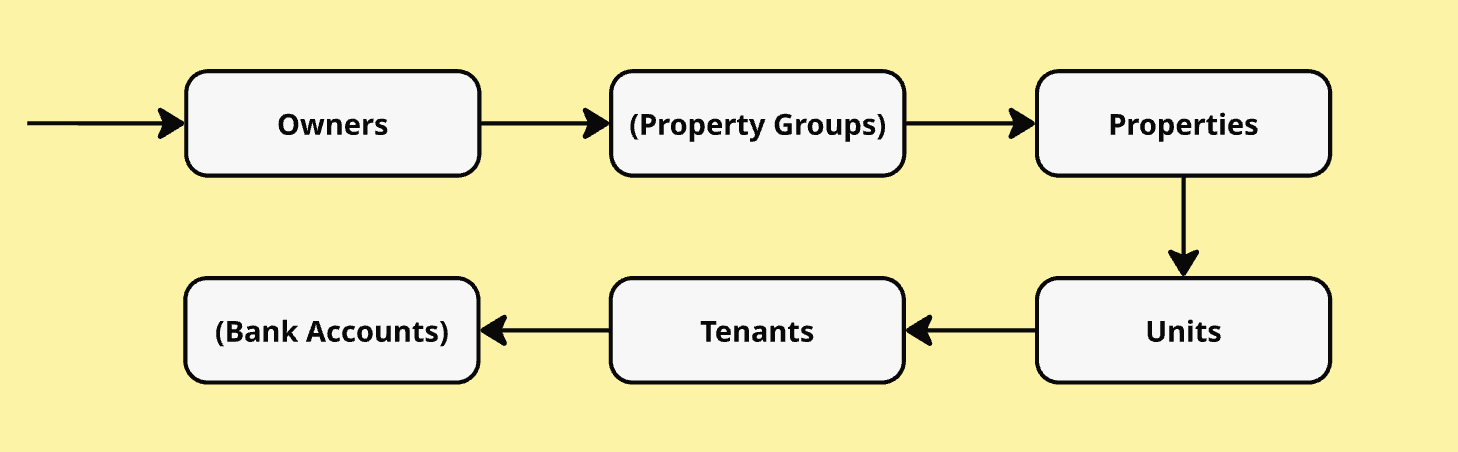
<figure><img src="https://1594188794-files.gitbook.io/~/files/v0/b/gitbook-x-prod.appspot.com/o/spaces%2F-MgL3i0-8YP9K1HyrHy8%2Fuploads%2FynmaeM1YeZfBgpOZuqBW%2FScreenshot%202025-05-26%20at%2015.21.30.png?alt=media&amp;token=a8a68e59-b0de-4b72-aaab-6f8be152c0b0" alt=""><figcaption><p>This chart shows the recommended data import flow</p></figcaption></figure>

**1.** First, the owners should be created/imported by using the following endpoint: [Owners Mutation](/endpoints/owners/owners-mutation).&#x20;

**2.** Once the import is finalised for the owners the next endpoint which should be used is [Property groups](/endpoints/property-groups).&#x20;

{% hint style="info" %}
Creating Property groups is recommended but it's not necessary or a precondition for creating properties. If you want to bulk inherit descriptions (for e.g. amenities, location) to several properties it's recommended to create them.
{% endhint %}

**3.** In the next step the properties should be created by using the following endpoint: [Property Mutation](/endpoints/properties/properties-mutation). The following checklist provides information about creating properties. The checklist summarizes the overall areas which might cause issues.&#x20;

* [ ] Address information is split in street, street number, zip code and city
* [ ] Avoid having additional information in address information (e.g. in street number "Hinterhaus")
* [ ] No duplicate properties --> Multiple properties with the same address information are not possible
* [ ] Properties are not property groups. Properties should be broken down to the building entrance (Hauseingang) for explicit assignment

4\. Going further in the following step [Units Mutation](/endpoints/units/units-mutation), units can be created and within creation assigned to associated property. Please consider the following when creating units:

* [ ] For UnitInput {name:} we would recommend to insert the value for unit location for e.g. 1. OG links
* [ ] &#x20;For UnitInput {mainStorage:} the value can be set to TRUE or FALSE if the information is not available
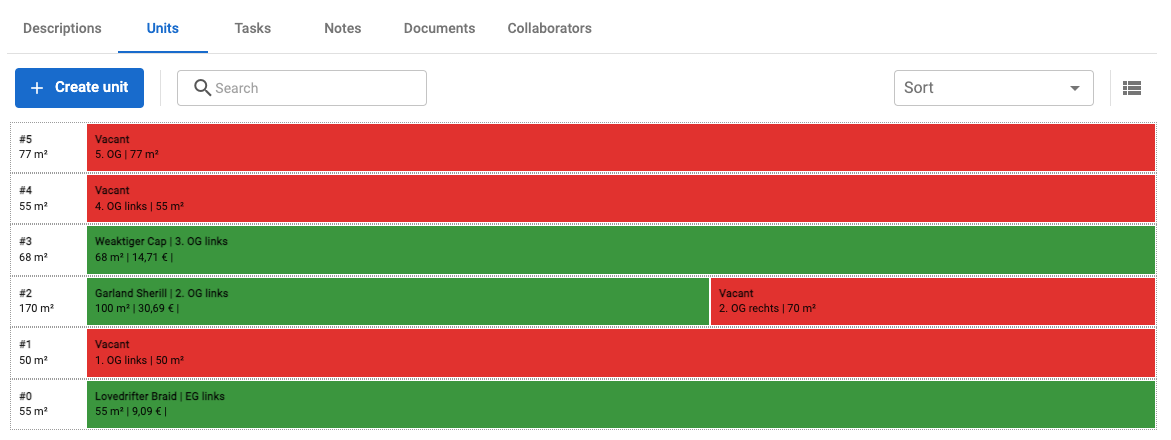
* [ ] For UnitInput {floorNo:} we need data format integer, in most of the ERP-systems the location of the unit is available for e.g. EG, 2. OG mitte etc. Therefore floorNo could be extracted from this information. This is required for generating the stacking plan in EverReal, as shown in the screenshot.

<figure><img src="https://1594188794-files.gitbook.io/~/files/v0/b/gitbook-x-prod.appspot.com/o/spaces%2F-MgL3i0-8YP9K1HyrHy8%2Fuploads%2Fd12JOrAEWHnLLeNwj1Ef%2Fimage.png?alt=media&amp;token=983f3578-6415-478c-b1a4-7818a8fb6f91" alt=""><figcaption><p>Stacking Plan in EverReal</p></figcaption></figure>

5. The next step is [Tenants Mutation](/endpoints/tenants/tenant-mutation), where tenants can be created and within creation assigned to associated units. As a result of the tenants import, the unit status is being automatically updated from EverReal.&#x20;
   1. Contract start date is in the past and there is no contract end date: unit status is <mark style="color:green;">leased</mark>&#x20;
   2. Contract start date is in the future: unit status is <mark style="color:red;">vacant</mark>, <mark style="color:green;">re-leased</mark>&#x20;
   3. Contract start date is either in the past or in the future but there is a contract end date in future: unit status is <mark style="color:orange;">terminated</mark>
6. Optional final step: Bank accounts Mutation\
   If you wish to import bank account data, use the Bank accounts Mutation after all core entities have been created.
   * [ ] Each bank account must be linked to at least one of the following IDs: `owner_id`, `property_id`, or `unit_id`.\
     You can associate a single bank account with multiple entities if needed.In the screenshot below, you can see an example of bank accounts linked to an owner. These are visible in EverReal under:\
     *Contacts → Owners → \*select an owner\* → Bank accounts tab*

<figure><img src="https://1594188794-files.gitbook.io/~/files/v0/b/gitbook-x-prod.appspot.com/o/spaces%2F-MgL3i0-8YP9K1HyrHy8%2Fuploads%2FTmAAmeQaqFP3lj1xhbvu%2FScreenshot%202025-05-26%20at%2014.58.39.png?alt=media&amp;token=3360cb27-9d86-4efd-8d33-432c58c1c644" alt=""><figcaption><p>Bank account linked to an owner </p></figcaption></figure>


# Endpoints

### Interactive Playground

{% hint style="warning" %}
To interact with data, we provide [GraphQL endpoint](https://graphql.org/learn/) where you can customize the response based on query payload. To use EverReal playground is required to provide the Bearer token, following was done in previous image.
{% endhint %}

Accessing EverReal playground you can run queries and mutations. Open your browser and access `https://{custom_subdomain}.everreal.co/api/reporting/graphql`

<figure><img src="https://1594188794-files.gitbook.io/~/files/v0/b/gitbook-x-prod.appspot.com/o/spaces%2F-MgL3i0-8YP9K1HyrHy8%2Fuploads%2FDGWIxGnd9APC8l1IKEaE%2FScreenshot%202023-01-17%20at%204.19.20%20PM.png?alt=media&amp;token=b25d8e06-6623-4c0a-9858-c5020899341a" alt=""><figcaption><p>Guilde to interactive playground</p></figcaption></figure>

Refer below entities to access data

<table data-view="cards"><thead><tr><th></th><th data-hidden></th><th data-hidden></th><th data-hidden data-card-target data-type="content-ref"></th></tr></thead><tbody><tr><td>Users</td><td></td><td></td><td><a href="/endpoints/account-users-members">Account users / members</a></td></tr><tr><td>Owners</td><td></td><td></td><td><a href="/endpoints/owners">Owners</a></td></tr><tr><td>Property Group</td><td></td><td></td><td><a href="/endpoints/property-groups">Property Groups</a></td></tr><tr><td>Properties</td><td></td><td></td><td><a href="/endpoints/properties">Properties</a></td></tr><tr><td>Units</td><td></td><td></td><td><a href="/endpoints/units">Units</a></td></tr><tr><td>Listings</td><td></td><td></td><td><a href="/endpoints/listing">Listing</a></td></tr><tr><td>Candidates</td><td></td><td></td><td><a href="/endpoints/candidates">Candidates</a></td></tr><tr><td>Messages</td><td></td><td></td><td><a href="/endpoints/messages">Messages</a></td></tr><tr><td>Contact Activities</td><td></td><td></td><td><a href="/endpoints/contact-activites">Contact Activites</a></td></tr><tr><td>Tenants</td><td></td><td></td><td><a href="/endpoints/tenants">Tenants</a></td></tr><tr><td>Contracting</td><td></td><td></td><td><a href="/endpoints/contract">Contract</a></td></tr></tbody></table>


# Account users / members

Entity responsible for getting user from a company, this is specifically used to get responsible users while importing properties or units

### GraphQL Endpoint

## GraphQL endpoint to perform user operations

<mark style="color:green;">`POST`</mark> `https://{custom_subdomain}.everreal.co/api/reporting/graphql`

Body of the request should follow GraphQL mutation structure like

`mutation {`\
&#x20;  `mutationName(input: {MutationNameInput!})`\
&#x20;  `{ MutationNamePayload }`\
`}`

### Account user Query

To query an user from Everreal use user query

{% tabs %}
{% tab title="cURL" %}

```
GET http://{custom_subdomain}.everreal.co/api/reporting/graphql
--header 'Authorization: Bearer eyJhbGci...'
{"query":"..."}
```

{% endtab %}

{% tab title="Schema" %}

```graphql
type User {
  id: String
  email: String
  firstName: String
  lastName: String
  profilePicture: IFile
  companyUser: companyUser
}

type companyUser {
  companyId: String
}

type Query {
  users(input: UserFilterListPaging): [User]
}

input UserFilterListPaging {
  filter: UserFilter
  paging: GraphPaging
  sort: GraphSorting
}

input UserFilter {
  id: String
  email: String
}

```

{% endtab %}
{% endtabs %}

Below we are providing a full example how to get a user by email

{% tabs %}
{% tab title="GraphQL" %}

```graphql
query {
  users(input: { paging: { take: 10, skip: 0 }, filter: { email: "email@domain.co" } }) {
    id
    email
  }
}
```

{% endtab %}

{% tab title="cURL" %}

```bash
curl --location --request POST 'http://{subdomain}.everreal.co/api/reporting/graphql' \
--header 'Authorization: Bearer ....' \
--header 'Content-Type: application/json' \
--header 'Cookie: accept-language=de-DE' \
--data-raw '{"query":"query {\r\n  users(input: { paging: { take: 10, skip: 0 }, filter: { email: \"email@domain.co\" } }) {\r\n    id\r\n    email\r\n  }\r\n}","variables":{}}'
```

{% endtab %}

{% tab title="Javascript" %}

```javascript
var myHeaders = new Headers();
myHeaders.append("Authorization", "Bearer ...");
myHeaders.append("Content-Type", "application/json");
myHeaders.append("Cookie", "accept-language=de-DE");

var graphql = JSON.stringify({
  query: "query {\r\n  users(input: { paging: { take: 10, skip: 0 }, filter: { email: \"email@domain.co\" } }) {\r\n    id\r\n    email\r\n  }\r\n}",
  variables: {}
})
var requestOptions = {
  method: 'POST',
  headers: myHeaders,
  body: graphql,
  redirect: 'follow'
};

fetch("http://{subdomain}.everreal.co/api/reporting/graphql", requestOptions)
  .then(response => response.text())
  .then(result => console.log(result))
  .catch(error => console.log('error', error));
```

{% endtab %}
{% endtabs %}


# Owners

Entity responsible for owners operations

{% hint style="warning" %}
To use EverReal playground is required to provide the Bearer token, read more in Master Data page
{% endhint %}

To understand what is necessary and how to use GraphQL, in Master Data page we explain what is necessary to do

{% content-ref url="/pages/-MgjbMsY28KoSiFbx\_k6" %}
[Ideal CSV Structure](/how-to-guide/everreal-data-import-process/master-data)
{% endcontent-ref %}

<table data-card-size="large" data-view="cards"><thead><tr><th></th><th data-hidden></th><th data-hidden></th><th data-hidden data-card-target data-type="content-ref"></th></tr></thead><tbody><tr><td>Owner Query</td><td></td><td></td><td><a href="/endpoints/owners/owners-query">Owners Query</a></td></tr><tr><td>Owner Mutation</td><td></td><td></td><td><a href="/endpoints/owners/owners-mutation">Owners Mutation</a></td></tr></tbody></table>

### GraphQL Endpoint

## GraphQL endpoint to perform owner operations

<mark style="color:green;">`POST`</mark> `https://{custom_subdomain}.everreal.co/api/reporting/graphql`

Body of the request should follow GraphQL mutation structure like

`mutation {`\
&#x20;  `mutationName(input: {MutationNameInput!})`\
&#x20;  `{ MutationNamePayload }`\
`}`


# Owners Query

Get Owner list from EverReal

### Introduction

Our owner query will get you the list of owners from the respective company. We provides ability to filter the owner by externalId and fullSearch over firstName, lastName and email. Please make sure the paging option is used to fetch more items.

To understand what is necessary and how to use GraphQL, on master data page we explain what is necessary to do

**Query**

```graphql
type Query {
  owners(input: OwnersFilterListPaging): [Owner]
}
```

**Schema**

```graphql
type Owner {
    id: String
    externalId: String
    email: String
    firstName: String
    lastName: String
    fullName: String
    companyName: String
    address: Address
    bankInformation: OwnerBankIformation
    bankDepositInformation: OwnerBankDepositInformation
    customFieldValues: [CustomFieldValue]
    company: Company
}

type Address {
  streetName: String
  streetNumber: String
  zipCode: String
  city: String
  country: String
}

type OwnerBankDepositInformation {
  iban: String
  bic: String
  bankName: String
  accountHolderName: String
}

type OwnerBankIformation {
  bankName: String
  bankAddress: String
  bic: String
  iban: String
}

type CustomFieldValue {
  key: String!
  value: JSON
}

type Company {
  id: String
  name: String
  partnerId: String
}

input OwnersFilterListPaging {
  filter: OwnersFilter
  paging: GraphPaging
  sort: GraphSorting
}

input OwnersFilter {
  id: String
  externalId: String
  companyId: String
  fullSearch: String
  updatedAt: IDateRange
}

input GraphPaging {
  skip: Int
  take: Int
}

input GraphSorting {
  fieldName: String
  direction: String
}
```

***Examples of Owner Query***

{% tabs %}
{% tab title="GraphQL" %}

```graphql
{
  owners(
    input: {
      filter: { externalId: "iE-32" }
      paging: { skip: 0, take: 50 }
    }
  ) {
    id
    email
    firstName
    lastName
    address {
      city
    }
    bankInformation {
      iban
    }
  }
}

```

{% endtab %}
{% endtabs %}


# Owners Mutation

Mutation enables to create or update owner in EverReal

### Mutation Types

{% hint style="info" %}
Mutations are responsible to insert or update a specific register, the operation insert or update is defined by **`externalId`**, in case this owner was imported previously, this mutation will updated the resource, otherwise will create the property.
{% endhint %}

```graphql
type Mutation {
    upsertOwner(owner:OwnerInput!)  
    deleteOwner(externalId: String!)  
}
```

Here are details on the capabilities of different mutations

* `The upsertOwner`  mutation is used to create or update an owner in Everreal system and owners added to the system cannot be modified by Everreal and if needs to be modified it should be done via the same endpoint itself.
* The `deleteOwner`  mutation is used to delete the owner relation with the external integration source, doing this will not delete the owner but instead it will remain as a detached owner from integration and can be modified using Everreal.

### Schema Definition

{% hint style="warning" %}
&#x20;items with **!** notation are required
{% endhint %}

```graphql
input OwnerInput {
  meta: MetaInformation!
  externalOwnerId: String! #externalId by which the owner is identified
  firstName: String!
  lastName: String!
  companyName: String
  email: String!
  phoneNo: String
  address: PersonalAddress
  bankDepositInformation: BankDepositInformation
  bankInformation: BankIformation
  customFieldValues: [CustomFieldValueInput]
}

input PersonalAddress {
  streetName: String
  streetNumber: String
  zipCode: String
  city: String
  country: String
}

input BankDepositInformation {
  iban: String
  bic: String
  bankName: String
  accountHolderName: String
}

input BankIformation {
  bankName: String
  bankAddress: String
  bic: String
  iban: String
}

input MetaInformation {
  source: String! # source should be the integration source, so logo is visible in everreal
}
```

Below we are providing a full example how to create or update an owner, all this information is not required, only the ones that was using **!** notation previously.

{% tabs %}
{% tab title="graphQL" %}

```graphql
mutation {
  upsertOwner(
    owner: {
      meta: { source: "INTEGRATION_SOURCE" }
      externalOwnerId: "91001+002242"
      firstName: "Ivana"
      lastName: "Maric"
      email: "ivana.maric@everreal.com"
      companyName: "Everreal Gmbh"
      phoneNo: "+49 123 1231 1237"
      address: {
        streetName: "Villenallee"
        streetNumber: "21"
        zipCode: "40211"
        city: "Düsseldorf"
        country: "DE"
      }
    }
  ) {id}
}
```

{% endtab %}

{% tab title="JavaScript" %}

```javascript
var myHeaders = new Headers();
myHeaders.append("Authorization", "Bearer ....");
myHeaders.append("Content-Type", "application/json");

var graphql = JSON.stringify({
  query: "mutation {\r\n  upsertOwner(\r\n    owner: {\r\n      meta: { source: \"INTEGRATION_SOURCE\" }\r\n      externalOwnerId: \"91001+002242\"\r\n      firstName: \"Ivana\"\r\n      lastName: \"Maric\"\r\n      email: \"ivana.maric@everreal.com\"\r\n      companyName: \"Everreal Gmbh\"\r\n      phoneNo: \"+49 123 1231 1237\"\r\n      address: {\r\n        streetName: \"Villenallee\"\r\n        streetNumber: \"21\"\r\n        zipCode: \"40211\"\r\n        city: \"Düsseldorf\"\r\n        country: \"DE\"\r\n      }\r\n    }\r\n  ) {\r\n    id\r\n  }\r\n}\r\n\r\n",
  variables: {}
})
var requestOptions = {
  method: 'POST',
  headers: myHeaders,
  body: graphql,
  redirect: 'follow'
};

fetch("http://{subdomain}.everreal.co/api/reporting/graphql", requestOptions)
  .then(response => response.text())
  .then(result => console.log(result))
  .catch(error => console.log('error', error))
```

{% endtab %}
{% endtabs %}


# Property Groups

Entity responsible for property group operations

{% hint style="warning" %}
To use EverReal playground is required to provide the Bearer token, read more in Master Data page
{% endhint %}

To understand what is necessary and how to use GraphQL, in Master Data page we explain what is necessary to do

{% content-ref url="/pages/-MgjbMsY28KoSiFbx\_k6" %}
[Ideal CSV Structure](/how-to-guide/everreal-data-import-process/master-data)
{% endcontent-ref %}

### GraphQL Endpoint

## GraphQL endpoint to perform property operations

<mark style="color:green;">`POST`</mark> `https://{custom_subdomain}.everreal.co/api/reporting/graphql`

Body of the request should follow GraphQL mutation structure like

`mutation {`\
&#x20;  `mutationName(input: {MutationNameInput!})`\
&#x20;  `{ MutationNamePayload }`\
`}`


# Property Groups Query

Gets property group lists from EverReal

### **Introduction**

Our property group query will get you the list of owners from the respective company. We provides ability to filter the property group query by externalId and fullSearch over propertyGroup name. Please make sure the paging option is used to fetch more items.

### Property Group Query

To query a property group from Everreal use `propertyGroups` query

```graphql
type Query {
  propertyGroups(input: PropertyGroupFilterListPaging): [PropertyGroup]
}
```

**Schema**

```graphql
type PropertyGroup {
  id: String
  externalId: String
  name: String
  createdAt: DateTime
  updatedAt: DateTime
  descriptions: PropertyGroupDescription
  properties: [PartialProperty]
}

type PartialProperty {
  id: String
  objectId: String
  name: String
  category: String
  subtype: String
  type: String
}

input PropertyGroupDescriptionInput {
  object: String
  amenities: String
  location: String
  other: String
}

input PropertyGroupFilter {
  id: String
  externalId: String
  companyId: String
  fullSearch: String
}

input GraphPaging {
  skip: Int
  take: Int
}

input GraphSorting {
  fieldName: String
  direction: String
}
```

***Example for property group query***

{% tabs %}
{% tab title="GraphQL" %}

```graphql
{
  propertyGroups(
    input: { filter: { externalId: "iPG-32" }, paging: { skip: 0, take: 10 } }
  ) {
    name
    externalId
    properties {
      id
      objectId
      name
      category
      subtype
      type
    }
  }
}
```

{% endtab %}
{% endtabs %}


# Property Group Mutation

Create or update property groups in EverReal

### Mutation Types

{% hint style="info" %}
**upsertPropertyGroup**: Mutation is responsible for inserting or updating a specific register, the operation insert or update is defined by **`externalId`**, in case this property was imported previously, this mutation will updated the resource, otherwise will create the property.
{% endhint %}

```graphql
type Mutation {
  upsertPropertyGroup(propertyGroup: PropertyGroupInput!): PropertyGroup!
}
```

Here are details on the capabilities of different mutations

* The `upsertPropertyGroup` the mutation is used to create or update a property group in the EverReal system and property added to the system cannot be modified by Everreal and if needs to be modified it should be done via the same endpoint itself.

### Schema Definition

{% hint style="warning" %}
&#x20;items with **!** notation are required
{% endhint %}

```graphql
input PropertyGroupInput {
  name: String
  externalPropertyGroupId: String!
  descriptions: PropertyGroupDescriptionInput
}


input PropertyGroupDescriptionInput {
  object: String
  amenities: String
  location: String
  other: String
}

```

> `externalPropertyGroupId` is required field, this is the `key` or the `id` which is used by the 3d party system(data synchronize between 3rd party)&#x20;

Below we are providing a full example how to create or update a property, all this information is not required, only the ones that was using **!** notation previously.

{% tabs %}
{% tab title="graphQL" %}

```graphql
mutation {
  upsertPropertyGroup(
    propertyGroup: {
        name: "Ray - PG1"
        externalPropertyGroupId: "RPG-1"
        descriptions:{
            object: "Sample - Object"
            amenities: "Sample - Amenities"
            location: "Sample - Location"
            other: "Sample - Other"
        }
    }
  ) { id }
}
```

{% endtab %}

{% tab title="JavaScript" %}

```javascript
var myHeaders = new Headers();
myHeaders.append("Authorization", "Bearer ....");
myHeaders.append("Content-Type", "application/json");

var graphql = JSON.stringify({
  query: "mutation {\n  upsertPropertyGroup(\n    propertyGroup: {\n        name: \"Ray - PG1\"\n        externalPropertyGroupId: \"RPG-1\"\n        descriptions:{\n            object: \"Sample - Object\"\n            amenities: \"Sample - Amenities\"\n            location: \"Sample - Location\"\n            other: \"Sample - Other\"\n        }\n    }\n  ) { id }\n}",
  variables: {}
})
var requestOptions = {
  method: 'POST',
  headers: myHeaders,
  body: graphql,
  redirect: 'follow'
};

fetch("https://acme-qa.everreal-dev.co/api/reporting/graphql", requestOptions)
  .then(response => response.text())
  .then(result => console.log(result))
  .catch(error => console.log('error', error));
```

{% endtab %}
{% endtabs %}


# Properties

Entity responsible for properties operations

{% hint style="warning" %}
To use EverReal playground is required to provide the Bearer token, read more in Master Data page
{% endhint %}

To understand what is necessary and how to use GraphQL, in Master Data page we explain what is necessary to do

{% content-ref url="/pages/-MgjbMsY28KoSiFbx\_k6" %}
[Ideal CSV Structure](/how-to-guide/everreal-data-import-process/master-data)
{% endcontent-ref %}

### GraphQL Endpoint

## GraphQL endpoint to perform property operations

<mark style="color:green;">`POST`</mark> `https://{custom_subdomain}.everreal.co/api/reporting/graphql`

Body of the request should follow GraphQL mutation structure like

`mutation {`\
&#x20;  `mutationName(input: {MutationNameInput!})`\
&#x20;  `{ MutationNamePayload }`\
`}`


# Properties Query

Get list of properties

### **Introduction**

Our property query will get you the list of properties from the respective company. We provides ability to filter the property query by externalId, propertyId, ownerId, propertyGroupId and fullSearch over property name. Please make sure the paging option is used to fetch more items.

### Property Group Query

To query a property group from Everreal use `properties` query

```graphql
type Query {
  properties(input: PropertiesFilterListPaging): [Property]
}
```

**Schema**

```graphql
input PropertiesFilterListPaging {
  filter: PropertiesFilter
  paging: GraphPaging
  sort: GraphSorting
}

input PropertiesFilter {
  id: String
  companyId: String
  propertyId: String @deprecated(reason: "propertyId is deprecated. Use id instead.")
  externalId: String
  propertyGroupId: String
  ownerId: String
  fullSearch: String
  updatedAt: IDateRange
}

input IDateRange {
  from: String
  to: String
}

input GraphPaging {
  skip: Int
  take: Int
}
input GraphSorting {
  fieldName: String
  direction: String
}

type Property {
  id: String
  objectId: String
  externalId: String
  name: String
  category: String
  subtype: String
  type: String
  ownershipType: String
  fullAddress: String
  ownerId: String
  yearBuilt: Int
  noOfStories: Int
  createdAt: DateTime
  updatedAt: DateTime
  company: Company
  address: Address
  descriptions: PropertyDescription
  owner: Owner
  listings: [Listing]
  units: [Unit]
  group: PropertyGroup
  responsibilityType: PROPERTY_RESPONSIBILITY_TYPE
  responsibleUserId: String
  responsibleUser: ResponsibleUser
}

type ResponsibleUser {
  id: String
  email: String
  firstName: String
  lastName: String
}

type Company {
  id: String
  name: String
  partnerId: String
  listings: [Listing]
}

type Address {
  street: String
  number: String
  zip: String
  city: String
  country: String
  location: GeoLocation
}

type Listing {
  id: String
  title: String
  type: String
  companyId: String
  listingResponsible: User
  contractDetails: ListingContractDetails
  coverPicture: IFile
  pictures: [IFile]
  documents: [IFile]
  floorplans: [IFile]
  company: Company
  property: Property
  unit: Unit
  createdAt: DateTime
  updatedAt: DateTime
}

type Unit {
  id: String
  objectId: String
  name: String
  category: String
  type: String
  subtype: String
  leasingStatuses: UnitLeasingStatuses
  availability: [Availability]
  leasingStatusEnum: String
  leasingStatusesEnum: [String]
  floorNumber: Float
  surface: Float
  livingSurface: Float
  hasMainStorage: Boolean
  rooms: UnitRooms
  owner: Owner
  property: Property
  createdAt: DateTime
  updatedAt: DateTime
}

type PropertyDescription {
  object: String
  amenities: String
  location: String
  other: String
}
```

***Example for property Query***

{% tabs %}
{% tab title="GraphQL" %}

```graphql
{
  properties(
    input: {
      filter: { externalId: "IE-U-32" }
      paging: { skip: 0, take: 10 }
    }
  ) {
    id
    name
    responsibleUser {
      id
      email
    }
    objectId
    category
    subtype
    type
    ownerId
    yearBuilt
    noOfStories
    units {
      id
    }
    group {
      name
    }
    responsibilityType
    responsibleUser {
      email
    }
  }
}

```

{% endtab %}
{% endtabs %}


# Properties Mutation

Create or update properties in EverReal

### Mutation Types

{% hint style="info" %}
Mutations are responsible to insert or update a specific register, the operation insert or update is defined by **`externalId`**, in case this property was imported previously, this mutation will updated the resource, otherwise will create the property.
{% endhint %}

```graphql
type Mutation {
    upsertProperty(property: PropertyInput!)
    deleteProperty(externalId: String!)  
}
```

Here are details on the capabilities of different mutations

* The `upsertProperty`  mutation is used to create or update a property in Everreal system and property added to the system cannot be modified by Everreal and if needs to be modified it should be done via the same endpoint itself.
* The `deleteProperty`  mutation is used to delete the property relation with the external integration source, doing this will not delete the property but instead it will remain as a detached property from integration and can be modified using Everreal.

### Schema Definition

{% hint style="warning" %}
&#x20;items with **!** notation are required
{% endhint %}

```graphql
input PropertyInput {
  meta: MetaInformation!
  address: AddressInput!
  id: String #you can pass the id to change the externalId of the property
  externalPropertyId: String! #externalId by which the property will be identified
  ownerId: String #when ownershipType=INDIVIDUAL you should either pass externalOwnerId or ownerId where ownerId is Everreal generated Id
  externalOwnerId: String  #when ownershipType=INDIVIDUAL you should either pass externalOwnerId or ownerId where ownerId is Everreal generated I
  name: String!
  type: PROPERTY_TYPE!
  subtype: PROPERTY_TYPE!
  category: PROPERTY_CATEGORY!
  noOfStories: Int # The total number of floors of the building
  yearBuilt: Int
  ownershipType: PROPERTY_OWNERSHIP_TYPE! #when passed as MULTIPLE you dont need to pass ownerId or externalOwnerId
  responsibilityType: PROPERTY_RESPONSIBILITY_TYPE
  responsibleUserId: String
  propertyGroupId: String
  externalPropertyGroupId: String
  descriptions: PropertyDescriptionInput
}

input AddressInput {
  streetName: String!
  streetNumber: String!
  zipCode: String!
  city: String!
  country: String!
  location: GeoLocationInput
  placeId: String
}


input PropertyDescriptionInput {
  object: String
  amenities: String
  location: String
  other: String
}

input GeoLocationInput {
  lat: Float!
  lng: Float!
}

input MetaInformation {
  source: String!
}

```

> If you don't have a value for a required field that is an enum, then pass the default value, for `PROPERTY_OWNERSHIP_TYPE`  if passed `INDIVIDUAL` then it should contain ownerId.

{% hint style="info" %}
When Owner or ResponsibleUser is changed in property the value will be inherited to the units attached to property and owner, unitResponsible will be updated respectively.\
\
Also, When OwnershipType and ResponsibilityUserType is changed to `MULTIPLE,`the value of the owner and responsible users will not be cleared in unit level instead retains previous value.
{% endhint %}

<table><thead><tr><th width="150">Enum</th><th>Default</th><th width="234.64078899395986">Possible Values</th></tr></thead><tbody><tr><td><code>PROPERTY_TYPE</code></td><td><code>BUILDING</code></td><td><code>BUILDING</code> | <code>LAND</code></td></tr><tr><td><code>PROPERTY_CATEGORY</code></td><td><code>RESIDENTIAL_AND_COMMERCIAL</code></td><td><code>RESIDENTIAL</code> | <code>COMMERCIAL</code> | <br><code>RESIDENTIAL_AND_COMMERCIAL</code></td></tr><tr><td><code>PROPERTY_OWNERSHIP_TYPE</code></td><td><code>MULTIPLE</code></td><td><code>INDIVIDUAL</code> | <code>MULTIPLE</code></td></tr><tr><td><code>PROPERTY_RESPONSIBILITY_TYPE</code></td><td><code>MULTIPLE</code></td><td><code>INDIVIDUAL</code>| <code>MULTIPLE</code></td></tr></tbody></table>

Below we are providing a full example how to create or update a property, all this information is not required, only the ones that was using **!** notation previously.

{% tabs %}
{% tab title="graphQL" %}

```graphql
mutation {
  upsertProperty(
    property: {
      meta: { source: "INTEGRATION_SOURCE" }
      name: "Munich Appartment"
      type: BUILDING
      externalPropertyId: "9098/501" 
      ownerId: "b8559500-bb35-11ec-a64e-4b00ff3d25d5" 
      externalOwnerId: "981/2"d
      category: RESIDENTIAL
      subtype: BUILDING
      noOfStories: 10
      address: {
        city: "Ludwigshafen a. Rhein"
        country: "DE"
        streetNumber: "44 - 68"
        streetName: "Hoher Weg"
        zipCode: "67067"
        location: { lat: 52.5705570, lng: 6.14847399999933 }
      }
      ownershipType: INDIVIDUAL 
    }
  ) {id}
}
```

{% endtab %}

{% tab title="JavaScript" %}

```javascript
var myHeaders = new Headers();
myHeaders.append("Authorization", "Bearer ....");
myHeaders.append("Content-Type", "application/json");

var graphql = JSON.stringify({
query:
    'mutation {\r\n  upsertProperty(\r\n    property: {\r\n      meta: { source: "INTEGRATION_SOURCE" }\r\n      name: "Hohe 12"\r\n      type: BUILDING\r\n      externalPropertyId: "9098/50"\r\n      category: RESIDENTIAL\r\n      subtype: BUILDING\r\n      address: {\r\n        city: "Ludwigshafen a. Rhein"\r\n        country: "DE"\r\n        streetNumber: "44 - 68"\r\n        streetName: "Hoher Weg"\r\n        zipCode: "67067"\r\n        location: { lat: 52.5705570, lng: 6.14847399999933 }\r\n      }\r\n      ownershipType: MULTIPLE\r\n    }\r\n  ) {\r\n    id\r\n  }\r\n}',
variables: {},
});
var requestOptions = {
  method: 'POST',
  headers: myHeaders,
  body: graphql,
  redirect: 'follow'
};

fetch("http://{subdomain}.everreal.co/api/reporting/graphql", requestOptions)
  .then(response => response.text())
  .then(result => console.log(result))
  .catch(error => console.log('error', error));
```

{% endtab %}
{% endtabs %}


# Units

Entity responsible for unts operations

{% hint style="warning" %}
To use EverReal playground is required to provide the Bearer token, read more in Master Data page
{% endhint %}

To understand what is necessary and how to use GraphQL, in Master Data page we explain what is necessary to do

{% content-ref url="/pages/-MgjbMsY28KoSiFbx\_k6" %}
[Ideal CSV Structure](/how-to-guide/everreal-data-import-process/master-data)
{% endcontent-ref %}

### GraphQL Endpoint

## GraphQL endpoint to perform unit operations

<mark style="color:green;">`POST`</mark> `https://{custom_subdomain}.everreal.co/api/reporting/graphql`

Body of the request should follow GraphQL mutation structure like

`mutation {`\
&#x20;  `mutationName(input: {MutationNameInput!})`\
&#x20;  `{ MutationNamePayload }`\
`}`


# Units Query

Get unit list from EverReal

### **Introduction**

Our unit query will get you the list of units from the respective company. We provides ability to filter the unit query by externalId, propertyId, ownerId, propertyGroupId, leasingStatus etc. Please make sure the paging option is used to fetch more items.

### Unit Query

To query a property group from Everreal use `units` query

```graphql
type Query {
  units(input: UnitsFilterListPaging): [Unit]
}
```

**Schema**

```graphql
input UnitsFilterListPaging {
  filter: UnitsFilter
  paging: GraphPaging
  sort: GraphSorting
}

input UnitsFilter {
  id: String
  companyId: String
  externalId: String
  propertyGroupId: String
  propertyId: String
  ownerId: String
  """
  Full search in Unit [name, objectId] OR Property [address, name]
  """
  fullSearch: String
    @deprecated(reason: "This will be removed, because 'leasingStatuses' should be used, which provides more flexibility.")
  leasingStatus: String
  """
  Search by multiple leasing statuses at the time
  """
  leasingStatuses: [FILTER_UNITS_LEASING_STATUSES]
  hasListing: Boolean
  updatedAt: IDateRange
  includeExternal: Boolean
}

input GraphPaging {
  skip: Int
  take: Int
}
input GraphSorting {
  fieldName: String
  direction: String
}

type Unit {
  id: String
  objectId: String
  externalId: String
  name: String
  category: String
  type: String
  subtype: String
  leasingStatuses: UnitLeasingStatuses
  leasingStatusCurrentlyLeased: Boolean
  statuses: AllUnitStatuses
  availability: [Availability]
    @deprecated(reason: "A unit can have multiple leasingStatuses, please switch to 'leasingStatusesEnum' property")
  leasingStatusEnum: FILTER_UNITS_LEASING_STATUSES
  leasingStatusesEnum: [FILTER_UNITS_LEASING_STATUSES]
  statusesEnum: [String]
  floorNumber: Float @deprecated('use floorNo instead')
  floorNo: Float
  surface: Float
  livingSurface: Float
  netFloorSurface: Float
  hasMainStorage: Boolean
  rooms: UnitRooms
  owner: Owner
  amenities: Amenities
  descriptions: UnitDescription
  unitResponsibleId: String
  unitResponsible: ResponsibleUser
  surcharges: Float
  currentRent: Float
  targetRent: Float
  availableFrom: DateTime
  onHoldStatus: Boolean
  onHoldReason: UNIT_ON_HOLD_REASON
  property: Property
  financingType: UNIT_FINANCING_TYPE
  createdAt: DateTime
  updatedAt: DateTime
}

type ResponsibleUser {
  id: String
  email: String
  firstName: String
  lastName: String
}

type UnitDescription {
  object: String
  amenities: String
  location: String
  other: String
}

type Amenities {
  amenitiesIncluded: [AMENITIES_INCLUDED]
  hasParking: Boolean
  parking: UnitParkingType
  qualityOfAmenities: QUALITY_OF_AMENITIES
  condition: AMENITIES_CONDITION
  lastRenovationYear: Int
  heatingType: HEATING_TYPE
  mainEnergySource: ENERGY_SOURCE_TYPE
  energyPerformanceCertificateAvailability: ENERGY_PERFORMANCE_CERTIFICATE_AVAILABILITY
  energyCertificateCreationDate: ENERGY_CERTIFICATE_CREATION_DATE
  buildingEnergyRatingType: BUILDING_ENERGY_RATING_TYPE
  thermalCharacteristic: Float
  energyConsumptionContainsWarmWater: Boolean
  energyEfficiencyClass: ENERGY_EFFICIENCY_CLASS
  hasLanCables: YES_NO_BYAPPOINTMENT
  hasAirConditioning: YES_NO_BYAPPOINTMENT
  floorType: COMMERCIAL_UNIT_FLOORTYPE
  goodsLiftLoad: Float
  floorLoad: Float
  supplyType: STORE_SUPPLY_TYPE
  powerSupplyLoad: Float
  craneRunwayLoad: Float
}

type Availability {
  from: DateTime
}

type UnitRooms {
  rooms: Float
  bedrooms: Float
  bathrooms: Float
}

type UnitLeasingStatuses {
  vacant: Boolean
  terminated: Boolean
  futureLeased: Boolean
  currentlyLeased: Boolean
}

enum UNIT_FINANCING_TYPE {
  PRIVATELY_FINANCED
  PUBLICLY_SUBSIDIZED
}

enum FILTER_UNITS_LEASING_STATUSES {
  LEASED
  TERMINATED
  VACANT
  FUTURE_LEASED
  ON_HOLD
}
```

***Example for property Query***

{% tabs %}
{% tab title="GraphQL" %}

```graphql
{
  units(
    input: {
      filter: { externalId: "ER-P12-U-22" }
      paging: { skip: 0, take: 20 }
    }
  ) {
    id
    name
    unitResponsible {
      email
      firstName
      lastName
    }
    externalId
    category
    type
    subtype
    currentRent
    amenities {
      amenitiesIncluded
      qualityOfAmenities
      hasParking
      parking {
        type
        quantity
      }
    }
  }
}
```

{% endtab %}
{% endtabs %}


# Units Mutation

Create or update properties in Everreal

### Mutation Types

{% hint style="info" %}
Mutations are responsible to insert or update a specific register, the operation insert or update is defined by **`externalId`**, in case this unit was imported previously, this mutation will updated the resource, otherwise will create the unit.
{% endhint %}

```graphql
type Mutation {
    upsertUnit(unit: UnitInput): Unit
    deleteUnit(externalId: String): Boolean  
}
```

Here are details on the capabilities of different mutations

* The `upsertUnit`  mutation is used to create or update a unit in Everreal system and unit added to the system cannot be modified by Everreal and if needs to be modified it should be done via the same endpoint itself.
* The `deleteUnit`  mutation is used to delete the unit relation with the external integration source, doing this will not delete the unit but instead it will remain as a detached unit from integration and can be modified using Everreal.

### Schema Definition

{% hint style="warning" %}
&#x20;items with **!** notation are required
{% endhint %}

```graphql
input UnitInput {
  externalUnitId: String! #externalId by which the unit will be identified
  propertyId: String! #propertyId by which the unit will be attached to. You have to either pass propertyId or externalpropertyId 
  externalPropertyId: String! #externalPropertyId by which the unit will be attached to. You have t
  ownerId: String! #ownerId by which the unit will be attached to. You have to either pass ownerId or externalOwnerId 
  externalOwnerId: String! #externalOwnerId by which the unit will be attached to. You have to either pass ownerId or externalOwnerId
  category: UNIT_CATEGORY!
  type: UNIT_TYPE!
  name: String
  subtype: UNIT_SUBTYPES!
  netFloorSurface: Float
  livingSurface: Float
  rooms: UnitRoomsInput
  mainStorage: Boolean!
  floorNo: Int!
  amenities: AmenitiesInput
  descriptions: IUnitDescriptionInput
  financingType: UNIT_FINANCING_TYPE!
  targetRent: Float
  surcharges: Float
  currentRent: Float
  availableFrom: Date # date in YYYY-MM-DD fromat
  lettingReadinessStatus: UNIT_LETTING_READINESS_STATUS
  lettingReadinessSubReason: UNIT_LETTING_READINESS_SUB_REASON
  unitResponsibleId: String
  lettingReadinessTargetDate: Date
  lettingReadinessNote: String
  leasingStatusAvailability: Date
  customFieldValues: [CustomFieldValueInput]
  meta: MetaInformation!
}

input UnitParkingTypeInput {
  type: PARKING_TYPES
  quantity: Int
}

input UnitRoomsInput {
  rooms: Float
  bathrooms: Float
  bedrooms: Float
}


input IUnitDescriptionInput {
  object: String
  amenities: String
  location: String
  other: String
}

input MetaInformation {
  source: String!
}

enum UNIT_ON_HOLD_REASON {
  FIRST_TIME_USE
  CONSTRUCTION_MEASURES
  OCCUPANCY_RIGHT
  INTERNAL_USE
  RESERVED
  OTHER
}

enum UNIT_FINANCING_TYPE {
  PRIVATELY_FINANCED
  PUBLICLY_SUBSIDIZED
}

enum AMENITIES_INCLUDED {
  BUILTIN_KITCHEN
  ELEVATOR
  GOODS_LIFT
  BALCONY_OR_TERRACE
  GUEST_TOILET
  GARDEN
  BASEMENT
  STEPLESS_ENTRY
  LIVING_QUALIFICATION_CERTIFICATE
  SUITABLE_FOR_SHARED_APARTMENT
  SUITABLE_FOR_HOLIDAY
  CAFETERIA
  HIGH_VOLTAGE
  RAMP
  HYDRAULIC_RAMP
  TERRACE
  HAS_CRANE_RUNWAY
}

input AmenitiesInput {
  amenitiesIncluded: [AMENITIES_INCLUDED]
  hasParking: Boolean
  parking: UnitParkingType
  qualityOfAmenities: QUALITY_OF_AMENITIES
  condition: AMENITIES_CONDITION
  lastRenovationYear: Int
  heatingType: HEATING_TYPE
  mainEnergySource: ENERGY_SOURCE_TYPE
  energyPerformanceCertificateAvailability: ENERGY_PERFORMANCE_CERTIFICATE_AVAILABILITY
  energyCertificateCreationDate: ENERGY_CERTIFICATE_CREATION_DATE
  buildingEnergyRatingType: BUILDING_ENERGY_RATING_TYPE
  thermalCharacteristic: Float
  energyConsumptionContainsWarmWater: Boolean
  energyEfficiencyClass: ENERGY_EFFICIENCY_CLASS
  hasLanCables: YES_NO_BYAPPOINTMENT
  hasAirConditioning: YES_NO_BYAPPOINTMENT
  floorType: COMMERCIAL_UNIT_FLOORTYPE
  goodsLiftLoad: Float
  floorLoad: Float
  supplyType: STORE_SUPPLY_TYPE
  powerSupplyLoad: Float
  craneRunwayLoad: Float
}

enum STORE_SUPPLY_TYPE {
  DIRECT_APPROACH
  NO_DIRECT_APPROACH
  CAR_APPROACH
  APPROACH_TO_THE_FRONT
  APPROACH_TO_THE_BACK
  FULL_TIME
  FORENOON
  NO_INFORMATION
}

enum ENERGY_SOURCE_TYPE {
  NO_INFORMATION
  GEOTHERMAL
  SOLAR_HEATING
  PELLET_HEATING
  GAS
  OIL
  DISTRICT_HEATING
  ELECTRICITY
  COAL
  ACID_GAS
  SOUR_GAS
  LIQUID_GAS
  STEAM_DISTRICT_HEATING
  WOOD
  WOOD_CHIPS
  COAL_COKE
  LOCAL_HEATING
  HEAT_SUPPLY
  BIO_ENERGY
  HYDRO_ENERGY
  ENVIRONMENTAL_THERMAL_ENERGY
  COMBINED_HEAT_AND_POWER_FOSSIL_FUELS
  COMBINED_HEAT_AND_POWER_RENEWABLE_ENERGY
  COMBINED_HEAT_AND_POWER_REGENERATIVE_ENERGY
  COMBINED_HEAT_AND_POWER_BIO_ENERGY
}

enum PARKING_TYPES {
  GARAGE
  OUTSIDE_PARKING_SPOT
  CARPORT
  DUPLEX
  PARKING_GARAGE
  UNDERGROUND_PARKING
  NO_INFORMATION
}

enum HEATING_TYPE {
  BLOCK_HEATING_STATION
  ELECTRIC_HEATING
  SELF_CONTAINED_CENTRAL_HEATING
  TELEHEATING
  FLOOR_HEATING
  GAS_HEATING
  WOOD_PELLET_HEATER
  NIGHT_STORAGE_HEATER
  STOVE_HEATING
  OIL_HEATING
  SOLAR_HEATING
  HEAT_PUMP
  CENTRAL_HEATING
}

enum QUALITY_OF_AMENITIES {
  LUXURIOUS
  UPSCALE
  NORMAL
  BASIC
}

```

### Enum table maps

**Field `sub_type` use the following table**

{% hint style="warning" %}
**Note:** `type = PARKING` only works when the property's `category` is `RESIDENTIAL` or `RESIDENTIAL_AND_COMMERCIAL`. Under a **pure `COMMERCIAL`** property, a parking unit is accepted but its Type cannot be displayed or edited in the UI. Set the property category accordingly before creating parking units.
{% endhint %}

<table><thead><tr><th width="224.91933325967324">UNIT_TYPE</th><th width="150">Default</th><th>Possible Values</th></tr></thead><tbody><tr><td>APARTMENT</td><td>NO_INFORMATION</td><td><code>NO_INFORMATION</code> | <code>APARTMENT</code> | <code>STUDIO</code> | <code>GROUND_FLOOR</code> | <code>TERRACE_APARTMENT</code> | <code>PENTHOUSE</code> | <code>MAISONETTE</code> | <code>LOFT</code> | <code>ROOM</code> | <code>HOUSE</code> | <code>ATTIC_FLOOR</code> | <code>BASEMENT</code> | <code>MEZZANINE</code></td></tr><tr><td>HOUSE</td><td>NO_INFORMATION</td><td><code>SINGLE_FAMILY_HOUSE</code> | <code>MID_TERRACE_HOUSE</code> | <code>END_TERRANCE_HOUSE</code> | <code>MULTI_FAMILY_HOUSE</code> | <code>BUNGALOW</code> | <code>FARMHOUSE</code> | <code>SEMIDETACHED_HOUSE</code> | <code>MANSION</code> | <code>TOWN_HOUSE</code> | <code>SPECIAL_REAL_ESTATE</code> | <code>NO_INFORMATION</code></td></tr><tr><td>PARKING</td><td>NO_INFORMATION</td><td><code>GARAGE</code> | <code>OUTSIDE_PARKING_SPOT</code> | <code>CARPORT</code> | <code>DUPLEX</code> | <code>PARKING_GARAGE</code> | <code>UNDERGROUND_PARKING</code> | <code>NO_INFORMATION</code></td></tr><tr><td>OFFICE</td><td>OFFICE</td><td><code>LOFT</code> | <code>STUDIO</code> | <code>OFFICE</code> | <code>OFFICE_FLOOR</code> | <code>OFFICE_CENTER</code> | <code>OFFICE_STORAGE_BUILDING</code> | <code>SURGERY</code> | <code>SURGERY_FLOOR</code> | <code>SURGERY_BUILDING</code> | <code>COMMERCIAL_CENTER</code> | <code>LIVING_AND_COMMERICAL_BUILDING</code> | <code>OFFICE_AND_COMMERICAL_BUILDING</code></td></tr><tr><td>STORE</td><td>STORE</td><td><code>SHOWROOM_SPACE</code> | <code>SHOPPING_CENTER</code> | <code>FACTORY_OUTLET</code> | <code>DEPARTMENT_STORE</code> | <code>KIOSK</code> | <code>STORE</code> | <code>SELF_SERVICE_MARKET</code> | <code>SALES_AREA</code> | <code>SALES_HALL</code></td></tr><tr><td>GASTRONOMY</td><td>CAFE</td><td><code>BAR_LOUNGE</code> | <code>CAFE</code> | <code>CLUB_DISCO</code> | <code>GUESTHOUSE</code> | <code>TAVERN</code> | <code>HOTEL</code> | <code>HOTEL_RESIDENCE</code> | <code>HOTEL_GARNI</code> | <code>PENSION</code> | <code>RESTAURANT</code> | <code>BUNGALOW</code></td></tr><tr><td>INDUSTRY</td><td>HALL</td><td><code>SHOWROOM_SPACE</code> | <code>HALL</code> | <code>HIGH_LACK_STORAGE</code> | <code>INDUSTRY_HALL</code> | <code>COLD_STORAGE</code> | <code>MULTIDECK_CABINET_STORAGE</code> | <code>STORAGE_WITH_OPEN_AREA</code> | <code>STORAGE_AREA</code> | <code>STORAGE_HALL</code> | <code>SERVICE_AREA</code> | <code>SHIPPING_STORAGE</code> | <code>REPAIR_SHOP</code></td></tr><tr><td>SPECIAL_PURPOSE</td><td>SPECIAL_ESTATE</td><td><code>RESIDENCE</code> | <code>FARM</code> | <code>HORSE_FARM</code> | <code>VINEYARD</code> | <code>REPAIR_SHOP</code> | <code>LEISURE_FACILITY</code> | <code>SPECIAL_ESTATE</code> | <code>COMMERCIAL_CENTER</code> | <code>INDUSTRIAL_AREA</code></td></tr></tbody></table>

**Field `UNIT_LETTING_READINESS_SUB_REASON` use the following table**

<table><thead><tr><th width="224.61328125">UNIT_LETTING_READINESS_STATUS</th><th width="150.0625">Default</th><th>Possible Values</th></tr></thead><tbody><tr><td>LETTABLE_WITH_RENOVATION</td><td></td><td><code>MINOR_RENOVATION</code> | <code>RENOVATION_2X_CAPEX</code> | <code>RENOVATION_EXCEEDS_2X_CAPEX</code> | <code>RENOVATION_EXCEEDS_3_YEARS_RENT</code></td></tr><tr><td>NOT_LETTABLE</td><td></td><td><code>NO_ACCESS</code> | <code>BLOCKED_BUILDING_CONDITION</code> | <code>BLOCKED_DUE_SALE</code> | <code>BLOCKED_REGULATORY</code> | <code>BLOCKED_STRATEGIC</code> | <code>RENTAL_PRICE_APPROVAL</code> | <code>RENTAL_AUTHORIZATION</code> | <code>FIRST_TIME_USE</code> | <code>CONSTRUCTION_MEASURES</code> | <code>OCCUPANCY_RIGHT</code> | <code>INTERNAL_USE</code> | <code>INTERNAL_USE_FOR_RENTAL_PURPOSE</code> | <code>RESERVED</code> | <code>OTHER</code></td></tr><tr><td>UNKNOWN</td><td></td><td><code>NOT_YET_ASSESSED</code></td></tr></tbody></table>

**Other enum fields**

<table><thead><tr><th width="150">ENUM</th><th width="150">Default</th><th>Possible Value</th></tr></thead><tbody><tr><td>UNIT_TYPE</td><td>APARTMENT</td><td><code>APARTMENT</code> | <code>HOUSE</code> | <code>PARKING</code> | <code>OFFICE</code> | <code>STORE</code> | <code>GASTRONOMY</code> | <code>INDUSTRY</code> | <code>SPECIAL_PURPOSE</code> | <code>LAND</code></td></tr><tr><td>UNIT_CATEGORY</td><td>RESIDENTIAL</td><td><code>COMMERCIAL</code> | <code>RESIDENTIAL</code></td></tr><tr><td>ENERGY_PERFORMANCE_CERTIFICATE_AVAILABILITY</td><td>AVAILABLE_AT_VIEWING</td><td><code>AVAILABLE</code> | <code>AVAILABLE_AT_VIEWING</code> | <code>NOT_REQUIRED</code></td></tr><tr><td>ENERGY_CERTIFICATE_CREATION_DATE</td><td></td><td><code>BEFORE_01_MAY_2014</code> | <code>FROM_01_MAY_2014</code></td></tr><tr><td>BUILDING_ENERGY_RATING_TYPE</td><td></td><td><code>ENERGY_REQUIRED</code> | <code>ENERGY_CONSUMPTION</code></td></tr><tr><td>ENERGY_EFFICIENCY_CLASS</td><td></td><td><code>NO_INFORMATION</code> | <code>A_PLUS</code> | <code>A</code> | <code>B</code> | <code>C</code> | <code>D</code> | <code>E</code> | <code>F</code> | <code>G</code> | <code>H</code></td></tr><tr><td>YES_NO_BYAPPOINTMENT</td><td>NO_INFORMATION</td><td><code>YES</code> | <code>NO</code> | <code>BY_APPOINTMENT</code> | <code>NO_INFORMATION</code></td></tr><tr><td>COMMERCIAL_UNIT_FLOORTYPE</td><td>NO_INFORMATION</td><td><code>CONCRETE</code> | <code>EPOXY_RESIN</code> | <code>TILES</code> | <code>PLANKS</code> | <code>LAMINATE</code> | <code>PARQUET</code> | <code>PVC</code> | <code>CARPET</code> | <code>ANTISTATIC_FLOOR</code> | <code>OFFICE_CARPET</code> | <code>STONE</code> | <code>CUSTOMIZABLE</code> | <code>WITHOUT</code> | <code>NO_INFORMATION</code></td></tr><tr><td>AMENITIES_CONDITION</td><td>WELL_KEPT</td><td><code>FIRST_TIME_USE</code> | <code>FIRST_TIME_USE_AFTER_REFURBISHMENT</code> | <code>AS_GOOD_AS_NEW</code> | <code>REFURBISHED</code> | <code>UPGRADED</code> | <code>FULLY_RENOVATED</code> | <code>WELL_KEPT</code> | <code>IN_NEED_OF_RENOVATION</code> | <code>NEGOTIABLE</code> | <code>DILAPIDATED</code></td></tr><tr><td>UNIT_LETTING_READINESS_STATUS</td><td></td><td><code>LETTABLE_WITHOUT_ISSUES</code> | <code>LETTABLE_WITH_RENOVATION</code> | <code>NOT_LETTABLE</code> | <code>UNKNOWN</code></td></tr></tbody></table>

Below we are providing a full example how to create or update a unit, all this information is not required, only the ones that was using **!** notation previously.

{% tabs %}
{% tab title="graphQL" %}

```graphql

mutation {
  upsertUnit(
    unit: {
      meta: { source: "INTEGRATION_TYPE" }
      name: "Appartmert"
      externalUnitId: "910011000009"
      propertyId: "b7ecfa0c-6dfc-4236-abac-0a92d90ce032"
      externalOwnerId: "2255"
      category: RESIDENTIAL
      type: APARTMENT
      subtype: APARTMENT
      rooms: {
        bedrooms: 0
        rooms: 4
      }
      amenities:{
        condition: FULLY_RENOVATED
        lastRenovationYear: 2012
        qualityOfAmenities: LUXURIOUS,
        energyConsumptionContainsWarmWater: true
        energyEfficiencyClass: A_PLUS
        energyCertificateCreationDate: FROM_01_MAY_2014
        hasLanCables: YES
      }
      descriptions: {
        object: "Property Group 01: child-rich parts of the city.ss",
        amenities: "Property Group 01: Completely furnished with high-quality custom-made fittings",
        location: "Property Group 01: Langenhagen The city of Langenhagen connects directly to the settlement area of ​​Hanover in the north.",
        other: "Property Group 01: See more Infosys at www.myclimate.org and in Kundenportal."
      }
    }
  ) {
    id
  }
}
```

{% endtab %}

{% tab title="JavaScript" %}

```javascript
var myHeaders = new Headers();
myHeaders.append("Authorization", "Bearer ....");
myHeaders.append("Content-Type", "application/json");
myHeaders.append("Cookie", "accept-language=de-DE");

var graphql = JSON.stringify({
  query: "\r\nmutation {\r\n  upsertUnit(\r\n    unit: {\r\n      meta: { source: \"INTEGRATION_TYPE\" }\r\n      name: \"Appartmert\"\r\n      externalUnitId: \"910011000009\"\r\n      propertyId: \"b7ecfa0c-6dfc-4236-abac-0a92d90ce032\"\r\n      externalOwnerId: \"2255\"\r\n      category: RESIDENTIAL\r\n      type: APARTMENT\r\n      subtype: APARTMENT\r\n      rooms: {\r\n        bedrooms: 0\r\n        rooms: 4\r\n      }\r\n      amenities:{\r\n        condition: FULLY_RENOVATED\r\n        lastRenovationYear: 2012\r\n        qualityOfAmenities: \"LUXURIOUS\",\r\n        energyConsumptionContainsWarmWater: true\r\n        energyEfficiencyClass: A_PLUS\r\n        energyCertificateCreationDate: FROM_01_MAY_2014\r\n        hasLanCables: YES\r\n      }\r\n      descriptions: {\r\n        object: \"Property Group 01: child-rich parts of the city.ss\",\r\n        amenities: \"Property Group 01: Completely furnished with high-quality custom-made fittings\",\r\n        location: \"Property Group 01: Langenhagen The city of Langenhagen connects directly to the settlement area of ​​Hanover in the north.\",\r\n        other: \"Property Group 01: See more Infosys at www.myclimate.org and in Kundenportal.\"\r\n      }\r\n    }\r\n  ) {\r\n    id\r\n  }\r\n}",
  variables: {}
})
var requestOptions = {
  method: 'POST',
  headers: myHeaders,
  body: graphql,
  redirect: 'follow'
};

fetch("https://acme-qa.everreal.co/api/reporting/graphql", requestOptions)
  .then(response => response.text())
  .then(result => console.log(result))
  .catch(error => console.log('error', error));
```

{% endtab %}
{% endtabs %}


# Listing

Advert for a property that is for sale or for rent, the listing actually refers to the listing agreement that is made between a principal and an agent, regarding marketing of a property.

{% hint style="warning" %}
To use EverReal playground is required to provide the Bearer token, read more in Master Data page
{% endhint %}

### Important information

#### Amenities

Parking can have 2 values:

* `null` if the listing does not have amenity "Has Parking" checked
* `{type, quality}` if the listing has amenity "Has Parking" checked

**Pictures and documents**

There are 4 important document properties: `{coverPicture,pictures,documents,floorPlans}`&#x20;

The base path of pictures is formed of the `baseUrl + "/" picture.resourcePath` .The base url is [https://resources.everreal.co](#graphql)

### Query

To understand what is necessary and how to use GraphQl, in Master Data page we explain what is necessary to do

{% content-ref url="/pages/-MgjbMsY28KoSiFbx\_k6" %}
[Ideal CSV Structure](/how-to-guide/everreal-data-import-process/master-data)
{% endcontent-ref %}

```graphql
type Query {
  listings(input: ListingFilterListPaging): [Listing]
  avgListingActivity(input: AvgActivityFilter): AvgListingActivity
  listingCounts(input: ListingCountsFilter): ListingCounts
}

type AvgListingActivity {
  activeListings: Int
}

type ListingCounts {
  listingsMissingViewings: Int
  listingsMissingContracts: Int
  activeAndPublished: Int
  olderThan30Days: Int
  listingsInContracting: Int
  listingsContractingCompleted: Int
  listingsMoveinCompleted: Int
}

type Listing {
  id: String
  title: String
  type: String
  isArchived: Boolean
  isActive: Boolean
  companyId: String
  listingResponsible: User
  contractDetails: ListingContractDetails
  coverPicture: IFile
  pictures: [IFile]
  documents: [IFile]
  floorplans: [IFile]
  company: Company
  status: LISTING_STATUS
  amenities: ListingAmenities
  listingInformation: ListingInformation
  availableFrom: Date
  propertyId: String
  property: Property
  unitId: String
  unit: Unit
  descriptions: ListingDescription
  createdAt: DateTime
  updatedAt: DateTime
}

type ListingAmenities {
  amenitiesIncluded: [AMENITIES_INCLUDED] # See this type under units page
  parking: UnitParkingType # See this type under units page
  qualityOfAmenities: String
  condition: String
  lastRenovationYear: Int
  heatingType: String
  mainEnergySource: String
  energyPerformanceCertificateAvailability: ENERGY_PERFORMANCE_CERTIFICATE_AVAILABILITY
  energyCertificateCreationDate: ENERGY_CERTIFICATE_CREATION_DATE
  buildingEnergyRatingType: BUILDING_ENERGY_RATING_TYPE
  thermalCharacteristic: Float
  energyConsumptionContainsWarmWater: Boolean
  energyEfficiencyClass: ENERGY_EFFICIENCY_CLASS
}

type ListingDescription {
  object: String
  amenities: String
  location: String
  other: String
}

type ListingContractDetails {
  currency: String
  rent: Float
  totalMonthlyRent: Float
  parkingRent: Float
  deposit: Float
  heatingCostsIncluded: Boolean
  utilityCosts: Float
  heatingCosts: Float
  petsAllowed: String
  displayAmount: Float
  hasCommission: Boolean
  commission: String
  commissionNote: String
  commissionType: String
}

enum UNIT_TYPE {
  APARTMENT
  HOUSE
  PARKING
  OFFICE
  STORE
  GASTRONOMY
  INDUSTRY
  SPECIAL_PURPOSE
  LAN
}

enum LISTING_TYPE {
  RENT_APARTMENT
  SELL_APARTMENT
  RENT_SHORT_TERM_APARTMENT
  RENT_HOUSE
  SELL_HOUSE
  RENT_PARKING
  SELL_PARKING
  RENT_RESIDENTIAL_LAND
  SELL_RESIDENTIAL_LAND
  RENT_OFFICE
  SELL_OFFICE
  RENT_STORE
  SELL_STORE
  RENT_GASTRONOMY
  SELL_GASTRONOMY
  RENT_INDUSTRY
  SELL_INDUSTRY
  RENT_SPECIAL_PURPOSE
  SELL_SPECIAL_PURPOSE
  RENT_COMMERCIAL_LAND
  SELL_COMMERCIAL_LAND
}

enum LISTING_STATUS {
  OPEN_FOR_CANDIDATES
  OPEN_FOR_APPLICANTS
  CONTRACTING_STARTED
  CONTRACTING_COMPLETED
  MOVE_IN_COMPLETED
  IS_INACTIVE
  IS_ARCHIVED
}

enum CANDIDATE_SOURCE {
  APPLIED_EVERREAL
  MANUAL_EVERREAL_CANDIDATE
  MANUAL_EVERREAL_SCHEDULED
  MANUAL_EVERREAL_APPLICANT
  IMMOSCOUT24
  WG_GESUCHT
  IMMOWELT
  IMMONET
  IVD24
  NWZ
  OPENIMMO_GENERIC
  EBAY
  OFFLINE_CONTRACT
}

input ListingFilter {
  from: Date
  to: Date
  candidateSources: [CANDIDATE_SOURCE]
  companyId: String
  propertyGroupId: String
  propertyId: String
  ownerId: String
  listingId: String
  external: Boolean
  fullSearch: String
  isArchived: Boolean
  isActive: Boolean
  internalAdvertiseId: String
  availableFrom: Date
  externalPropertyId: String
  scoringTemplateId: String
  propertyCity: String
  propertyName: String
  propertyStreet: String
  listingType: LISTING_TYPE
  status: LISTING_STATUS
  responsibleFullName: String
  unitName: String
  unitId: String
  externalUnitId: String
  unitType: UNIT_TYPE
  priceMin: Float
  priceMax: Float
  roomsMin: Int
  roomsMax: Int
  surfaceMin: Int
  surfaceMax: Int
  livingSurfaceMin: Int
  livingSurfaceMax: Int
  heightMax: Int
  heightMin: Int
  listingResponsibleUserId: String
  projectId: String
  candidateEmail: String
  candidateIsWinner: Boolean
}

input ListingFilterListPaging {
  filter: ListingFilter
  paging: GraphPaging
  sort: GraphSorting
}

input ListingCountsFilter {
  userId: String
  companyId: String
}

```

Usage:

{% tabs %}
{% tab title="GraphQL" %}
**Query:**

```graphql
  query listingsQuery(
    $from: Date
    $to: Date
    $companyId: String
    $propertyId: String
    $propertyGroupId: String
    $ownerId: String
    $listingId: String
    $isArchived: Boolean
    $isActive: Boolean
    $fullSearch: String
  ) {
    listings(
      input: {
        paging: { take: 100, skip: 0 }
        filter: {
          from: $from
          to: $to
          companyId: $companyId
          propertyGroupId: $propertyGroupId
          propertyId: $propertyId
          ownerId: $ownerId
          listingId: $listingId
          isArchived: $isArchived
          isActive: $isActive
          fullSearch: $fullSearch
        }
      }
    ) {
      id
      title
      type
      isArchived
      isActive
      companyId
      amenities{
        amenitiesIncluded
        qualityOfAmenities
        parking {type quantity}
        energyPerformanceCertificateAvailability
        energyCertificateCreationDate
        buildingEnergyRatingType
        thermalCharacteristic
        energyConsumptionContainsWarmWater
        energyEfficiencyClass
      }
      coverPicture {
        name
        resourceId
        resourcePath
        size
        type
        order
        isCoverPicture
      }
      pictures  {
        name
        resourceId
        resourcePath
        size
        type
        order
        isCoverPicture
      }
      documents   {
        name
        resourceId
        resourcePath
        size
        type
        order
        isCoverPicture
      }
      floorplans  {
        name
        resourceId
        resourcePath
        size
        type
        order
        isCoverPicture
      }
      property {
        objectId
        name
        category
        subtype
        type
        ownershipType
        fullAddress
      }
      unit {
        id
        objectId
        name
        category
        type
        subtype
        leasingStatusEnum
        leasingStatusesEnum
        statusesEnum
        floorNumber
        surface
        livingSurface
        netFloorSurface
        hasMainStorage
      }
      contractDetails {
        currency
        rent
        totalMonthlyRent
        parkingRent
        deposit
        heatingCostsIncluded
        utilityCosts
        heatingCosts
        petsAllowed
        displayAmount
        hasCommission
        commission
        commissionNote
        commissionType
      }
    }
  }
```

**Variables:**

You can used any variable in `ListingFilter` to&#x20;

```
{
  "listingId": "fce90f3a-b8e4-4bc6-b6c0-2539acef5cdc",
  "propertyId": "e7cde0a1-9708-4fce-b36e-d8b8bcaa695f",
  "isActive": true,
  "isArchived": false,
  "fullSearch": "Hermannstrasse"
}
```

Should l be something like this.<br>

![](https://1594188794-files.gitbook.io/~/files/v0/b/gitbook-x-prod.appspot.com/o/spaces%2F-MgL3i0-8YP9K1HyrHy8%2Fuploads%2FuVGik3Cbkms4zhuqOGcr%2FScreenshot%202022-06-20%20at%205.04.30%20PM.png?alt=media\&token=a4bd64fd-5143-4a9b-acba-8162ea5c7277)
{% endtab %}

{% tab title="CURL" %}

```shell
curl --location --request POST 'https://acme.everreal.co/api/reporting/graphql' \
--header 'authorization: Bearer eyJhbGciOiJSUzI1NiIsInR5cCI6IkpXVCJ9.eyJqdGkiOiI2ZTdhZmRlOC0xODFjLTQyNzUtYjY1NC1lNmJmZTZiMTZhZWIiLCJzdWIiOiI0MTQ2OWVjMS0yMjkzLTRjMjMtYWVmNy1lZjA4YzBkZTU0ZjEiLCJleHAiOjE2NTU3Mjc2NDEsImlhdCI6MTY1NTcyNDA0MX0.VbA7zl36QrIxRdFVKPluKC0PGrvS_4IFcWUajVQQLfDR6fsXArD8Q83btZ6Fz1UUjloRjFMmfugtIvDIRF1TvQBnDJFyx5568tpDg-H5nSRQ0iQ0fv8mRIGQWdigkXozo2FjHYO1alzU44GVcRx4JxABclexeDjKqeRklr5Gbb-z4fa_jbnMfB4z9mCK0nmy08igMzAB6Zgy0-yHuMpj6aXU-GNL1ti50sDVgNiQRDXUEZN2vor1S9c3sUYA521vBkszvWEXRgM_2ndV8sR8L-Tsma331ojL3PvEm1UNGjVj_yE6RhHIqdwxF7KsqhiUHjFKzgESLSOl3yIUTE10uw' \
--header 'Content-Type: application/json' \
--header 'Cookie: accept-language=en-US' \
--data-raw '{"query":"  query listingsQuery(\n    $from: Date\n    $to: Date\n    $companyId: String\n    $propertyId: String\n    $propertyGroupId: String\n    $ownerId: String\n    $listingId: String\n    $isArchived: Boolean\n    $isActive: Boolean\n    $fullSearch: String\n  ) {\n    listings(\n      input: {\n        paging: { take: 100, skip: 0 }\n        filter: {\n          from: $from\n          to: $to\n          companyId: $companyId\n          propertyGroupId: $propertyGroupId\n          propertyId: $propertyId\n          ownerId: $ownerId\n          listingId: $listingId\n          isArchived: $isArchived\n          isActive: $isActive\n          fullSearch: $fullSearch\n        }\n      }\n    ) {\n      id\n      title\n      type\n      isArchived\n      isActive\n      companyId\n      coverPicture {\n            name\n            resourceId\n            resourcePath\n            size\n            type\n            order\n            isCoverPicture\n      }\n      pictures  {\n            name\n            resourceId\n            resourcePath\n            size\n            type\n            order\n            isCoverPicture\n      }\n      documents   {\n            name\n            resourceId\n            resourcePath\n            size\n            type\n            order\n            isCoverPicture\n      }\n      floorplans  {\n            name\n            resourceId\n            resourcePath\n            size\n            type\n            order\n            isCoverPicture\n      }\n      property {\n        id\n        objectId\n        name\n        category\n        subtype\n        type\n        ownershipType\n        fullAddress\n      }\n      unit {\n           id\n            objectId\n            name\n            category\n            type\n            subtype\n            leasingStatusEnum\n            leasingStatusesEnum\n            statusesEnum\n            floorNumber\n            surface\n            livingSurface\n            netFloorSurface\n            hasMainStorage\n      }\n      contractDetails {\n        currency\n        rent\n        totalMonthlyRent\n        parkingRent\n        deposit\n        heatingCostsIncluded\n        utilityCosts\n        heatingCosts\n        petsAllowed\n        displayAmount\n        hasCommission\n        commission\n        commissionNote\n        commissionType\n      }\n    }\n  }","variables":{"listingId":"fce90f3a-b8e4-4bc6-b6c0-2539acef5cdc","propertyId":"e7cde0a1-9708-4fce-b36e-d8b8bcaa695f","isActive":true,"isArchived":false,"fullSearch":"Hermannstrasse"}}'
```

{% endtab %}

{% tab title="Javascript" %}

```javascript
var myHeaders = new Headers();
myHeaders.append("authorization", "Bearer eyJhbGciOiJSUzI1NiIsInR5cCI6IkpXVCJ9.eyJqdGkiOiI2ZTdhZmRlOC0xODFjLTQyNzUtYjY1NC1lNmJmZTZiMTZhZWIiLCJzdWIiOiI0MTQ2OWVjMS0yMjkzLTRjMjMtYWVmNy1lZjA4YzBkZTU0ZjEiLCJleHAiOjE2NTU3Mjc2NDEsImlhdCI6MTY1NTcyNDA0MX0.VbA7zl36QrIxRdFVKPluKC0PGrvS_4IFcWUajVQQLfDR6fsXArD8Q83btZ6Fz1UUjloRjFMmfugtIvDIRF1TvQBnDJFyx5568tpDg-H5nSRQ0iQ0fv8mRIGQWdigkXozo2FjHYO1alzU44GVcRx4JxABclexeDjKqeRklr5Gbb-z4fa_jbnMfB4z9mCK0nmy08igMzAB6Zgy0-yHuMpj6aXU-GNL1ti50sDVgNiQRDXUEZN2vor1S9c3sUYA521vBkszvWEXRgM_2ndV8sR8L-Tsma331ojL3PvEm1UNGjVj_yE6RhHIqdwxF7KsqhiUHjFKzgESLSOl3yIUTE10uw");
myHeaders.append("Content-Type", "application/json");

var graphql = JSON.stringify({
  query: "  query listingsQuery(\n    $from: Date\n    $to: Date\n    $companyId: String\n    $propertyId: String\n    $propertyGroupId: String\n    $ownerId: String\n    $listingId: String\n    $isArchived: Boolean\n    $isActive: Boolean\n    $fullSearch: String\n  ) {\n    listings(\n      input: {\n        paging: { take: 100, skip: 0 }\n        filter: {\n          from: $from\n          to: $to\n          companyId: $companyId\n          propertyGroupId: $propertyGroupId\n          propertyId: $propertyId\n          ownerId: $ownerId\n          listingId: $listingId\n          isArchived: $isArchived\n          isActive: $isActive\n          fullSearch: $fullSearch\n        }\n      }\n    ) {\n      id\n      title\n      type\n      isArchived\n      isActive\n      companyId\n      coverPicture {\n            name\n            resourceId\n            resourcePath\n            size\n            type\n            order\n            isCoverPicture\n      }\n      pictures  {\n            name\n            resourceId\n            resourcePath\n            size\n            type\n            order\n            isCoverPicture\n      }\n      documents   {\n            name\n            resourceId\n            resourcePath\n            size\n            type\n            order\n            isCoverPicture\n      }\n      floorplans  {\n            name\n            resourceId\n            resourcePath\n            size\n            type\n            order\n            isCoverPicture\n      }\n      property {\n        id\n        objectId\n        name\n        category\n        subtype\n        type\n        ownershipType\n        fullAddress\n      }\n      unit {\n           id\n            objectId\n            name\n            category\n            type\n            subtype\n            leasingStatusEnum\n            leasingStatusesEnum\n            statusesEnum\n            floorNumber\n            surface\n            livingSurface\n            netFloorSurface\n            hasMainStorage\n      }\n      contractDetails {\n        currency\n        rent\n        totalMonthlyRent\n        parkingRent\n        deposit\n        heatingCostsIncluded\n        utilityCosts\n        heatingCosts\n        petsAllowed\n        displayAmount\n        hasCommission\n        commission\n        commissionNote\n        commissionType\n      }\n    }\n  }",
  variables: {"listingId":"fce90f3a-b8e4-4bc6-b6c0-2539acef5cdc","propertyId":"e7cde0a1-9708-4fce-b36e-d8b8bcaa695f","isActive":true,"isArchived":false,"fullSearch":"Hermannstrasse"}
})
var requestOptions = {
  method: 'POST',
  headers: myHeaders,
  body: graphql,
  redirect: 'follow'
};

fetch("https://acme.everreal.co/api/reporting/graphql", requestOptions)
  .then(response => response.text())
  .then(result => console.log(result))
  .catch(error => console.log('error', error));
```

{% endtab %}
{% endtabs %}

### Mutation

{% hint style="info" %}
Mutations are responsible to update a specific operations like activating, deactivating listing or archiving or unarchiving listing.
{% endhint %}

```typescript
type Mutation {
  updateListing(listing: ListingInput): Listing
}
```

Here are details on the capabilities of different mutations

* `updateListing`: Is used to perform update on an listing with the help of a listing Id, this will help is performing some basic operations listed below

### Schema Definition

```graphql
input ListingInput {
  id: String!
  action: LISTING_ACTIONS!
}

enum LISTING_ACTIONS {
  ACTIVATE_LISTING
  DEACTIVATE_LISTING
  ARCHIVE_LISTING
  UNARCHIVE_LISTING
}
```

Below we are providing a full example how to  update listing, all this information is not required, only the ones that was using **!** notation previously.

{% tabs %}
{% tab title="graphQL" %}

```graphql

mutation {
  updateListing(
    listing: {
      id: "42b751a6-3eb6-4e48-a0d1-8e9959151672"
      action: ACTIVATE_LISTING
    }
  ) {
    id
  }
}
```

{% endtab %}

{% tab title="cURL" %}

```shell
curl --location --request POST 'http://<subdomain>.everreal.co/api/reporting/graphql' \
--header 'Authorization: Bearer ....' \
--header 'Content-Type: application/json' \
--header 'Cookie: accept-language=de-DE' \
--data-raw '{"query":"\r\nmutation {\r\n  updateListing(\r\n    listing: {\r\n      id: \"42b751a6-3eb6-4e48-a0d1-8e9959151672\"\r\n      action: ACTIVATE_LISTING\r\n    }\r\n  ) {\r\n    id\r\n  }\r\n}","variables":{}}'
```

{% endtab %}

{% tab title="JavaScript" %}

```java
var myHeaders = new Headers();
myHeaders.append("Authorization", "Bearer ....");
myHeaders.append("Content-Type", "application/json");
myHeaders.append("Cookie", "accept-language=de-DE");

var graphql = JSON.stringify({
  query: "\r\nmutation {\r\n  updateListing(\r\n    listing: {\r\n      id: \"42b751a6-3eb6-4e48-a0d1-8e9959151670\"\r\n      action: ACTIVATE_LISTING\r\n    }\r\n  ) {\r\n    id\r\n  }\r\n}",
  variables: {}
})
var requestOptions = {
  method: 'POST',
  headers: myHeaders,
  body: graphql,
  redirect: 'follow'
};

fetch("http://<subdomain>.everreal.co/api/reporting/graphql", requestOptions)
  .then(response => response.text())
  .then(result => console.log(result))
  .catch(error => console.log('error', error));
```

{% endtab %}
{% endtabs %}


# Listing Query

### Query

To understand what is necessary and how to use GraphQl, in Master Data page we explain what is necessary to do

{% content-ref url="/pages/-MgjbMsY28KoSiFbx\_k6" %}
[Ideal CSV Structure](/how-to-guide/everreal-data-import-process/master-data)
{% endcontent-ref %}

```graphql
type Query {
  listings(input: ListingFilterListPaging): [Listing]
  avgListingActivity(input: AvgActivityFilter): AvgListingActivity
  listingCounts(input: ListingCountsFilter): ListingCounts
}

type AvgListingActivity {
  activeListings: Int
}

type ListingCounts {
  listingsMissingViewings: Int
  listingsMissingContracts: Int
  activeAndPublished: Int
  olderThan30Days: Int
  listingsInContracting: Int
  listingsContractingCompleted: Int
  listingsMoveinCompleted: Int
}

type Listing {
  id: String
  title: String
  type: String
  isArchived: Boolean
  isActive: Boolean
  companyId: String
  listingResponsible: User
  contractDetails: ListingContractDetails
  coverPicture: IFile
  pictures: [IFile]
  documents: [IFile]
  floorplans: [IFile]
  company: Company
  status: LISTING_STATUS
  amenities: ListingAmenities
  listingInformation: ListingInformation
  availableFrom: Date
  propertyId: String
  property: Property
  unitId: String
  unit: Unit
  descriptions: ListingDescription
  createdAt: DateTime
  updatedAt: DateTime
  virtualTourLink: String
}

type ListingAmenities {
  amenitiesIncluded: [AMENITIES_INCLUDED] # See this type under units page
  parking: UnitParkingType # See this type under units page
  qualityOfAmenities: String
  condition: String
  lastRenovationYear: Int
  heatingType: String
  mainEnergySource: String
  energyPerformanceCertificateAvailability: ENERGY_PERFORMANCE_CERTIFICATE_AVAILABILITY
  energyCertificateCreationDate: ENERGY_CERTIFICATE_CREATION_DATE
  buildingEnergyRatingType: BUILDING_ENERGY_RATING_TYPE
  thermalCharacteristic: Float
  energyConsumptionContainsWarmWater: Boolean
  energyEfficiencyClass: ENERGY_EFFICIENCY_CLASS
}

type ListingDescription {
  object: String
  amenities: String
  location: String
  other: String
}

type ListingContractDetails {
  currency: String
  rent: Float
  totalMonthlyRent: Float
  parkingRent: Float
  deposit: Float
  heatingCostsIncluded: Boolean
  utilityCosts: Float
  heatingCosts: Float
  petsAllowed: String
  displayAmount: Float
  hasCommission: Boolean
  commission: String
  commissionNote: String
  commissionType: String
}

enum UNIT_TYPE {
  APARTMENT
  HOUSE
  PARKING
  OFFICE
  STORE
  GASTRONOMY
  INDUSTRY
  SPECIAL_PURPOSE
  LAN
}

enum LISTING_TYPE {
  RENT_APARTMENT
  SELL_APARTMENT
  RENT_SHORT_TERM_APARTMENT
  RENT_HOUSE
  SELL_HOUSE
  RENT_PARKING
  SELL_PARKING
  RENT_RESIDENTIAL_LAND
  SELL_RESIDENTIAL_LAND
  RENT_OFFICE
  SELL_OFFICE
  RENT_STORE
  SELL_STORE
  RENT_GASTRONOMY
  SELL_GASTRONOMY
  RENT_INDUSTRY
  SELL_INDUSTRY
  RENT_SPECIAL_PURPOSE
  SELL_SPECIAL_PURPOSE
  RENT_COMMERCIAL_LAND
  SELL_COMMERCIAL_LAND
}

enum LISTING_STATUS {
  OPEN_FOR_CANDIDATES
  OPEN_FOR_APPLICANTS
  CONTRACTING_STARTED
  CONTRACTING_COMPLETED
  MOVE_IN_COMPLETED
  IS_INACTIVE
  IS_ARCHIVED
}

enum CANDIDATE_SOURCE {
  APPLIED_EVERREAL
  MANUAL_EVERREAL_CANDIDATE
  MANUAL_EVERREAL_SCHEDULED
  MANUAL_EVERREAL_APPLICANT
  IMMOSCOUT24
  WG_GESUCHT
  IMMOWELT
  IMMONET
  IVD24
  NWZ
  OPENIMMO_GENERIC
  EBAY
  OFFLINE_CONTRACT
}

input ListingFilter {
  from: Date
  to: Date
  candidateSources: [CANDIDATE_SOURCE]
  companyId: String
  propertyGroupId: String
  propertyId: String
  ownerId: String
  listingId: String
  external: Boolean
  fullSearch: String
  isArchived: Boolean
  isActive: Boolean
  internalAdvertiseId: String
  availableFrom: Date
  externalPropertyId: String
  scoringTemplateId: String
  propertyCity: String
  propertyName: String
  propertyStreet: String
  listingType: LISTING_TYPE
  status: LISTING_STATUS
  responsibleFullName: String
  unitName: String
  unitId: String
  externalUnitId: String
  unitType: UNIT_TYPE
  priceMin: Float
  priceMax: Float
  roomsMin: Int
  roomsMax: Int
  surfaceMin: Int
  surfaceMax: Int
  livingSurfaceMin: Int
  livingSurfaceMax: Int
  heightMax: Int
  heightMin: Int
  listingResponsibleUserId: String
  projectId: String
  candidateEmail: String
  candidateIsWinner: Boolean
}

input ListingFilterListPaging {
  filter: ListingFilter
  paging: GraphPaging
  sort: GraphSorting
}

input ListingCountsFilter {
  userId: String
  companyId: String
}

```

Usage:

{% tabs %}
{% tab title="GraphQL" %}

```graphql
  query listingsQuery(
    $from: Date
    $to: Date
    $companyId: String
    $propertyId: String
    $propertyGroupId: String
    $ownerId: String
    $listingId: String
    $isArchived: Boolean
    $isActive: Boolean
    $fullSearch: String
  ) {
    listings(
      input: {
        paging: { take: 100, skip: 0 }
        filter: {
          from: $from
          to: $to
          companyId: $companyId
          propertyGroupId: $propertyGroupId
          propertyId: $propertyId
          ownerId: $ownerId
          listingId: $listingId
          isArchived: $isArchived
          isActive: $isActive
          fullSearch: $fullSearch
        }
      }
    ) {
      id
      title
      type
      isArchived
      isActive
      companyId
      amenities{
        amenitiesIncluded
        qualityOfAmenities
      }
      floorplans  {
        name
        resourceId
        resourcePath
      }
      property {
        objectId
        name
        category
        fullAddress
      }
      unit {
        id
        objectId
        name
      }
      contractDetails {
        currency
        rent
        totalMonthlyRent
      }
    }
  }
```

**Variables:**

You can used any variable in `ListingFilter` to&#x20;

```
{
  "listingId": "fce90f3a-b8e4-4bc6-b6c0-2539acef5cdc",
  "propertyId": "e7cde0a1-9708-4fce-b36e-d8b8bcaa695f",
  "isActive": true,
  "isArchived": false,
  "fullSearch": "Hermannstrasse"
}
```

{% endtab %}
{% endtabs %}


# Listing Mutation

{% hint style="info" %}
Mutations are responsible to update a specific operations like activating, deactivating listing or archiving or unarchiving listing.
{% endhint %}

```typescript
type Mutation {
  updateListing(listing: ListingInput): Listing
}
```

Here are details on the capabilities of different mutations

* `updateListing`: Is used to perform update on an listing with the help of a listing Id, this will help is performing some basic operations listed below

### Schema Definition

```graphql
input ListingInput {
  id: String!
  action: LISTING_ACTIONS!
}

enum LISTING_ACTIONS {
  ACTIVATE_LISTING
  DEACTIVATE_LISTING
  ARCHIVE_LISTING
  UNARCHIVE_LISTING
}
```

Below we are providing a full example how to  update listing, all this information is not required, only the ones that was using **!** notation previously.

{% tabs %}
{% tab title="graphQL" %}

```graphql

mutation {
  updateListing(
    listing: {
      id: "42b751a6-3eb6-4e48-a0d1-8e9959151672"
      action: ACTIVATE_LISTING
    }
  ) {
    id
  }
}
```

{% endtab %}

{% tab title="cURL" %}

```shell
curl --location --request POST 'http://<subdomain>.everreal.co/api/reporting/graphql' \
--header 'Authorization: Bearer ....' \
--header 'Content-Type: application/json' \
--header 'Cookie: accept-language=de-DE' \
--data-raw '{"query":"\r\nmutation {\r\n  updateListing(\r\n    listing: {\r\n      id: \"42b751a6-3eb6-4e48-a0d1-8e9959151672\"\r\n      action: ACTIVATE_LISTING\r\n    }\r\n  ) {\r\n    id\r\n  }\r\n}","variables":{}}'
```

{% endtab %}

{% tab title="JavaScript" %}

```javascript
var myHeaders = new Headers();
myHeaders.append("Authorization", "Bearer ....");
myHeaders.append("Content-Type", "application/json");
myHeaders.append("Cookie", "accept-language=de-DE");

var graphql = JSON.stringify({
  query: "\r\nmutation {\r\n  updateListing(\r\n    listing: {\r\n      id: \"42b751a6-3eb6-4e48-a0d1-8e9959151670\"\r\n      action: ACTIVATE_LISTING\r\n    }\r\n  ) {\r\n    id\r\n  }\r\n}",
  variables: {}
})
var requestOptions = {
  method: 'POST',
  headers: myHeaders,
  body: graphql,
  redirect: 'follow'
};

fetch("http://<subdomain>.everreal.co/api/reporting/graphql", requestOptions)
  .then(response => response.text())
  .then(result => console.log(result))
  .catch(error => console.log('error', error));j
```

{% endtab %}
{% endtabs %}


# Candidates

Entity responsible for candidates operations

{% hint style="warning" %}
To use EverReal playground is required to provide the Bearer token, read more on the Master Data page
{% endhint %}

A candidate represents a new prospect that is added to a listing.  This candidate is unique to a listing, only based on email, if the same person uses 2 emails, they will be seen as 2 candidates and cannot be merged at the moment.

When a candidate is added, a contact is also created in the system automatically, based on the email passed. While the same person can exist multiple times over one listing, there can only by one contact with the same email


# Candidates Query

This query will allow you to pull candidates from EverReal.

### Introduction

A candidate represents a new prospect that is added to a listing.  This candidate is unique to a listing, only based on email, if the same person uses 2 emails, they will be seen as 2 candidates and cannot be merged at the moment.

To understand what is necessary and how to use GraphQL, on master data page we explain what is necessary to do

### Query

{% hint style="info" %}
Queries are responsible to pull data from GraphQL. For more information please read the GraphQL documentation.
{% endhint %}

<pre class="language-graphql"><code class="lang-graphql">type Query {
  candidates(input: CandidatesFilterListPaging): [Candidate]
}

type Candidate {
  id: String
  email: String
  firstName: String
  lastName: String
  fullName: String
  companyContactId: String
  listingId: String
  rating: Float
  notes: String
  candidateSource: String
  isNewCandidate: Boolean
  isNewApplicant: Boolean
  isSharedApplicant: Boolean
  isToDo: Boolean
  isInvited: Boolean
  isScheduled: Boolean
  isApplicant: Boolean
  isDisabled: Boolean
  isPendingCandidate: Boolean
  isFromInvestment: Boolean
  hasSharedDataRoom: Boolean
  longExposeNoViews: Int
  longExposeLastView: DateTime
  hadAcceptedSellingCancelationNotice: Boolean
  sellingCancellationStatus: CandidateSellingCancellationStatusType
  viewingStartDate: DateTime
  disabledReason: CandidateDisabledReason
<strong>  scheduledStatus: CANDIDATE_SCHEDULED_STATUS
</strong>  scoring: CandidateScoreType
  statuses: CandidateStatuses
  notificationStatuses: CandidateNotificationStatuses
  createdAt: DateTime
  updatedAt: DateTime
  applications: [ListingCandidateApplication]
  listing: Listing
}

enum CANDIDATE_SCHEDULED_STATUS {
  NOT_INVITED
  INVITED
  ADMIN_CANCELLED
  CANDIDATE_CANCELLED
  SCHEDULED
  NEW_TIMESLOTS_REQUESTED
}

type ListingCandidateApplication {
  id: String
  candidateId: String
  email: String
  userId: String
  isMainCandidate: Boolean
  applicationDataString: String
  applicationData: ApplicationData
}

type ApplicationData {
  isFinancingReady: Boolean
  isAnyoneSmoking: Boolean
  hasPets: Boolean
  hasEligibilityCertificate: Boolean
  email: String
  firstName: String
  lastName: String
  eligibilityExpirationDate: String
  employmentType: String
  householdPersons: Int
}

type CandidateSellingCancellationStatusType {
  date: DateTime
  checkedSellingCancellation: Boolean
  checkedExplicitelyStartEarly: Boolean
  checkedAcceptFee: Boolean
  acceptedFeeDate: DateTime
}

type CandidateScoreType {
  totalScore: Float
}

type CandidateDisabledReason {
  reason: String
  message: String
}

type CandidateStatuses {
  scheduledStatus: String
  vettingStatus: String
  disabledStatus: String
}

type CandidateNotificationStatuses {
  hasReceivedStep2InviteEmail: DateTime
  hasReceivedStep2InvitationFromAdmin: DateTime
  hasReceivedGdprNotification: DateTime
  hasReceived24hrsBeforeViewingReminder: DateTime
  hasReceivedAfterViewingInviteReminder: DateTime
  hasReceived24hrAfterViewingStep2Reminder: DateTime
  hadReceivedSellingCancelationNotice: DateTime
}

input CandidatesFilter {
  id: String
  companyId: String
  ownerId: String
  propertyGroupId: String
  propertyId: String
  candidateSources: [String]
  disabledReasons: [String]
  isApplicant: Boolean
  isDisabled: Boolean
  from: Date
  to: Date
  external: Boolean
  updatedAt: IDateRange
}

input CandidatesFilterListPaging {
  filter: CandidatesFilter
  paging: GraphPaging
  sort: GraphSorting
}
</code></pre>

{% tabs %}
{% tab title="GraphQL" %}

```graphql
query candidates(
  $companyId: String
  $propertyId: String
  $isApplicant: Boolean
) {
  candidates(
    input: {
      paging: { take: 100, skip: 0 }
      filter: {
        companyId: $companyId
        propertyId: $propertyId
        isApplicant: $isApplicant
      }
    }
  ) {
    id
    email
    firstName
    lastName
    fullName
    rating
    candidateSource
    isApplicant
    isDisabled
    isPendingCandidate
    isFromInvestment
    hasSharedDataRoom
    hadAcceptedSellingCancelationNotice
    viewingStartDate
    disabledReason {
      reason
      message
    }
    statuses {
      scheduledStatus
      vettingStatus
      disabledStatus
    }
    notificationStatuses {
      hasReceivedStep2InviteEmail
      hasReceivedStep2InvitationFromAdmin
      hasReceivedGdprNotification
      hasReceived24hrsBeforeViewingReminder
      hasReceivedAfterViewingInviteReminder
      hasReceived24hrAfterViewingStep2Reminder
      hadReceivedSellingCancelationNotice
    }
    applications {
      id
      candidateId
      email
      userId
      isMainCandidate
      applicationDataString
    }
  }
}

```

{% endtab %}
{% endtabs %}


# Candidate Mutation

This mutation will add a candidate to a new listing. There is limited amount of information that you can add with a candidate.

{% hint style="warning" %}
Please keep in mind **GDPR**. Before you add a new candidate in EverReal, please make sure that he accepted your company terms and conditions.
{% endhint %}

### Introduction

A candidate represents a new prospect that is added to a listing.&#x20;

After a candidate was added a few things are happening in EverReal:

* One of 3 emails is sent to the candidate. There is no way to turn off emails as of now.
  * Request to submit more information, if necessary
  * Request to choose a time slot, if the listing is configure to auto-invite candidates and times slots are available
  * A thank you email, if none of the above
  * Please note that if the email address is invalid, EverReal will blacklist it for 3 months.
* A contact is also created in the system, that is unique based on the email address
* A message is attached to the candidate record, based on the message field
* If the candidate is added multiple times, his information is updated
* A webhook request is also sent, if you are using the candidate API webhook.

To create a new candidate you are required to have at least 4 **required** parameters:

* the `listingId` you are adding the candidate to
* `email`
* `firstName`
* `lastName`

Other **optional** parameters to the candidate mutation are:

```graphql
message: String
phoneNumber: String
desiredStartDate: Date
noTotalPeopleMovingIn: Int
netMonthlyIncomeRanges: IncomeRangeInput
currency: CURRENCY_TYPE
employmentType: CANDIDATE_EMPLOYMENT_TYPE
```

### Mutation types

{% hint style="info" %}
Mutations are responsible to update or perform changes in GraphQL. For more information please read the GraphQL documentation.
{% endhint %}

```graphql
type Mutation {
  upsertCandidateInitialApplication(
    listingId: String
    candidate: CandidateInitialApplicationRequest
  ): CandidateInitialApplicationResponse
}

input CandidateInitialApplicationRequest {
  firstName: String!
  lastName: String!
  email: String!
  message: String
  phoneNumber: String
  desiredStartDate: Date
  noTotalPeopleMovingIn: Int
  netMonthlyIncomeRanges: IncomeRangeInput
  currency: CURRENCY_TYPE
  employmentType: CANDIDATE_EMPLOYMENT_TYPE
  isFinancingReady: Boolean
  isAnyoneSmoking: Boolean
  hasPets: Boolean
  hasEligibilityCertificate: Boolean
}

type CandidateInitialApplicationResponse {
  success: Boolean
}

input IncomeRangeInput {
  from: Int!
  to: Int!
}

enum CURRENCY_TYPE {
  EUR
  USD
  GBP
  CHF
  DKK
  HRK
  HUF
  NOK
  SEK
  BGN
  CZK
  PLN
  RON
  AED
}

enum CANDIDATE_EMPLOYMENT_TYPE {
  EMPLOYED
  SELF_EMPLOYED
  STUDENT
  SEEKING_WORK
  CLERK
  RETIRED
  HOUSE_MAN_WIFE
  APPRENTICE
  POSTGRADUATE
  OTHER
}

```

Below we are providing a full example how to create or update a candidate using this mutation:

```graphql
# Write your query or mutation here
mutation {
  upsertCandidateInitialApplication(
    listingId:"1eb2ad05-e692-4439-9ee9-2f61f3ff64bb",
    candidate:{
      email:"liviu+candidateintegration3@ignat.email"
      firstName:"Liviu"
      lastName:"from integrations",
      message: "Hi, how are u mate",
      currency: EUR,
      phoneNumber: "+49123456",
      desiredStartDate: "2022-12-01",
      noTotalPeopleMovingIn: 3,
      netMonthlyIncomeRanges: {from: 3000, to: 4000},
      employmentType: CLERK
    }
  ){ success }
} 

```


# Messages

Entity responsible for message operations

GraphQL interface for messages.

```graphql
enum MESSAGE_SENT_BY {
  ADMIN
  CANDIDATE
}

type MessageAttachment {
  id: String
  name: String
  resourcePath: String
  type: String
  size: Int
}

type Message {
  id: String
  candidateId: String
  sentBy: MESSAGE_SENT_BY
  userId: String
  text: String
  user: User
  replyToMessageId: String
  isRead: Boolean
  attachments: [MessageAttachment]
}

input MessageFilterPaging {
  filter: MessageFilter
  paging: GraphPaging
  sort: GraphSorting
}

input MessageFilter {
  candidateId: String
  contactId: String
  listingId: String
}

type Query {
  messages(input: MessageFilterPaging): [Message]
}

```

Usage of Query:

{% tabs %}
{% tab title="GraphQL" %}

```graphql
query message($candidateId: String, $contactId: String, $listingId: String) {
    messages(
      input: {
        filter: {
          candidateId: $candidateId
          contactId: $contactId
          listingId: $listingId
        }
      }
    ) {
      id
      candidateId
      sentBy
      text
      isRead
      attachments {
        id
        name
        resourcePath
        type
        size
      }
    }
  }
```

**Variables:**

Using either of these 3 should give an error if no variables not given.

```
{
"candidateId": "a50ddf78-c792-4461-b77e-c36ec444ddb5", 
"contactId": "6aec3680-a1de-4e5b-b3d9-67cb4b4727f6",
"listingId": "1840826c-08aa-419c-9779-c0a0dfcbd190"
}

```

{% endtab %}

{% tab title="CURL" %}

```shell
curl --location --request POST 'https://acme-qa.everreal-dev.co/api/reporting/graphql' \
--header 'Authorization: Bearer ....' \
--header 'Content-Type: application/json' \
--data-raw '{"query":"query message($candidateId: String, $contactId: String, $externalContactId: String, $listingId: String) {\n    messages(\n      input: {\n        filter: {\n          candidateId: $candidateId\n          contactId: $contactId\n          externalContactId: $externalContactId\n          listingId: $listingId\n        }\n      }\n    ) {\n      id\n      candidateId\n      sentBy\n      text\n      isRead\n      attachments {\n        id\n        name\n        resourcePath\n        type\n        size\n      }\n    }\n  }","variables":{"candidateId":"a50ddf78-c792-4461-b77e-c36ec444ddb5","contactId":"6aec3680-a1de-4e5b-b3d9-67cb4b4727f6","listingId":"1840826c-08aa-419c-9779-c0a0dfcbd190"}}'
```

{% endtab %}

{% tab title="Javascript" %}

```javascript
var myHeaders = new Headers();
myHeaders.append("Authorization", "Bearer ....");
myHeaders.append("Content-Type", "application/json");

var graphql = JSON.stringify({
  query: "query message($candidateId: String, $contactId: String, $externalContactId: String, $listingId: String) {\n    messages(\n      input: {\n        filter: {\n          candidateId: $candidateId\n          contactId: $contactId\n          externalContactId: $externalContactId\n          listingId: $listingId\n        }\n      }\n    ) {\n      id\n      candidateId\n      sentBy\n      text\n      isRead\n      attachments {\n        id\n        name\n        resourcePath\n        type\n        size\n      }\n    }\n  }",
  variables: {"candidateId":"a50ddf78-c792-4461-b77e-c36ec444ddb5","contactId":"6aec3680-a1de-4e5b-b3d9-67cb4b4727f6","listingId":"1840826c-08aa-419c-9779-c0a0dfcbd190"}
})
var requestOptions = {
  method: 'POST',
  headers: myHeaders,
  body: graphql,
  redirect: 'follow'
};

fetch("https://acme-qa.everreal-dev.co/api/reporting/graphql", requestOptions)
  .then(response => response.text())
  .then(result => console.log(result))
  .catch(error => console.log('error', error));
```

{% endtab %}
{% endtabs %}


# Contact Activites

Entity responsible for contact activity operations

GraphQL interface for messages.

```graphql
type Query {
  contactActivity(input: ActivityFilterPaging): [Activity]
}

enum COMPANY_CONTACT_ACTIVITY_CATEGORY {
  EMAIL
  NOTE
  CALL
  SMS
  SEARCH_PROFILE_UPDATE
  DATA_ROOM_VIEWED
  USER_BLACKLISTED
  USER_UNBLACKLISTED
}

type Activity {
  id: String
  companyId: String
  listingId: String
  candidateId: String
  companyContactId: String
  messageId: String
  tenantId: String
  searchProfileId: String
  createdByUserId: String
  category: COMPANY_CONTACT_ACTIVITY_CATEGORY
  type: String
  text: String
}

input ActivityFilterPaging {
  filter: ActivityFilter
  paging: GraphPaging
  sort: GraphSorting
}

input ActivityFilter {
  contactId: String
  companyId: String
}

```

Usage of Query:

{% tabs %}
{% tab title="GraphQL" %}

```graphql
query contactActivity($companyId: String, $contactId: String) {
    contactActivity(
      input: { filter: { companyId: $companyId, contactId: $contactId } }
    ) {
      id
      companyId
      listingId
      candidateId
      messageId
      type
      text
      category
    }
  }
  
```

**Variables:**

Using either of these two, should give an error if no variables are not given.

```
{
    "contactId": "6aec3680-a1de-4e5b-b3d9-67cb4b4727f6",
    "companyId": "341de250-2fd6-11e7-9e51-ff0020488d44"
}
```

{% endtab %}

{% tab title="CURL" %}

```shell
curl --location --request POST 'https://acme-qa.everreal-dev.co/api/reporting/graphql' \
--header 'Authorization: Bearer ...' \
--header 'Content-Type: application/json' \
--data-raw '{"query":"query contactActivity($companyId: String, $contactId: String, $externalContactId: String) {\n    contactActivity(\n      input: { filter: { companyId: $companyId, contactId: $contactId, externalContactId: $externalContactId } }\n    ) {\n      id\n      companyId\n      listingId\n      candidateId\n      messageId\n      type\n      text\n      category\n    }\n  }","variables":{"contactId":"6aec3680-a1de-4e5b-b3d9-67cb4b4727f6","companyId":"341de250-2fd6-11e7-9e51-ff0020488d44"}}'
```

{% endtab %}

{% tab title="Javascript" %}

```javascript
var myHeaders = new Headers();
myHeaders.append("Authorization", "Bearer ....");
myHeaders.append("Content-Type", "application/json");

var graphql = JSON.stringify({
  query: "query contactActivity($companyId: String, $contactId: String, $externalContactId: String) {\n    contactActivity(\n      input: { filter: { companyId: $companyId, contactId: $contactId, externalContactId: $externalContactId } }\n    ) {\n      id\n      companyId\n      listingId\n      candidateId\n      messageId\n      type\n      text\n      category\n    }\n  }",
  variables: {"contactId":"6aec3680-a1de-4e5b-b3d9-67cb4b4727f6","companyId":"341de250-2fd6-11e7-9e51-ff0020488d44"}
})
var requestOptions = {
  method: 'POST',
  headers: myHeaders,
  body: graphql,
  redirect: 'follow'
};

fetch("https://acme-qa.everreal-dev.co/api/reporting/graphql", requestOptions)
  .then(response => response.text())
  .then(result => console.log(result))
  .catch(error => console.log('error', error));
```

{% endtab %}
{% endtabs %}


# Tenants

Entity responsible for tenant operations

{% hint style="warning" %}
To use EverReal playground is required to provide the Bearer token, read more in Master Data page
{% endhint %}

To understand what is necessary and how to use GraphQL, in Master Data page we explain what is necessary to do

{% content-ref url="/pages/-MgjbMsY28KoSiFbx\_k6" %}
[Ideal CSV Structure](/how-to-guide/everreal-data-import-process/master-data)
{% endcontent-ref %}

### GraphQL Endpoint

## GraphQL endpoint to perform tenant operations

<mark style="color:green;">`POST`</mark> `http://{custom_subdomain}.everreal.co/api/reporting/graphql`

Body of the request should follow GraphQL mutation structure like

`mutation {`\
&#x20;  `mutationName(input: {MutationNameInput!})`\
&#x20;  `{ MutationNamePayload }`\
`}`


# Tenants Query

Get list of tenants from EverReal

### **Introduction**

Our tenant query will get you the list of tenants from the respective company. We provides ability to filter the tenant query by externalId, updatedAt and candidateSources. Please make sure the paging option is used to fetch more items.

### Tenant Query

To query a property group from Everreal use `tenants` query

```graphql
type Query {
  tenants(input: TenantFilterListPaging): [Tenant]
}
```

**Schema**

```graphql
input TenantFilterListPaging {
  filter: TenantFilter
  paging: GraphPaging
  sort: GraphSorting
}

input TenantFilter {
  id: String
  candidateSources: [String]
  externalId: String
  updatedAt: IDateRange
}

input IDateRange {
  from: String
  to: String
}

input GraphPaging {
  skip: Int
  take: Int
}

input GraphSorting {
  fieldName: String
  direction: String
}

type Tenant {
  id: String
  externalId: String
  email: String
  firstName: String
  lastName: String
  company: Company
  createdAt: DateTime
  updatedAt: DateTime
  companyContact: CompanyContact
}

type CompanyContact {
  userId: String
  externalId: String
  firstName: String
  lastName: String
  email: String
  phoneNumber: String
  cellPhoneNumber: String
}

type Company {
  id: String
  name: String
  partnerId: String
  listings: [Listing]
}
```

*example for tenant query*

{% tabs %}
{% tab title="GraphQL" %}

```graphql
{
  tenants(
    input: {
      filter: { externalId: "external-tenant-3" }
      paging: { skip: 0, take: 20 }
    }
  ) {
    id
    firstName
    lastName
    externalId
    email
    company {
      id
    }
    createdAt
    updatedAt
  }
}

```

{% endtab %}
{% endtabs %}


# Tenant Mutation

Create or Update in EverReal

### Mutation Types

{% hint style="info" %}
Mutations are responsible to insert or update a specific register, the operation insert or update is defined by **`externalId`**, in case this tenant was imported previously, this mutation will updated the resource, otherwise will create the tenant. If you wish to update the externalId, pass EverReal UUID as id in the mutation payload along with the changed externalId
{% endhint %}

```graphql
type Mutation {
    upsertTenant(tenant: TenantInput): Tenant
    deleteTenant(externalId: String): AsyncEventResponse
    removeTenant(id: String): Boolean
}
```

Here are details on the capabilities of different mutations

* The `upsertTenant`  mutation is used to create or update a tenant in Everreal system and tenant added to the system cannot be modified by Everreal and if needs to be modified it should be done via the same endpoint itself.
* The `deleteTenant`  mutation is used to delete the tenant relation with the external integration source, doing this will not delete the tenant but instead it will remain as a detached tenant from integration and can be modified using Everreal.
* The `removeTenant` mutation is used to remove the tenant from the system, in order to perform removeTenant, please make sure that all the contracts assosiated with the tenant is been removed ( [reference](/endpoints/contract/contract-mutation) to delete contract)

### Schema Definition

{% hint style="warning" %}
&#x20;items with **!** notation are required
{% endhint %}

<pre class="language-graphql"><code class="lang-graphql">input TenantInput {
  id:String #EverReal UUID typically can be passes in case of updating externalId
  externalTenantId: String! #externalTenantId by which the tenent is identified
  unitId: String! #unitId by which the tenent will be attached to. You have to either pass unitId or exteranalunitId 
  externalUnitId: String! #exteranalunitId by which the tenent will be attached to. You have to either pass unitId or exteranalunitId
  firstName: String!
  lastName: String!
  email: String
  companyName: String
  phoneNumber: String
  cellPhoneNumber: String
  additionalTenants: [AdditionalTenant]
  coldRent: String       # number format should be numeric "123456.34" 
  serviceCharges: String # number format should be numeric "123456.34"
  heatingCosts: String   # number format should be numeric "123456.34"
  totalRent: String      # number format should be numeric "123456.34"
  securityDeposit: String # number format should be numeric "123456.34"
  contractStartDate: String #date format should be "YYYY-MM-DD"
  contractEndDate: String #date format should be "YYYY-MM-DD" 
  terminationDate: String #date format should be "YYYY-MM-DD"
  meta: MetaInformation!
  customFieldValues: [CustomFieldValueInput]
}

input AdditionalTenant {
  externalId: String
  firstName: String
  lastName: String
  email: String
  phoneNumber: String
}

input MetaInformation {
  source: String!
}

input CustomFieldValueInput {
  key: String!
  value: JSON
}

<strong>type AsyncEventResponse {
</strong>  statusCode: Int
  message: String
}

</code></pre>

Below we are providing a full example how to create or update a tenant, all this information is not required, only the ones that was using **!** notation previously.

{% tabs %}
{% tab title="graphQL" %}

```graphql
mutation {
  upsertTenant(
    tenant: {
      meta: { source: "INTEGRATION_SOURCE" }
      externalTenantId: "91001+006"
      externalUnitId: "11092+1101"
      firstName: "Ivana"
      lastName: "Maric"
      email: "ivanamaric@everreal.co"
      coldRent: "900.00"
      serviceCharges: "880.00"
      heatingCosts: "3.00"
      totalRent: "500"
      securityDeposit: "500"
      contractStartDate: "01.01.2020"
      contractEndDate: "01.01.2024" 
      companyName: "gmbh"
    }
  ) { id }
}
```

{% endtab %}

{% tab title="JavaScript" %}

```javascript
var myHeaders = new Headers();
myHeaders.append("Authorization", "Bearer ....");
myHeaders.append("Content-Type", "application/json");

var graphql = JSON.stringify({
  query:
    '\r\n mutation {\r\n  upsertTenant(\r\n    tenant: {\r\n      meta: { source: "INTEGRATION_SOURCE" }\r\n      externalTenantId: "91001+0069330"\r\n      externalUnitId: "11092+1101122211s"\r\n      firstName: "Ivana"\r\n      lastName: "Maric"\r\n      email: "ivana@masssric.de"\r\n      coldRent: "900.00"\r\n      serviceCharges: "880.00"\r\n      heatingCosts: "3.00"\r\n      totalRent: "500"\r\n      securityDeposit: "500"\r\n      contractStartDate: "01.01.2020"\r\n      contractEndDate: "01.01.2024"\r\n      placeOfBirth: "thotta"\r\n      companyName: "Everreal Gmbh"\r\n    }\r\n  ) {\r\n    id\r\n  }\r\n}',
  variables: {},
});
var requestOptions = {
  method: 'POST',
  headers: myHeaders,
  body: graphql,
  redirect: 'follow'
};

fetch("http://{subdomain}.everreal.co/api/reporting/graphql", requestOptions)
  .then(response => response.text())
  .then(result => console.log(result))
  .catch(error => console.log('error', error));

```

{% endtab %}
{% endtabs %}


# Contract

Entity responsible for a contracting operations

{% hint style="warning" %}
To use EverReal playground is required to provide the Bearer token, read more in Master Data page
{% endhint %}

To understand what is necessary and how to use graphql, in Master Data page we explain what is necessary to do

{% content-ref url="/pages/-MgjbMsY28KoSiFbx\_k6" %}
[Ideal CSV Structure](/how-to-guide/everreal-data-import-process/master-data)
{% endcontent-ref %}


# Contract Query

Entity responsible for a contracting operations

{% hint style="warning" %}
To use EverReal playground is required to provide the Bearer token, read more in Master Data page
{% endhint %}

To understand what is necessary and how to use graphql, in Master Data page we explain what is necessary to do

{% content-ref url="/pages/-MgjbMsY28KoSiFbx\_k6" %}
[Ideal CSV Structure](/how-to-guide/everreal-data-import-process/master-data)
{% endcontent-ref %}

```graphql
type Query {
  contracts(input: ContractsFilterListPaging): [Contract]
}

type ContractTerms {
  rent: Float
  deposit: Float
  heatingCosts: Float
  utilityCosts: Float
  totalMonthlyRent: Float
  contractEndDate: Date
  contractStartDate: Date
}

type ContractData {
  terms: ContractTerms
}

type Contract {
  id: String
  startDate: Date
  endDate: Date
  contractFlowType: CONTRACT_FLOW_TYPE
  status: String
  candidate: Candidate
  units: [Unit]
  tenants: [Tenant]
  tenantFullNames: String
  versions: [JSON]
  contractData: ContractData
  contractDataString: String
  createdAt: DateTime
  updatedAt: DateTime
}

input ListContractFilter {
  id: String
  companyId: String
  propertyGroupId: String
  propertyId: String
  status: String
  from: Date
  to: Date
}

input ContractsFilterListPaging {
  filter: ListContractFilter
  paging: GraphPaging
  sort: GraphSorting
}

enum CONTRACT_FLOW_TYPE {
  VIRTUAL
  OFFLINE
  DOWNLOAD_UPLOAD
  ELECTRONIC_SIGNATURE_V2
  ELECTRONIC_SIGNATURE_QES
}
```

{% tabs %}
{% tab title="GraphQL" %}

```graphql
  query contracts($companyId: String, $propertyId: String, $status: String) {
    contracts(
      input: {
        paging: { take: 100, skip: 0 }
        filter: { companyId: $companyId, propertyId: $propertyId, status: $status }
      }
    ) {
      id
      contractDataString
        startDate
        endDate
        status
        unit {
            id
        }
        candidate {
            id
        }
        versions
        contractData {
            terms {
                rent
                deposit
                heatingCosts
                utilityCosts
                totalMonthlyRent
            }
        }
        contractDataString
        createdAt
    }
  }
```

{% endtab %}

{% tab title="CURL" %}

```bash
curl --location --request POST 'https://acme.everreal.co/api/reporting/graphql' \
--header 'Authorization: Bearer ....' \
--header 'Content-Type: application/json' \
--header 'Cookie: accept-language=en-US' \
--data-raw '{"query":"  query contracts($companyId: String, $propertyId: String, $status: String) {\n    contracts(\n      input: {\n        paging: { take: 100, skip: 0 }\n        filter: { companyId: $companyId, propertyId: $propertyId, status: $status }\n      }\n    ) {\n      id\n      contractDataString\n        startDate\n        endDate\n        status\n        unit {\n            id\n        }\n        candidate {\n            id\n        }\n        versions\n        contractData {\n            terms {\n                rent\n                deposit\n                heatingCosts\n                utilityCosts\n                totalMonthlyRent\n            }\n        }\n        contractDataString\n        createdAt\n    }\n  }","variables":{"status":"CONTRACT_TERMINATED"}}'
```

{% endtab %}

{% tab title="Javascript" %}

```javascript
var myHeaders = new Headers();
myHeaders.append("Authorization", "Bearer ...");
myHeaders.append("Content-Type", "application/json");
myHeaders.append("Cookie", "accept-language=en-US");

var graphql = JSON.stringify({
  query: "  query contracts($companyId: String, $propertyId: String, $status: String) {\n    contracts(\n      input: {\n        paging: { take: 100, skip: 0 }\n        filter: { companyId: $companyId, propertyId: $propertyId, status: $status }\n      }\n    ) {\n      id\n      contractDataString\n        startDate\n        endDate\n        status\n        unit {\n            id\n        }\n        candidate {\n            id\n        }\n        versions\n        contractData {\n            terms {\n                rent\n                deposit\n                heatingCosts\n                utilityCosts\n                totalMonthlyRent\n            }\n        }\n        contractDataString\n        createdAt\n    }\n  }",
  variables: {"status":"CONTRACT_TERMINATED"}
})
var requestOptions = {
  method: 'POST',
  headers: myHeaders,
  body: graphql,
  redirect: 'follow'
};

fetch("https://acme.everreal.co/api/reporting/graphql", requestOptions)
  .then(response => response.text())
  .then(result => console.log(result))
  .catch(error => console.log('error', error));// Some code
```

{% endtab %}
{% endtabs %}


# Contract Mutation

### Mutation Types

{% hint style="info" %}
Mutations are responsible to insert or update a specific register, the operation insert or update is defined by **everreal`Id`**, in case this contract you could use to delete contract.&#x20;
{% endhint %}

```graphql
type Mutation {
    removeContract(id: String): AsyncEventResponse
}

type AsyncEventResponse {
  statusCode: Int
  message: String
}
```

Here are details on the capabilities of different mutations

* The `removeContract` mutation is used to delete a contract from Everreal system and contract will no longer be available in Everreal. To delete contract, you should pass `everrealUUID` which can be acquired from contracting query by passing the propertyId for which you need to delete the contract.([reference](/endpoints/contract/contract-query) to get contractId)

Below we are providing a full example how to delete

{% tabs %}
{% tab title="GraphQL" %}

```graphql
mutation {
  removeContract(
    id: <everreal_uuid>
  )
}
```

{% endtab %}

{% tab title="Second Tab" %}

{% endtab %}
{% endtabs %}


# Contacts

Entity responsible for a contact operations

{% hint style="warning" %}
To use EverReal playground is required to provide the Bearer token, read more in Master Data page
{% endhint %}

To understand what is necessary and how to use graphql, in Master Data page we explain what is necessary to do


# Contact Mutation

### **Mutation Types**

{% hint style="info" %}
Mutations are responsible to insert or update a specific register, the operation insert or update is defined by **everreal`Id`**, in case this contact you could use to delete contact.&#x20;
{% endhint %}

```graphql
type Mutation {
    removeContact(id: String): AsyncEventResponse
}

type AsyncEventResponse {
  statusCode: Int
  message: String
}
```

Here are details on the capabilities of different mutations

* The `removeContact` mutation is used to delete a contact from Everreal system and contact will no longer be available in Everreal. To delete contact, you should pass `everrealUUID` which can be acquired from tenants endpoint.([reference](/endpoints/tenants/tenant-mutation) to delete tenant)

Below we are providing a full example how to delete

{% tabs %}
{% tab title="GraphQL" %}

```graphql
mutation {
  removeContact(
    id: <everreal_uuid>
  )
}
```

{% endtab %}
{% endtabs %}


# Contact Query

Get list of contact

### **Introduction**

Contacts are the company contact that a company user can add in our system. We provides ability to filter the contacts by externalId, email, id and fullSearch(first name and last name). Please make sure the paging option is used to fetch more items.

### Contact Query

To query a contacts from Everreal use contacts query

```graphql
type Query {
  contacts(input: ContactFilterListPaging): [Contact]
}
```

**Schema**

```graphql
type Contact {
  id: String
  externalId: String
  salutation: String
  title: String
  firstName: String
  lastName: String
  email: String
  userId: String
  companyId: String
  phoneNumber: String
  address: ContactAddress
  cellPhoneNumber: String
  birthDate: DateTime
  blacklistReason: String
  companyContactGroupId: String
  gdprAcceptedDate: String
  gdprAcceptedIpAddress: String
  isBlacklisted: String
  responsibleUserId: String
  createdAt: DateTime
  updatedAt: DateTime
  deletedAt: DateTime
}

type ContactAddress {
  streetName: String
  streetNumber: String
  zipCode: String
  city: String
  country: String
}

input ContactFilterListPaging {
  filter: ContactFilter
  paging: GraphPaging
  sort: GraphSorting
}

input ContactFilter {
  id: String
  externalId: String
  email: String
  fullSearch: String
}
```

***Example for contact query***

{% tabs %}
{% tab title="GraphQL" %}

```graphql
{
    contacts(input: { filter: { email: "test@acme.com"}, paging: {skip: 0, take: 5}}) {
    id
    firstName
    lastName
    salutation
    title
    email
    createdAt
    updatedAt   
  }
}
```

{% endtab %}
{% endtabs %}


# Document management

Uploading files and documents into EverReal

## Introduction

#### EverReal provides 2 ways to upload files.

1. Uploading a **document** that can be linked to various entities directly.
2. Uploading a **file** for later use that can be transformed to a document later or can be used for other data sources, like linking it to a listing.

#### Most common scenarios

* For uploading documents to properties and units, please use the [Document management](/endpoints/document-management/document-management) page.
* For uploading files for listings please use the [Simple file upload](/endpoints/document-management/simple-file-upload) page.

#### Important to know

* All files uploaded to your account are tracked and are subject to extra cost if the account file size exceeds 10GB
* Maximum file size allowed to be uploaded is 20MB
* We don't support uploading in chunks for bigger file sizes - yet
* Images are resized automatically for storage optimisation to a maximum size /or width of 2500px.
* A relative path needs to be passed for every upload as `resourcePath` property and we will return the final `resourcePath` with the company namespace appended to it, similar to something like: `subdomain/{accountUniqueIdentifier}/{resourcePath}`.&#x20;
  * for documents we also append the document id at the end, so the final resourcePath will look like `subdomain/{accountUniqueIdentifier}/{resourcePath}/{documentId}`
* To get the complete URL to the file, you should append one of these urls:
  * `https://resources.everreal.co/returnedResourcePath` for production environment
  * `https://qa.resources.everreal.co/returnedResourcePath` for staging environment
* We don't provide an "update" endpoint, because the CDN will cache the resources, thus we recommend always creating a new file and to delete the old one. The CDN cache is between 1h to 24h.

#### GDPR

* All files are stored in AWS S3 and encrypted on bucket level and only we, as EverReal have access to it.


# Document management

Endpoints to upload documents to EverReal and link them to different objects

## Introduction

Important notes

* Documents represents files that are uploaded and have metadata that link them to different objects in EverReal. Documents can be linked to tenants, units, properties, property groups. If you want to upload files and link them to listings later, please read the [Simple file upload](/endpoints/document-management/simple-file-upload) section.
* Documents need to have a `resourcePath` that is a "virtual folder" in EverReal. Recommended resource paths
  * Tenant documents: `tenants/$tenantId`
  * Property documents: `properties/$propertyId`
  * Unit documents: `units/$unitId`&#x20;
  * property group documents: `properties/$propertyId`  - documents attached to a property group should also be attached to a property as well

## Endpoints

#### Upload a document with metadata

Uploading a document is a `multipart/form-data` operation that can pass via multipart parameters several required or optional parameters.

Please note that the field metadata needs to be passed as string JSON and can contain the following data:

```typescript
// The type of document
type?: DOCUMENT_TYPES;
// Link a document to a tenant by id
tenantId?: string;
// Link the document to a unit by id
unitId?: string;
// Link the document to a property by id
propertyId?: string;
// Link the document to a property group by id
propertyGroupId?: string;

enum DOCUMENT_TYPES {
  // default document type
  DOCUMENT = "DOCUMENT",
  // rental application of a tenant, passed during rental process
  RENTAL_APPLICATION = "RENTAL_APPLICATION",
  // contract with a tenant or buyer
  CONTRACT = "CONTRACT",
  // move-in protocol
  MOVE_IN = "MOVE_IN",
  // move-out protocol
  MOVE_OUT = "MOVE_OUT",
  // pre-move-in protocol
  PRE-MOVE_IN = "PRE-MOVE_IN",
  // selling protocol
  SELLING = "SELLING",
}
```

Sample response

```json
{
    "id": "f2d8b7a5-9e58-4347-8864-35243fd952b0",
    "resourcePath": "subdomain/116aeae1-615a-11e7-97db-257f422c1234/properties/117ff3a1-6f1b-4da8-a3da-208d2e6f5ac4/f2d8b7a5-9e58-4347-8864-35243fd952b0",
    "title": "Floor plans",
    "companyId": "116aeae1-615a-11e7-97db-257f422c1234",
    "type": "DOCUMENT",
    "propertyId": "117ff3a1-6f1b-4da8-a3da-208d2e6f5ac4",
    "propertyGroupId": null,
    "unitId": null,
    "tenantId": null,
    "candidateId": "3512f79f-5c99-49ce-a517-df838cce75b7",
    "email": null,
    "mediaType": "image/png",
    "size": 10473459,
    "createdAt": "2023-05-24T09:43:19.043Z",
    "updatedAt": "2023-05-24T09:43:19.043Z"
}

// afterwards the file will be accessible at 
// https://resources.everreal.co/subdomain/116aeae1-615a-11e7-97db-257f422c1234/properties/117ff3a1-6f1b-4da8-a3da-208d2e6f5ac4/f2d8b7a5-9e58-4347-8864-35243fd952b0
```

## Upload a document with metadata

<mark style="color:green;">`POST`</mark> `https://{custom_subdomain}.everreal.co/api/file-storage/company/documents`

&#x20;The parameters are passed via form data and are listed below.

#### Request Body

| Name                                           | Type           | Description                                                                                            |
| ---------------------------------------------- | -------------- | ------------------------------------------------------------------------------------------------------ |
| file<mark style="color:red;">\*</mark>         | form Data File | File buffer                                                                                            |
| resourcePath<mark style="color:red;">\*</mark> | String         | Example: `/protocols/:id`                                                                              |
| metadata<mark style="color:red;">\*</mark>     | String         | String metadata as json string, example `{\"propertyId\": \"{propertyId}\", \"unitId\": \"{unitId}\"}` |
| name                                           | String         | Force another file name                                                                                |
| format                                         | ENUM           | JPEG,PNG . Will force the conversion to JPEG or PNG of any image.                                      |

{% tabs %}
{% tab title="201: Created Create id is in "Location" header" %}

{% endtab %}

{% tab title="401: Unauthorized " %}

{% endtab %}

{% tab title="400: Bad Request " %}

{% endtab %}
{% endtabs %}

{% tabs %}
{% tab title="cURL" %}
The example below will upload a file and attach it to a property and unit by passing metadata as string JSON.

```sh

curl --location "${BASE_URL}/api/file-storage/company/documents" \
--header 'Accept: application/json' \
--header 'Authorization: Bearer {accessToken}' \
--form 'file=@"file blob multipart"' \
--form 'resourcePath="units/{unitId}"' \
--form 'name="Floor plans"' \
--form 'metadata="{\"propertyId\": \"{propertyId}\", \"unitId\": \"{unitId}\"}"'
```

{% endtab %}

{% tab title="Typescript" %}
The example below will upload a file and attach it to a property and unit by passing metadata as string JSON.

```typescript
const uploadFile = (input: { fileInput: Buffer; accessToken: string; propertyId: string; unitId: string }) => {
  const { fileInput, accessToken, propertyId, unitId } = input;
  const myHeaders = new Headers();
  myHeaders.append('Accept', 'application/json');
  myHeaders.append('Authorization', `Bearer ${accessToken}`);

  const formdata = new FormData();
  formdata.append('file', fileInput, { filename: 'Sample-png-image-10mb.png', contentType: 'image/png' });
  formdata.append('resourcePath', `units/${unitId}`);
  formdata.append('name', 'Move-in protocol John Doe, Unit 1');
  formdata.append('metadata', JSON.stringify({ propertyId, unitId, type: 'MOVE_IN' }));

  const requestOptions  = {
    method: 'POST',
    headers: myHeaders,
    body: formdata,
    redirect: 'follow',
  };

  fetch(`{baseUrl}/api/file-storage/company/documents`, requestOptions)
    .then((response) => response.text())
    .then((result) => console.log(result))
    .catch((error) => console.log('error', error));
};
```

{% endtab %}

{% tab title="Java" %}
The example below will upload a file and attach it to a property and unit by passing metadata as string JSON.

```java
OkHttpClient client = new OkHttpClient().newBuilder()
  .build();
MediaType mediaType = MediaType.parse("text/plain");
RequestBody body = new MultipartBody.Builder().setType(MultipartBody.FORM)
  .addFormDataPart("file","Sample-png-image-10mb.png",
    RequestBody.create(MediaType.parse("application/octet-stream"),
    new File("/pathtofile/Sample-png-image-10mb.png")))
  .addFormDataPart("resourcePath","properties/117ff3a1-6f1b-4da8-a3da-208d2e6f5ac4")
  .addFormDataPart("name","Floor plans")
  .addFormDataPart("metadata","{\"propertyId\": \"117ff3a1-6f1b-4da8-a3da-208d2e6f5123\",\"unitId\": \"117ff3a1-6f1b-4da8-a3da-208d2e6f5567\"}")
  .build();
Request request = new Request.Builder()
  .url("{baseUrk}/api/file-storage/company/documents")
  .method("POST", body)
  .addHeader("Accept", "application/json")
  .addHeader("Authorization", "Bearer {accessToken}")
  .build();
Response response = client.newCall(request).execute();
```

{% endtab %}

{% tab title="C#" %}
The example below will upload a file and attach it to a property and unit by passing metadata as string JSON.

```csharp
var client = new HttpClient();
var request = new HttpRequestMessage(HttpMethod.Post, baseUrl + "/api/file-storage/company/documents");
request.Headers.Add("Accept", "application/json");
request.Headers.Add("Authorization", "Bearer " + accessToken);
var content = new MultipartFormDataContent();
content.Add(new StreamContent(File.OpenRead("/pathtofile/Sample-png-image-10mb.png")), "file", "/pathtofile/Sample-png-image-10mb.png");
content.Add(new StringContent("properties/117ff3a1-6f1b-4da8-a3da-208d2e6f5ac4"), "resourcePath");
content.Add(new StringContent("Floor plans"), "name");
content.Add(new StringContent("{\"propertyId\": \"117ff3a1-6f1b-4da8-a3da-208d2e6f123\", \"unitId\": \"117ff3a1-6f1b-4da8-a3da-208d2e6f5567\"}"), "metadata");
request.Content = content;
var response = await client.SendAsync(request);
response.EnsureSuccessStatusCode();
Console.WriteLine(await response.Content.ReadAsStringAsync());

```

{% endtab %}
{% endtabs %}

#### Delete a document by id

## Deletes a document by id

<mark style="color:red;">`DELETE`</mark> `https://{custom_subdomain}.everreal.co/api/file-storage/company/documents/{documentId}`

#### Path Parameters

| Name       | Type   | Description |
| ---------- | ------ | ----------- |
| documentId | String |             |

{% tabs %}
{% tab title="401: Unauthorized " %}

{% endtab %}

{% tab title="404: Not Found " %}

{% endtab %}

{% tab title="204: No Content " %}

{% endtab %}
{% endtabs %}

#### Get all documents metadata and / or apply filters

## Get all documents metadata from a company and filter

<mark style="color:blue;">`GET`</mark> `https://{custom_subdomain}.everreal.co/api/file-storage/company/documents/metadata`

Can get all documents metadata from an account and filter by certain parameters passed via query string. The response can be used to display a list of documents or to query via `resourcePath` and download the files.

#### Query Parameters

| Name            | Type         | Description                                  |
| --------------- | ------------ | -------------------------------------------- |
| unitId          | String       |                                              |
| propertyId      | String       |                                              |
| propertyGroupId | String       |                                              |
| candidateId     | String       |                                              |
| tenantId        | String       |                                              |
| types           | Array String | See documentation above for available values |
| skip            | Number       | How many items should skip                   |
| take            | Number       | Ho many items should take.                   |
| propertyGroupId | String       |                                              |
| title           | String       |                                              |
| tenantId        | String       |                                              |

{% tabs %}
{% tab title="200: OK " %}

```
[{
    "id": "f2d8b7a5-9e58-4347-8864-35243fd952b0",
    "resourcePath": "subdomain/116aeae1-615a-11e7-97db-257f422c1234/properties/117ff3a1-6f1b-4da8-a3da-208d2e6f5ac4/f2d8b7a5-9e58-4347-8864-35243fd952b0",
    "title": "Floor plans",
    "companyId": "116aeae1-615a-11e7-97db-257f422c1234",
    "type": "DOCUMENT",
    "propertyId": "117ff3a1-6f1b-4da8-a3da-208d2e6f5ac4",
    "propertyGroupId": null,
    "unitId": null,
    "tenantId": null,
    "candidateId": "3512f79f-5c99-49ce-a517-df838cce75b7",
    "email": null,
    "mediaType": "image/png",
    "size": 10473459,
    "createdAt": "2023-05-24T09:43:19.043Z",
    "updatedAt": "2023-05-24T09:43:19.043Z"
}]
```

{% endtab %}

{% tab title="401: Unauthorized " %}

{% endtab %}
{% endtabs %}

#### Get document metadata by id

## Get a single document metadata

<mark style="color:blue;">`GET`</mark> `https://{custom_subdomain}.everreal.co/api/file-storage/company/documents/{documentId}/metadata`

{% tabs %}
{% tab title="200: OK " %}

{% endtab %}

{% tab title="401: Unauthorized " %}

{% endtab %}

{% tab title="404: Not Found " %}

{% endtab %}
{% endtabs %}


# Simple file upload

This page describes how to upload files, so you can use them later for other purposes.

## Introduction

Please use this endpoint only if you don't want to automatically link the files to properties, units, tenants. For example this endpoint could be used for:

* creating a listing via API (currently only possible with restricted access and not yet documented)
* updating a user profile image via API
* submit candidate / applicant information, with files via API (currently only possible with restricted access and not yet documented)

## Endpoints

#### Upload a file

<mark style="color:blue;">`GET`</mark> `https://{custom_subdomain}.everreal.co/api/file-storage/company/files`

#### Request Body

| Name                                           | Type      | Description                           |
| ---------------------------------------------- | --------- | ------------------------------------- |
| file<mark style="color:red;">\*</mark>         | Form file | The file                              |
| resourcePath<mark style="color:red;">\*</mark> | String    | The virtual folder path               |
| name                                           | String    | Override the display name of the file |

{% tabs %}
{% tab title="200: OK " %}

{% endtab %}

{% tab title="401: Unauthorized " %}

{% endtab %}
{% endtabs %}

#### Delete a file

<mark style="color:red;">`DELETE`</mark> `https://{custom_subdomain}.everreal.co/api/file-storagecompany/files?resourcePath={uploadedResourcePath}`

{% tabs %}
{% tab title="204: No Content " %}

{% endtab %}

{% tab title="401: Unauthorized " %}

{% endtab %}
{% endtabs %}

#### Example flow for creating a listing

* upload `image1.jpeg` , `image2.jpeg` , `floorPlan.pdf`&#x20;
* pass the responses to the create listing payload

Step 1 - upload images

```typescript
// Do this for every image
const myHeaders = new Headers();
myHeaders.append('Accept', 'application/json');
myHeaders.append(
  'Authorization',
  'Bearer eyJhbGciOiJSUzI1NiIsInR5cCI6IkpXVCJ9.eyJqdGkiOiIwZTY1Y2ViYi1lNDI4LTQ4YTktOTY4MS03NmRkYTM0ZDIyOTkiLCJzdWIiOiJkNWY4ZmI5My1kYTIxLTQwNTktYjhjOC0wN2M0MjE0OTczMTkiLCJleHAiOjE2ODUwMTAyMjEsImlhdCI6MTY4NTAwNjYyMX0.byF0tReLQOYRXwvgssQG1HFfrxWOPm1WdA4ZcLyJMX6LDxg586pjebiyBtE7cJvFAHhDxIdXGlp6LLDs-HaGmk10H-HMmRdLG4gHzs-QRz4goQIVgUv3kikG5YseXMgqmRCssXtBVbo-XjS_bHFSLkMV5zNESByliYLFJReXXpQTC_LP3PUdA7qvnL4PZAwbcoa6aPKyPtuur9gCXvcVDgvFdzQQ5WMnr9u0CiXMeqk3ybAMUTD9RdXYBpTDoJChemFDq0E1-GYDBbC-WuwOsw5sYPokCjuD-7ARsm6UaBxNExJWYUz5erpVhewNZHiGhOyUqARomV8QcbatiL-RNw',
);

const formdata = new FormData();
formdata.append('file', fileInput, { filename: 'Living Room', contentType: 'image/png' });
formdata.append('resourcePath', 'listings/117ff3a1-6f1b-4da8-a3da-208d2e6f5ac4/pictures');
formdata.append('name', 'Floor plans');

const requestOptions = {
  method: 'POST',
  headers: myHeaders,
  body: formdata,
  redirect: 'follow',
};

fetch('https://{subdomain}.everreal.co/api/file-storage/company/files', requestOptions)
  .then((response) => response.json())
  .then((result) => console.log(result))
  .catch((error) => console.log('error', error));
```

Response will be something like

```json
{
    "name": "Floor plans",
    "resourcePath": "subdomain/116aeae1-615a-11e7-97db-257f422c12345/listings/117ff3a1-6f1b-4da8-a3da-208d2e6f5ac4/pictures",
    "size": 389417,
    "type": "image/png"
}
```

Step 2 - pass payload during create listing

```typescript
const body = {
   /// other data
   pictures: [{
      ...responsePicture1,
      order: 0,
   }, {
      ...responsePicture2,
      order: 1,
   }],
   floorPlans: [{
      ...responseFloorPlanPdf,
      order: 0
   }]
};

const requestOptions = {
  method: 'POST',
  headers: {....},
  body
};

fetch('https://{subdomain}.everreal.co/api/create-listing-endpoint', requestOptions)
  .then((response) => response.json())
  .then((result) => console.log(result))
  .catch((error) => console.log('error', error));
```


# Tasks

Section responsible for tasks operations

{% hint style="warning" %}
To use EverReal playground is required to provide the Bearer token, read more on the Master Data page
{% endhint %}


# Tasks Query

This query will allow you to pull tasks from EverReal.

{% hint style="info" %}
Queries are responsible to pull data from GraphQL. For more information please read the GraphQL documentation.
{% endhint %}

Below you can view a sample of the task query. The query accepts an input that can filter the list. The list returns the tasks ordered by `createdAt` descending.

### Filter options

* assigneeEmail - filter by assignee email
* reporterEmail - filter by reporter email
* status - filter by task status. See possible options in types below.
* type - filter by task type. See possible options in types below.
* taskId - pass an id of a task to return a single task
* companyId - pass a companyId to filter by. Only usable if a customer has multiple subsidiaries.

{% tabs %}
{% tab title="GraphQL" %}

```graphql
query tasks(
    $assigneeEmail: String
    $reporterEmail: String
    $status: TASK_STATUSES
    $type: TASK_TYPES
    $taskId: String
    $companyId: String
  ) {
    tasks(
      input: {
        paging: { take: 20, skip: 0 }
        filter: {
          assigneeEmail: $assigneeEmail
          reporterEmail: $reporterEmail
          status: $status
          type: $type
          taskId: $taskId
          companyId: $companyId
        }
      }
    ) {
      id
      title
      description
      status
      createdAt
      links {
        label 
        listingId
        contactId
        unitId
        propertyId
      }
      assignee {
        id
        email
        firstName
        lastName
      }
      reporter {
        id
        email
        firstName
        lastName
      }
      comments {
        id
        comment
        createdAt
        user {
          id
          email
          firstName
          lastName
        }
      }
    }
  }

```

{% endtab %}
{% endtabs %}

#### Sample types

<pre class="language-graphql"><code class="lang-graphql"><strong>
</strong>enum TASK_TYPES {
  GENERIC
  EXPOSE_REVIEW
  APPLICANT_REVIEW
}

enum TASK_STATUSES {
  TODO
  IN_PROGRESS
  DONE
}

type Task {
  id: String
  title: String
  description: String
  type: String
  status: String
  numberOfComments: Int
  dueDate: DateTime
  lastSeenAt: DateTime
  archivedAt: DateTime
  createdAt: DateTime
  updatedAt: DateTime
  comments: [TaskComment]
  assignee: User
  reporter: User
}

type TaskComment {
  id: String
  user: User
  comment: String
  createdAt: DateTime
}

</code></pre>


# Protocols

Entity responsible for Protocol operations


# Protocol Query

This query will allow you to pull protocols from EverReal.

### Protocol query

The protocol graphQL query allows one to retrieve protocols information from EverReal.&#x20;

### Filter options

* `id` - filter by the protocol id
* `draftId` - filter by the protocol draft id
* `companyId` - filter by company id
* `unitId` - filter by the unit id&#x20;
* `propertyId` - filter by the property id
* `protocolType` - filter by the protocol type. See possible options in types below.

### Protocol Query

To query a protocol  from EverReal use `protocol` query

```graphql
type Query {
  protocols(input: ProtocolFilterListPaging): [Protocol]
}
```

### Schema&#x20;

```graphql
enum ProtocolType {
  MOVE_IN
  MOVE_OUT
  SELLING
  PRE_MOVE_OUT
}

enum ProtocolVersion {
  V1
  V2
}


type Protocol {
  id: ID!
  protocolVersion: ProtocolVersion
  companyId: String!
  propertyId: String
  unitId: String
  documentId: String
  additionalNotes: String
  moveInExtraInformation: MoveInExtraInformation
  moveOutExtraInformation: MoveOutExtraInformation
  sellingExtraInformation: SellingExtraInformation
  uploadsRootId: String
  draftId: String
  protocolType: ProtocolType!
  createdAt: DateTime!
  updatedAt: DateTime!
  deletedAt: DateTime
  property: Property
  unit: Unit
  company: Company
  rooms: [ProtocolRoom!]!
  meters: [ProtocolMeter!]!
  keysets: [ProtocolKeyset!]!
  persons: [ProtocolPerson!]!
  savingProgress: ProtocolSavingProgress
  signatureAcknowledgementText: String
}

type ProtocolRoom {
  id: ID!
  protocolId: String!
  name: String!
  floorType: ProtocolRoomFloorType
  wallType: ProtocolRoomWallType
  ceilingType: ProtocolRoomCeilingType
  smokeDetectors: Int
  additionalNotes: String
  hasPreinstalledFurniture: ProtocolRoomFurniture
  roomInGoodCondition: Boolean
  isInspected: Boolean
  createdAt: DateTime!
  updatedAt: DateTime!
}

type ProtocolMeter {
  id: ID!
  protocolId: String!
  unitMeterId: String
  stand: String
  type: ProtocolMeterType!
  number: String!
  pictures: [File!]
  createdAt: DateTime!
  updatedAt: DateTime!
  deletedAt: DateTime
}

type ProtocolKeyset {
  id: ID!
  protocolId: String!
  unitKeysetId: String
  quantity: Int!
  type: ProtocolKeysetType
  model: String
  pictures: [File!]
  keyNumbers: [ProtocolKeyNumber!]
  createdAt: DateTime!
  updatedAt: DateTime!
  deletedAt: DateTime
}

type ProtocolPerson {
  id: ID!
  protocolId: String!
  companyContactId: String
  email: String
  firstName: String
  lastName: String
  phoneNumber: String
  role: ProtocolPersonType
  signature: ProtocolPersonSignature
  createdAt: DateTime!
  updatedAt: DateTime!
}

type ProtocolFilterListPaging {
  filter: ProtocolFilter
  paging: GraphPaging
  sort: GraphSorting
}

type ProtocolFilter {
  id: String
  draftId: String
  companyId: String
  propertyId: String
  unitId: String
  protocolType: ProtocolType
}

type GraphPaging {
  skip: Int
  take: Int
}

type GraphSorting {
  fieldName: String
  direction: String
}


```

### Example

{% tabs %}
{% tab title="GraphQL" %}

```graphql
query GetProtocols {
  protocols(input:
  {
  filter:{
    id:"b953017a-3824-4b44-a28f-e872a3c53b09"
    unitId:"b953017a-3824-4b44-a28f-e872a3c53b08",
    propertyId:"b953017a-3823-4b44-a28f-e872a3c53b09",
    draftId:"b953017a-3824-4b44-a28f-e872a4c53b09",
    companyId:"341de250-2fd6-11e7-9e51-ff0020488d44",
    protocolType:"V2"
  }
  }
  ){
    id
    draftId
    propertyId
    companyId
    unitId
    protocolType
    protocolVersion
    unit {
     id
    }
    company {
      id
    }
    property {
      id
    }
    keysets {
      id
      pictures {
      id
      }
    }
    meters {
      id
      protocolId
      unitMeterId
      stand
      number
      pictures{id}
    }
    rooms {
      id
    }
    
  }
}
```

{% endtab %}

{% tab title="JavaScript" %}

```javascript
async function fetchProtocols() {
  const graphqlEndpoint = 'https://acme-qa.everreal.co/api/reporting/graphql'; // Replace with your actual GraphQL endpoint URL

  const query = `
    query GetProtocols($filterInput: ProtocolFilter!) {
      protocols(input: { filter: $filterInput }) {
        id
        draftId
        propertyId
        companyId
        unitId
        protocolType
        protocolVersion
        unit { id }
        company { id }
        property { id }
        keysets {
          id
          pictures { id }
        }
        meters {
          id
          protocolId
          unitMeterId
          stand
          number
          pictures { id }
        }
        rooms { id }
      }
    }
  `;

  const variables = {
    filterInput: {
      id: "b953017a-3824-4b44-a28f-e872a3c53b09",
      unitId: "b953017a-3824-4b44-a28f-e872a3c53b08",
      propertyId: "b953017a-3823-4b44-a28f-e872a3c53b09",
      draftId: "b953017a-3824-4b44-a28f-e872a4c53b09",
      companyId: "341de250-2fd6-11e7-9e51-ff0020488d44",
      protocolType: "V2"
    }
  };

  try {
    const response = await fetch(graphqlEndpoint, {
      method: 'POST',
      headers: {
        'Content-Type': 'application/json',
        'Accept': 'application/json',
        // Add any necessary Authorization headers here e.g.,
        // 'Authorization': 'Bearer YOUR_ACCESS_TOKEN'
      },
      body: JSON.stringify({
        query: query,
        variables: variables // Send variables separately
      })
    });

    if (!response.ok) {
      throw new Error(`HTTP error! status: ${response.status}`);
    }

    const result = await response.json();

    if (result.errors) {
      console.error("GraphQL Errors:", result.errors);
      // Handle GraphQL errors (e.g., validation errors, execution errors)
    } else {
      console.log("Protocols Data:", result.data.protocols);
      // Process the received data (result.data.protocols)
      return result.data.protocols;
    }

  } catch (error) {
    console.error("Error fetching protocols:", error);
    // Handle network errors or other exceptions
  }
}

// Example usage:
fetchProtocols().then(protocols => {
  if (protocols) {
    console.log("Successfully fetched protocols.");
    // Do something with the protocols array
  }
});
```

{% endtab %}
{% endtabs %}


# Webhooks

Webhooks are custom notifications where EverReal will send a request to registered url to notify a specific event happened in our system.

## List Webhooks

<mark style="color:blue;">`GET`</mark> `https://{subdomain}.everreal.co/api/external-integrations/webhooks`

Endpoint responsible for list all webhooks url registered in EverReal.&#x20;

#### Headers

| Name          | Type   | Description  |
| ------------- | ------ | ------------ |
| Authorization | string | Bearer Token |

{% tabs %}
{% tab title="200 " %}

```javascript
[
    {
        "id": "01dd383b-9106-4921-bb53-aasdfa3",
        "type": "LISTING_CREATED",
        "partnerId": "01dd383b-9106-4921-bb53-aasdfa3",
        "companyId": "01dd383b-9106-4921-bb53-aasdfa3",
        "connectedByUserId": "01dd383b-9106-4921-bb53-aasdfa3",
        "url": "https://collect2.com/api/01dd383b-9106-4921-bb53-aasdfa3/datarecord/",
        "createdAt": "2020-09-30T10:07:28.052Z",
        "updatedAt": "2020-09-30T10:07:28.052Z",
        "deletedAt": null
    }
]
```

{% endtab %}

{% tab title="403 User not authorized" %}

```javascript
{
    "code": "server_error",
    "statusCode": 403
}
```

{% endtab %}
{% endtabs %}

## Register a new Webhook

<mark style="color:green;">`POST`</mark> `https://{subdomain}.everreal.co/api/external-integrations/webhooks`

Webhook in EverReal server.

#### Headers

| Name          | Type   | Description  |
| ------------- | ------ | ------------ |
| Authorization | string | Bearer Token |

#### Request Body

| Name         | Type   | Description                                                                                                 |
| ------------ | ------ | ----------------------------------------------------------------------------------------------------------- |
| Body Request | object | <p><code>{</code><br><code>"type":"string",</code><br><code>"url":"string"</code><br><code>}</code><br></p> |

{% tabs %}
{% tab title="200 " %}

```javascript
// Response Header
{
"Location": "d32d5912-4496-4398-814e-a734ccadb615"
}
```

{% endtab %}
{% endtabs %}

## Delete a Webhook

<mark style="color:red;">`DELETE`</mark> `https://{subdomain}.everreal.co/api/external-integrations/webhooks/:id`

Deletes a webhook by its unique ID.

#### Path Parameters

| Name | Type   | Description                     |
| ---- | ------ | ------------------------------- |
| :id  | string | Webhook id provided by EverReal |

#### Headers

| Name          | Type   | Description  |
| ------------- | ------ | ------------ |
| Authorization | string | Bearer Token |

{% tabs %}
{% tab title="204 " %}

{% endtab %}
{% endtabs %}

## Event Types

Below is a list of all events available in EverReal.

{% hint style="info" %}
Each event type has its own data structure used when notifying the external system - on webhooks sub pages we provide details for each event type and data type.
{% endhint %}

<table><thead><tr><th width="150">Events</th><th>List of available actions</th></tr></thead><tbody><tr><td><strong>Listing events</strong></td><td><code>LISTING_CREATED</code> | <code>LISTING_UPDATED</code> | <code>LISTING_ARCHIVED</code> | <code>LISTING_ACTIVATED</code> | <code>LISTING_DEACTIVATED</code> | <code>LISTING_PUBLISHED_TO_CHANNEL</code> | <code>LISTING_UNPUBLISHED_FROM_CHANNEL</code></td></tr><tr><td><strong>Candidates events</strong></td><td><code>CANDIDATE_PARSED</code> | <code>LISTING_CANDIDATE_APPLIED</code></td></tr><tr><td><strong>Scheduling events</strong></td><td><code>LISTING_CANDIDATE_SCHEDULE_INVITED_VIEWING</code> | <code>LISTING_CANDIDATE_SCHEDULE_NEW_TIMESLOTS_REQUESTED</code> | <code>LISTING_CANDIDATE_SCHEDULE_TIMESLOT_BOOKED_ADMIN</code> | <code>LISTING_CANDIDATE_SCHEDULE_TIMESLOT_BOOKED_CANDIDATE</code> | <code>LISTING_CANDIDATE_SCHEDULE_TIMESLOT_BOOKING_REMOVED_ADMIN</code> | <code>LISTING_CANDIDATE_SCHEDULE_TIMESLOT_BOOKING_REMOVED_CANDIDATE</code></td></tr><tr><td><strong>Contracting events</strong></td><td><code>LISTING_CONTRACT_FLOW_STARTED</code> | <code>LISTING_CONTRACT_FLOW_WITHDRAWN</code> | <code>LISTING_CONTRACT_FLOW_PARTIALLY_SIGNED</code> | <code>LISTING_CONTRACT_FLOW_SIGNED</code></td></tr><tr><td><strong>Owner events</strong></td><td><code>OWNER_CREATED</code> | <code>OWNER_UPDATED</code> | <code>OWNER_DELETED</code></td></tr><tr><td><strong>Properties events</strong></td><td><code>PROPERTY_CREATED</code> | <code>PROPERTY_UPDATED</code> | <code>PROPERTY_DELETED</code></td></tr><tr><td><strong>Units events</strong></td><td><code>UNIT_CREATED</code> |<code>UNIT_UPDATED</code> |<code>UNIT_DELETED</code></td></tr></tbody></table>

Below we are providing a full example how to create webhook

{% tabs %}
{% tab title="cURL" %}

```
curl --location --request POST 'https://acme-qa.everreal.co/api/external-integrations/webhooks' \
--header 'Authorization: Bearer eyJhbGciOiJ...' \
--header 'Content-Type: application/json' \
--data-raw '{
    "type":"LISTING_CANDIDATE_APPLIED",
    "url":"https://<your_domain>/<your_path>"
}'
```

{% endtab %}
{% endtabs %}

##


# Owner Events


# OWNER\_CREATED

When owner is created in EverReal, the below payload is submitted as a notification.

```typescript
interface IOwnerAction {
  ownerId: string;
  id: string;
  firstName: string;
  lastName: string;
  email: string;
  externalId: string;
}

```


# OWNER\_UPDATED

When owner details are updated in EverReal, the below payload is submitted as a notification.

```typescript
interface IOwnerAction {
  ownerId: string;
  id: string;
  firstName: string;
  lastName: string;
  email: string;
  externalId: string;
}

```


# OWNER\_DELETED

When owner is deleted in EverReal, the below payload is submitted as a notification.

```typescript
interface IOwnerAction {
  ownerId: string;
  id: string;
  firstName: string;
  lastName: string;
  email: string;
  externalId: string;
}

```


# Property Events


# PROPERTY\_CREATED

When property is created in EverReal, the below payload is submitted as a notification.

```javascript
interface IPropertyAction {
  propertyId: string;
  name: string;
  objectId: string;
}

```


# PROPERTY\_UPDATED

When property is updated in EverReal, the below payload is submitted as a notification.

```typescript
interface IPropertyAction {
  propertyId: string;
  name: string;
  objectId: string;
}

```


# PROPERTY\_DELETED

When property is deleted in EverReal, the below payload is submitted as a notification.

```typescript
interface IPropertyAction {
  propertyId: string;
  name: string;
  objectId: string;
}

```


# Unit Events


# UNIT\_CREATED

When unit is created in EverReal, the below payload is submitted as a notification.

```typescript
interface IUnitAction {
  unitId: string;
  propertyId: string;
  name: string;
  objectId: string;
}

```


# UNIT\_UPDATED

When unit details are updated in EverReal, the below payload is submitted as a notification.

```typescript
interface IUnitAction {
  unitId: string;
  propertyId: string;
  name: string;
  objectId: string;
}

```


# UNIT\_DELETED

When unit is deleted in EverReal, the below payload is submitted as a notification.

```typescript
interface IUnitAction {
  unitId: string;
  propertyId: string;
  name: string;
  objectId: string;
}

```


# Listing Events


# LISTING\_ACTIVATED

When a listing is activated in EverReal, the below payload is submitted as a notification.

```typescript
interface IWebhookDispatcher<IListingActivatedAction> {
  uuid: string;
  operation: string;
  subdomain: string;
  language: string;
  createdAt: Date;
  data: IListingActivatedAction;
}


interface IListingActivatedAction{
  id: string;
  title: string;
  companyId: string;
  type: LISTING_TYPE;
  listingResponsible: {
    id: string;
    email: string;
  };
}
```


# LISTING\_ARCHIVED

When a listing is archived or auto-archived in EverReal, the below payload is submitted as a notification.

```typescript
interface IWebhookDispatcher<IListingArchivedAction> {
  uuid: string;
  operation: string;
  subdomain: string;
  language: string;
  createdAt: Date;
  data: IListingArchivedAction;
}

interface IListingArchivedAction {
  id: string;
  title: string;
  companyId: string;
  type: LISTING_TYPE;
  listingResponsible: {
    id: string;
    email: string;
  };
}
```


# LISTING\_UPDATED

When listing details are updated in EverReal, the below payload is submitted as a notification.

{% tabs %}
{% tab title="TypeScript" %}

```typescript

interface IWebhookDispatcher<IListingCreatedAction> {
  uuid: string;
  operation: string;
  subdomain: string;
  language: string;
  createdAt: Date;
  data: IListingCreatedAction;
}


interface IListingCreatedAction {
  id: string;
  title: string;
  companyId: string;
  type: LISTING_TYPE;
  listingResponsible: {
    id: string;
    email: string;
  };
  property: {
    id: string;
    objectId: string;
    type: PROPERTY_TYPE;
    address: {
      zip: string;
      city: string;
      streetNumber: string;
      streetName: string;
      placeId: string;
      location?: {
        lat?: number;
        lng?: number;
      };
    };
  };
  unit: {
    id: string;
    objectId: string;
    name: string;
    type: UNIT_TYPE;
  };
  contractDetails?: {
    currency?: CURRENCY_TYPE;
    rent?: number;
    totalMonthlyRent?: number;
    parkingRent?: number;
    deposit?: number;
    heatingCostsIncluded?: boolean;
    utilityCosts?: number;
    heatingCosts?: number;
    petsAllowed?: string;
    displayAmount?: number;
    hasCommission?: boolean;
    commission?: number;
    commissionNote?: string;
  };
}
```

{% endtab %}
{% endtabs %}


# LISTING\_DEACTIVATED

When a listing is deactivated in EverReal, the below payload is submitted as a notification.

```typescript
interface IWebhookDispatcher<IListingDeactivatedAction> {
  uuid: string;
  operation: string;
  subdomain: string;
  language: string;
  createdAt: Date;
  data: IListingDeactivatedAction;
}


interface IListingDeactivatedAction {
  id: string;
  title: string;
  companyId: string;
  type: LISTING_TYPE;
  listingResponsible: {
    id: string;
    email: string;
  };
}
```


# LISTING\_CREATED

When a listing is created in EverReal, the below payload is submitted as a notification.

{% tabs %}
{% tab title="TypeScript" %}

```typescript

interface IWebhookDispatcher<IListingCreatedAction> {
  uuid: string;
  operation: string;
  subdomain: string;
  language: string;
  createdAt: Date;
  data: IListingCreatedAction;
}


interface IListingCreatedAction {
  id: string;
  title: string;
  companyId: string;
  type: LISTING_TYPE;
  totalListingCountFromCurrentCompany: number;
  listingResponsible: {
    id: string;
    email: string;
  };
  property: {
    id: string;
    objectId: string;
    type: PROPERTY_TYPE;
    address: {
      zip: string;
      city: string;
      streetNumber: string;
      streetName: string;
      placeId: string;
      location?: {
        lat?: number;
        lng?: number;
      };
    };
  };
  unit: {
    id: string;
    objectId: string;
    name: string;
    type: UNIT_TYPE;
  };
  contractDetails?: {
    currency?: CURRENCY_TYPE;
    rent?: number;
    totalMonthlyRent?: number;
    parkingRent?: number;
    deposit?: number;
    heatingCostsIncluded?: boolean;
    utilityCosts?: number;
    heatingCosts?: number;
    petsAllowed?: string;
    displayAmount?: number;
    hasCommission?: boolean;
    commission?: number;
    commissionNote?: string;
  };
}
```

{% endtab %}
{% endtabs %}


# LISTING\_PUBLISHED\_TO\_CHANNEL

When a listing is published on a portal in EverReal, the below payload is submitted as a notification.

```typescript
interface IWebhookDispatcher<IListingPublishedAction > {
  uuid: string;
  operation: string;
  subdomain: string;
  language: string;
  createdAt: Date;
  data: IListingPublishedAction ;
}


interface IListingPublishedAction {
  id: string;
  title: string;
  companyId: string;
  type: LISTING_TYPE;
  channels: {
    type: string;
    internalId: string;
    status?: string;
    placementType?: {
      type: string;
      createdAt: string;
    };
    isTypeInvestment?: boolean;
  }[];
  listingResponsible: {
    id: string;
    email: string;
  };
}
```


# LISTING\_UNPUBLISHED\_FROM\_CHANNEL

When a listing is un-published in EverReal, the below payload is submitted as a notification.

```typescript
interface IWebhookDispatcher<IListingUnpublishedAction> {
  uuid: string;
  operation: string;
  subdomain: string;
  language: string;
  createdAt: Date;
  data: IListingUnpublishedAction;
}


interface IListingUnpublishedAction{
  id: string;
  title: string;
  companyId: string;
  type: LISTING_TYPE;
  channels: {
    type: string;
    internalId: string;
    status?: string;
    placementType?: {
      type: string;
      createdAt: string;
    };
    isTypeInvestment?: boolean;
  }[];
  listingResponsible: {
    id: string;
    email: string;
  };
}
```


# Candidates Events


# CANDIDATE\_PARSED

When a candidate applies from portal to a listing in EverReal, the below payload is submitted as a notification.

```typescript
interface IWebhookDispatcher<IGetCandidateParsedAction> {
  uuid: string;
  operation: string;
  subdomain: string;
  language: string;
  createdAt: Date;
  data: IGetCandidateParsedAction;
}


interface IGetCandidateParsedAction {
  portalId: string;
  externalListingId: string;
  internalId?: string;
  candidateSource: string;
  integrationType: string;
  email: string;
  firstName: string;
  lastName: string;
  phoneNumber?: string;
  street?: string;
  number?: string;
  zipCode?: string;
  city?: string;
  employmentType?: {
    selectedValue?: EMPLOYMENT_TYPE;
  };
  hasPets?: {
    checked?: boolean;
    answer?: string;
  };
  netMonthlyIncome?: number;
  netMonthlyIncomeRanges?: {
    from?: number;
    to?: number;
  };
  noTotalPeopleMovingIn?: number;
  householdPersons?: {
    count?: number;
    values?: IHouseholdPersonsValue[];
  };
  message?: string;
  desiredStartDate?: string;
  integration: {
    id: string;
    listingId: string;
    companyIntegrationId: string;
    internalId: string | number;
    type: string;
    externalListingId?: string;
  };
}
```


# LISTING\_CANDIDATE\_APPLIED

When a candidate applies to a listing in EverReal, the below payload is submitted as a notification.

```typescript
interface IWebhookDispatcher<IListingCandidateApplied> {
  uuid: string;
  operation: string;
  subdomain: string;
  language: string;
  createdAt: Date;
  data: IListingCandidateApplied;
}


interface IListingCandidateApplied {
  id: string;
  candidateSource: CANDIDATE_SOURCE;
  email: string;
  firstName: string;
  lastName: string;
  listing: {
    id: string;
    property: {
      id: string;
      objectId: string;
      type: PROPERTY_TYPE;
      address: {
        zip: string;
        city: string;
        streetNumber: string;
        streetName: string;
        placeId: string;
        location?: {
          lat?: number;
          lng?: number;
        };
      };
    };
    unit: {
      id: string;
      objectId: string;
      name: string;
      type: UNIT_TYPE;
    };
  };
}
```


# Listing Contracting Events


# LISTING\_CONTRACT\_FLOW\_SIGNED

When the contract is fully signed by both candidate and owner in EverReal, the below payload is submitted as a notification.

```typescript
interface IWebhookDispatcher<IListingContractFlowSignedAction> {
  uuid: string;
  operation: string;
  subdomain: string;
  language: string;
  createdAt: Date;
  data: IListingContractFlowSignedAction;
}


interface IListingContractFlowSignedAction {
  id: string;
  metadata?: {
    unitId?: string;
    listingId?: string;
    candidateId?: string;
  };
  contractData?: any;
  status?: CONTRACT_STATUS;
  contractFlowType: CONTRACT_FLOW_TYPE;
  contractFile?: {
    name?: string;
    resourcePath?: string;
    order?: number;
    size?: number;
    type?: string;
  };
  auditTrailFile?: {
    name?: string;
    resourcePath?: string;
    order?: number;
    size?: number;
    type?: string;
  };
}
```


# LISTING\_CONTRACT\_FLOW\_PARTIALLY\_SIGNED

When the contract is partially signed by candidate in EverReal, the below payload is submitted as a notification.

```typescript
interface IWebhookDispatcher<IListingContractFlowPartiallySignedAction> {
  uuid: string;
  operation: string;
  subdomain: string;
  language: string;
  createdAt: Date;
  data: IListingContractFlowPartiallySignedAction;
}


interface IListingContractFlowPartiallySignedAction {
  id: string;
  metadata?: {
    unitId?: string;
    listingId?: string;
    candidateId?: string;
  };
  status?: CONTRACT_STATUS;
  contractFlowType: CONTRACT_FLOW_TYPE;
  contractFile?: {
    name?: string;
    resourcePath?: string;
    order?: number;
    size?: number;
    type?: string;
  };
}
```


# LISTING\_CONTRACT\_FLOW\_WITHDRAWN

When a contract is withdrawn in EverReal, the below payload is submitted as a notification.

```typescript
interface IWebhookDispatcher<IListingContractFlowWithdrawnAction> {
  uuid: string;
  operation: string;
  subdomain: string;
  language: string;
  createdAt: Date;
  data: IListingContractFlowWithdrawnAction;
}


interface IListingContractFlowWithdrawnAction {
  id: string;
  metadata?: {
    unitId?: string;
    listingId?: string;
    candidateId?: string;
  };
  contractFlowType: CONTRACT_FLOW_TYPE;
  status?: CONTRACT_STATUS;
}
```


# LISTING\_CONTRACT\_FLOW\_STARTED

When the contract is created in EverReal, the below payload is submitted as a notification.

```typescript
interface IWebhookDispatcher<IListingContractFlowStartedAction> {
  uuid: string;
  operation: string;
  subdomain: string;
  language: string;
  createdAt: Date;
  data: IListingContractFlowStartedAction;
}


interface IListingContractFlowStartedAction {
  id: string;
  contractTemplateId?: string;
  metadata?: {
    unitId?: string;
    listingId?: string;
    candidateId?: string;
  };
  contractData?: any;
  status?: CONTRACT_STATUS;
  contractFlowType: CONTRACT_FLOW_TYPE;
  contractFile?: {
    name?: string;
    resourcePath?: string;
    order?: number;
    size?: number;
    type?: string;
  };
}
```


# Listing Scheduling Events


# LISTING\_CANDIDATE\_SCHEDULE\_TIMESLOT\_BOOKING\_REMOVED\_CANDIDATE

When a candidate cancels a viewing time-slot in EverReal, the below payload is submitted as a notification.

```typescript
interface IWebhookDispatcher<IListingTimeslotBookingAction> {
  uuid: string;
  operation: string;
  subdomain: string;
  language: string;
  createdAt: Date;
  data: IListingTimeslotBookingAction;
}


interface IListingTimeslotBookingAction {
  bookingId: string;
  invitationId: string;
  listing: {
    id: string;
    property: {
      id: string;
      objectId: string;
      type: PROPERTY_TYPE;
      address: {
        zip: string;
        city: string;
        streetNumber: string;
        streetName: string;
        placeId: string;
        location?: {
          lat?: number;
          lng?: number;
        };
      };
    };
    unit: {
      id: string;
      objectId: string;
      name: string;
      type: UNIT_TYPE;
    };
  };
  candidate: {
    id: string;
    email: string;
  };
  timeslot: {
    id: string;
    startDate: DateOrString;
    duration: number;
    responsibleUser: {
        id: string;
        email: string;
        firstName: string;
        lastName: string;
    }
  };
}
```


# LISTING\_CANDIDATE\_SCHEDULE\_TIMESLOT\_BOOKING\_REMOVED\_ADMIN

When a admin cancels a viewing timeslot in EverReal, the below payload is submitted as a notification.

```typescript
interface IWebhookDispatcher<IListingTimeslotBookingAction> {
  uuid: string;
  operation: string;
  subdomain: string;
  language: string;
  createdAt: Date;
  data: IListingTimeslotBookingAction;
}


interface IListingTimeslotBookingAction {
  bookingId: string;
  invitationId: string;
  listing: {
    id: string;
    property: {
      id: string;
      objectId: string;
      type: PROPERTY_TYPE;
      address: {
        zip: string;
        city: string;
        streetNumber: string;
        streetName: string;
        placeId: string;
        location?: {
          lat?: number;
          lng?: number;
        };
      };
    };
    unit: {
      id: string;
      objectId: string;
      name: string;
      type: UNIT_TYPE;
    };
  };
  candidate: {
    id: string;
    email: string;
  };
  timeslot: {
    id: string;
    startDate: DateOrString;
    duration: number;
    responsibleUser: {
        id: string;
        email: string;
        firstName: string;
        lastName: string;
    }
  };
}
```


# LISTING\_CANDIDATE\_SCHEDULE\_TIMESLOT\_BOOKED\_CANDIDATE

When a candidate books a viewing timeslot in EverReal, the below payload is submitted as a notification.

```typescript
interface IWebhookDispatcher<IListingTimeslotBookingAction> {
  uuid: string;
  operation: string;
  subdomain: string;
  language: string;
  createdAt: Date;
  data: IListingTimeslotBookingAction;
}


interface IListingTimeslotBookingAction {
  bookingId: string;
  invitationId: string;
  listing: {
    id: string;
    property: {
      id: string;
      objectId: string;
      type: PROPERTY_TYPE;
      address: {
        zip: string;
        city: string;
        streetNumber: string;
        streetName: string;
        placeId: string;
        location?: {
          lat?: number;
          lng?: number;
        };
      };
    };
    unit: {
      id: string;
      objectId: string;
      name: string;
      type: UNIT_TYPE;
    };
  };
  candidate: {
    id: string;
    email: string;
  };
  timeslot: {
    id: string;
    startDate: DateOrString;
    duration: number;
    responsibleUser: {
        id: string;
        email: string;
        firstName: string;
        lastName: string;
    }
  };
}
```


# LISTING\_CANDIDATE\_SCHEDULE\_TIMESLOT\_BOOKED\_ADMIN

When admin schedules the time-slot for candidate in EverReal, the below payload is submitted as a notification.

```typescript
interface IWebhookDispatcher<IListingTimeslotBookingAction> {
  uuid: string;
  operation: string;
  subdomain: string;
  language: string;
  createdAt: Date;
  data: IListingTimeslotBookingAction;
}


interface IListingTimeslotBookingAction {
  bookingId: string;
  invitationId: string;
  listing: {
    id: string;
    property: {
      id: string;
      objectId: string;
      type: PROPERTY_TYPE;
      address: {
        zip: string;
        city: string;
        streetNumber: string;
        streetName: string;
        placeId: string;
        location?: {
          lat?: number;
          lng?: number;
        };
      };
    };
    unit: {
      id: string;
      objectId: string;
      name: string;
      type: UNIT_TYPE;
    };
  };
  candidate: {
    id: string;
    email: string;
  };
  timeslot: {
    id: string;
    startDate: DateOrString;
    duration: number;
    responsibleUser: {
        id: string;
        email: string;
        firstName: string;
        lastName: string;
    }
  };
}
```


# LISTING\_CANDIDATE\_SCHEDULE\_NEW\_TIMESLOTS\_REQUESTED

When candidate requests a new time-slot in EverReal, the below payload is submitted as a notification.

```typescript
interface IWebhookDispatcher<IListingNewTimeslotRequestedAction> {
  uuid: string;
  operation: string;
  subdomain: string;
  language: string;
  createdAt: Date;
  data: IListingNewTimeslotRequestedAction;
}


interface IListingNewTimeslotRequestedAction {
  listing: {
    id: string;
    property: {
      id: string;
      objectId: string;
      type: PROPERTY_TYPE;
      address: {
        zip: string;
        city: string;
        streetNumber: string;
        streetName: string;
        placeId: string;
        location?: {
          lat?: number;
          lng?: number;
        };
      };
    };
    unit: {
      id: string;
      objectId: string;
      name: string;
      type: UNIT_TYPE;
    };
  };
  candidate: {
    id: string;
    email: string;
  };
}
```


# LISTING\_CANDIDATE\_SCHEDULE\_INVITED\_VIEWING

When admin invites a candidate for new viewing in EverReal, the below payload is submitted as a notification.

```typescript
interface IWebhookDispatcher<IListingViewngInviteAction> {
  uuid: string;
  operation: string;
  subdomain: string;
  language: string;
  createdAt: Date;
  data: IListingViewngInviteAction;
}


interface IListingViewngInviteAction {
  invitationId: string;
  listing: {
    id: string;
    property: {
      id: string;
      objectId: string;
      type: PROPERTY_TYPE;
      address: {
        zip: string;
        city: string;
        streetNumber: string;
        streetName: string;
        placeId: string;
        location?: {
          lat?: number;
          lng?: number;
        };
      };
    };
    unit: {
      id: string;
      objectId: string;
      name: string;
      type: UNIT_TYPE;
    };
  };
  candidate: {
    id: string;
    email: string;
  };
}
```


# Protocol Events


# MOVE\_IN\_PROTOCOL\_COMPLETED

Payload submitted when EverReal send a notification for MOVE\_IN\_PROTOCOL\_COMPLETED

```typescript
interface IProtocolAction {
    listing?: {
       id?: string;
       title?: string;
    },
    unit: {
        unitId: string;
        propertyId: string;
        name: string;
        objectId: string;
      },
    property: {
        unitId: string;
        propertyId: string;
        name: string;
        objectId: string;
    },
    tenant: {
     id: string;
     email: string;
     firstName: string;
     lastName: string;
    },
    file: {
        name?: string;
        resourceId?: string;
        resourcePath?: string;
        size?: number;
    },
    protocolId: string;
    documentId: string;
    tenantId: string;
    companyId: string;
    protocolType?: string;
 }
```


# MOVE\_OUT\_PROTOCOL\_COMPLETED

Payload submitted when EverReal send a notification for MOVE\_OUT\_PROTOCOL\_COMPLETED

```typescript
interface IProtocolAction {
    listing?: {
       id?: string;
       title?: string;
    },
    unit: {
        unitId: string;
        propertyId: string;
        name: string;
        objectId: string;
      },
    property: {
        unitId: string;
        propertyId: string;
        name: string;
        objectId: string;
    },
    tenant: {
     id: string;
     email: string;
     firstName: string;
     lastName: string;
    },
    file: {
        name?: string;
        resourceId?: string;
        resourcePath?: string;
        size?: number;
    },
    protocolId: string;
    documentId: string;
    tenantId: string;
    companyId: string;
    protocolType?: string;
 }
```


# PROTOCOL\_COMPLETED

Payload submitted when EverReal send a notification for PROTOCOL\_COMPLETED

```graphql
interface IProtocolAction {
    id:string
    companyId: string;
    protocolType?: string;
    protocolVersion?: string;
    protocolVersion: ProtocolVersion
    companyId: string
    propertyId: string
    unitId: string
    documentId: string
    additionalNotes: string
    moveInExtraInformation: MoveInExtraInformation
    moveOutExtraInformation: MoveOutExtraInformation
    sellingExtraInformation: SellingExtraInformation
    uploadsRootId: string
    draftId: string
    protocolType: ProtocolType
    createdAt: string
    updatedAt: string
    deletedAt: string
    property: {
        id:string
        }
    unit: {
        id : string
       }
    company: {
        id:string
      }
    rooms: [ProtocolRoom]
    meters: [ProtocolMeter]
    keysets: [ProtocolKeyset]
    persons: [ProtocolPerson]
    signatureAcknowledgementText: string
 }

enum ProtocolType {
  MOVE_IN
  MOVE_OUT
  SELLING
  PRE_MOVE_OUT
}

enum ProtocolVersion {
  V1
  V2
}

type ProtocolMeter {
  id: string
  protocolId: string
  unitMeterId: string
  stand: string
  type: ProtocolMeterType
  number: string
  pictures: [File]
}

type ProtocolKeyset {
  id: id
  protocolId: string
  unitKeysetId: string
  quantity: number
  type: ProtocolKeysetType
  model: string
  pictures: [File]
  keyNumbers: [ProtocolKeyNumber]
}

type ProtocolPerson {
  id: id
  protocolId: string
  companyContactId: string
  email: string
  firstName: string
  lastName: string
  phoneNumber: string
}

```


# Change log

This section provides a summary of the changes made to the API over time. For detailed information about specific releases, please refer to the "Released" section for past announcements and the "Upcoming" section for upcoming releases.

<table data-card-size="large" data-view="cards"><thead><tr><th></th><th></th><th data-hidden></th><th data-hidden data-type="content-ref"></th><th data-hidden data-card-target data-type="content-ref"></th></tr></thead><tbody><tr><td>Releases</td><td>Released change logs</td><td></td><td><a href="/change-log/releases">Releases</a></td><td><a href="/change-log/releases">Releases</a></td></tr><tr><td>Upcoming Release Announcements</td><td>Announced upcoming releases</td><td></td><td><a href="/change-log/upcoming">Upcoming</a></td><td><a href="/change-log/upcoming">Upcoming</a></td></tr></tbody></table>


# Releases


# Introducing Mappers

Release Date: 16 May 2023

### Release V2023.05.16

* Introducing [Mappers](/how-to-guide/everreal-data-import-process/import-mappers) for ERP integrations.

**Deprecation Warnings**

Part of cleaning our graphQL we are planing to deprecate following keys from our graphQL endpoints by Oct 2023

* Owner Module

  ```graphql
  raw: RawInput @deprecated(reason: "raw is deprecated. Use meta instead with a source.")
  externalId: String @deprecated(reason: "externalId is deprecated. Use externalOwnerId instead.")
  street: String @deprecated(reason: "street is deprecated. Use address.streetName instead.")
  number: String @deprecated(reason: "number is deprecated. Use address.streetNumber instead.")
  zipCode: String @deprecated(reason: "zipCode is deprecated. Use address.zipCode instead.")
  city: String @deprecated(reason: "city is deprecated. Use address.city instead.")
  country: String @deprecated(reason: "country is deprecated. Use address.country instead.")
  ```
* Property Module

  ```graphql
  raw: PropertyRawInput @deprecated(reason: "raw is deprecated. Use meta instead with a source.")
  objectId: String @deprecated(reason: "objectId is deprecated. Use externalPropertyId instead.")
  owner: PropertyOwnerInput @deprecated(reason: "owner is deprecated. Use ownerId instead.")
  street: String @deprecated(reason: "address.street is deprecated. Use address.streetName instead.")
  number: String @deprecated(reason: "address.number is deprecated. Use address.streetNumber instead.")
  zip: String @deprecated(reason: "address.zip is deprecated. Use address.zipCode instead.")
  ```
* Unit Module

  ```graphql
  raw: PropertyRawInput @deprecated(reason: "raw is deprecated. Use meta instead with a source.")
  unitId: String @deprecated(reason: "unitId is deprecated. Use externalUnitId instead.")
  objectId: String @deprecated(reason: "objectId is deprecated. Use externalUnitId instead.")
  propertyObjectId: String @deprecated(reason: "propertyObjectId is deprecated. Use externalPropertyId instead.")
  floorNumber: Float @deprecated(reason: "floorNumber is deprecated. Use floorNo instead.")
  ```
* Tenant Module

  ```graphql
  raw: PropertyRawInput @deprecated(reason: "raw is deprecated. Use meta instead with a source.")
  externalId: String @deprecated(reason: "externalId is deprecated. Use externalTenantId instead.")
  nameOfTheUnit: String @deprecated(reason: "nameOfTheUnit is deprecated.")
  objectName: String @deprecated(reason: "objectName is deprecated.")
  startOfLease: String @deprecated(reason: "startOfLease is deprecated. Use contractStartDate instead.")
  endOfContract: String @deprecated(reason: "endOfContract is deprecated. Use contractEndDate instead.")
  ```
* Listing Module

  ```graphql
  availableFrom: Date @deprecated(reason: "ListingInformation.availableFrom will be moved to the main level.")
  ```


# Enhancements for GraphQL

Release - End of May

* New fields are added to application data for candidate query.

  ```graphql
  type ApplicationData {
    ... existingKeys+
    netMonthlyIncomeRanges: NetMonthlyIncomeRange
    netMonthlyIncome: Float
    grossMonthlyIncome: Float
    salutation: String
    phoneNumber: String
    address: CandidateAddress
  }

  type CandidateAddress {
    streetNumber: String
    streetName: String
    city: String
    zipCode: String
    country: String
  }

  type NetMonthlyIncomeRange {
    from: Int
    to: Int
  }
  ```
* Ability to send phoneNumber for tenant mutation
* Ability to delete tenants along with contracts associated with tenants

  ```graphql
  type Mutation {
    removeTenant(id: String, shouldDeleteContracts: Boolean): AsyncEventResponse
  }
  ```


# Enhancements for Querying

Release Date July 10th 2023

* Introducing Identity for Owners and Tenants, Now you can add owners/tenants with same email unless an Identity is matched. ie, we consider `externalId_firstName_lastName_email` as an identity it should be unique. So If you need multiple tenant/owner with same email Id, make a change to the identity eg: different externalId's.
* Added abilities to do query modules with EverReal UUID for the following module and results will be returned in an array.

**Owner Query**

```graphql
input OwnersFilter {
   ... existingFilters+
   id: String
}
```

**Property Query**

```graphql
input PropertyFilter {
   ... existingFilters+
   id: String
   propertyId: String @deprecated(reason: "propertyId is deprecated. Use id instead.")
}
```

**Unit Query**

```graphql
input UnitsFilter {
   ... existingFilters+
   id: String
}
```

**PropertyGroup Query**

```graphql
input PropertyGroupFilter {
   ... existingFilters+
   id: String
}
```

**Candidate Query**

```graphql
input CandidateFilter {
   ... existingFilters+
   id: String
}
```

**Tenant Query**

```graphql
input TenantFilter {
   ... existingFilters+
   id: String
}
```


---

[Next Page](/llms-full.txt/1)